ScriptSpot

Forum topic · Scripts Wanted

Align vertex to plane

By titane357 · 2011-04-06

Description

Hello

I'm looking for a tool to align a vertex to a plane defined by 3 vertexes.
The workflow would be :
- run script
- clic 3 vertexes
- clic 1 vertex to be aligned
- done
The alignement is done perpendiculary to the defined plane.

Hope somebody could do it.
Thanks. :-)

Comments (16)

titane357 · 2011-04-08

hello Garp, if you want to test your math knowledge I can give you a challenge... :-)
Max lake of a tool to control how planar are polys.
I would like to see a tool to show with colors how planar are faces :
red over 10% (for eg) non planar to green completly planar (0%)
Percentage could be calculated for example as a relation between edge length and the "deviance" of each vertex from the average plane defined by the poly's vertexes.
If it make sense, I'm sure you could'nt resist...

Thanks.

You're welcome :)

Garp · 2011-04-08

I had to figure the maths for another script I needed a few month ago. So now, it's easy (...ahem)

titane357 · 2011-04-07

WOw ! Thanks a lot. Works like a charme.
seems easy for you but too much maths for me.... :-) Thanks
Hope max2012 will have better snap !

This should do it:

Garp · 2011-04-07

(
  local p1 = pickPoint snap:#3D
  local p2 = pickPoint snap:#3D rubberBand:p1
  local p3 = pickPoint snap:#3D rubberBand:p2

  local theTM = matrixFromNormal (normalize (cross (p3-p2) (p2-p1)))
  theTM.translation = (p1+p2+p3)/3
  local obj = selection[1]
  in coordSys theTM for v in polyOp.getVertSelection obj do
    polyOp.setVert obj v ((polyOp.getVert obj v) * [1,1,0])
)

Works on editable polys.
Select the vert(s) to align, turn vertex snap on (if you want to use verts), run the script and pick your three points. Done :)
Note that there's no error checking, so if the points are aligned...

code error

kevinlp · 2017-11-06

Hello Friend ...
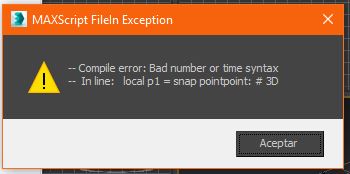
I was trying to use your script code, but at the time of opening it I get an error of syntax, in the part of # 3D, that section is recognizing 3ds max, I'm new to this but I think the operation of the script is poorly written, or am I wrong.
please help me with tha

.

miauu · 2017-11-06

I don't get any error with thes script.
Select Editable Poly object, select som vertices and run the code. Pick 3 points and the selected verts will be moved.

kevinlp · 2017-11-06

Hi friend I admire your work and experience, I've seen some of your work, I think it's great.
the truth is that I do not know how to execute the code, as far as I understand, I have to store it in an extension (.ms) or (, mrc). to then import it into my workspace in 3ds max. I think the procedure is wrong, could you do me the favor of explaining how to execute the script code.

At the end I see this error, and when I try to look for it in customize I can not find it.

Attachments

.

miauu · 2017-11-07

Hi!

This is the code as macroscript:


macroscript alignVertexToPlane
category:"miauu"
tooltip:"Align vertex to plane"
buttonText:"Align vertex to plane"
(
  local p1 = pickPoint snap:#3D
  local p2 = pickPoint snap:#3D rubberBand:p1
  local p3 = pickPoint snap:#3D rubberBand:p2
 
  local theTM = matrixFromNormal (normalize (cross (p3-p2) (p2-p1)))
  theTM.translation = (p1+p2+p3)/3
  local obj = selection[1]
  in coordSys theTM for v in polyOp.getVertSelection obj do
    polyOp.setVert obj v ((polyOp.getVert obj v) * [1,1,0])
)

Sve it as mcr file and drag and drop it in 3ds Max viewports. Then you can find it under "miauu" category(change it if you want).

The error shown in the image is from bad copy-paste. As you can see from the code there is no line that starts with:


local p1 = snap pointpoint: #3D

.

kevinlp · 2017-11-07

Hello
Thanks for your collaboration, for accepting to help me, this macroscript has helped me a lot to advance in my 3ds max designs.
I hope he continues to share his experience.
If you ever ask me how I have made so much progress, I will answer that a boy or girl who calls himself miauu has helped me.
thank you very much.

Your YouTube channel is great.

.

kevinlp · 2017-11-07

I did not know that there was another way to execute a script code, other than with a macroscript.

miauu · 2017-11-07

Thank you.
There is another way to execute a code. Put the code in Maxscript Editor and hit Ctrl+E.

.

kevinlp · 2017-11-07

but crtl + E, active is the scale option

thank you very much

kevinlp · 2017-11-07

sorry, if it works.
only that it does not work with ctrrl + E, I only give it in tool, and then in Evaluate All

.

kevinlp · 2017-11-08

miauu ...
there is some possibility that you can do me the favor of giving me a code script so that instead of the three vertex aligning to a plane, they align to another vertex.

.

miauu · 2017-11-08

Ctrl+E will evaluate the code in Maxscript Editor when the MAxscript Editor is in focus. If in the focus is one of the viewports you will have different result.

About the script that will align three verts to another vert - go here and watch the videos of Align Verts to Vert: http://miauumaxscript.blogspot.bg/p/miauus-script-pack-vol2.html

kiski · 2018-08-16

Hi Garp, would it be possible to modify the script code so I can choose a face directly instead of those 3 vertices (that define the triangle plane) ? I would be very glad and thankful.