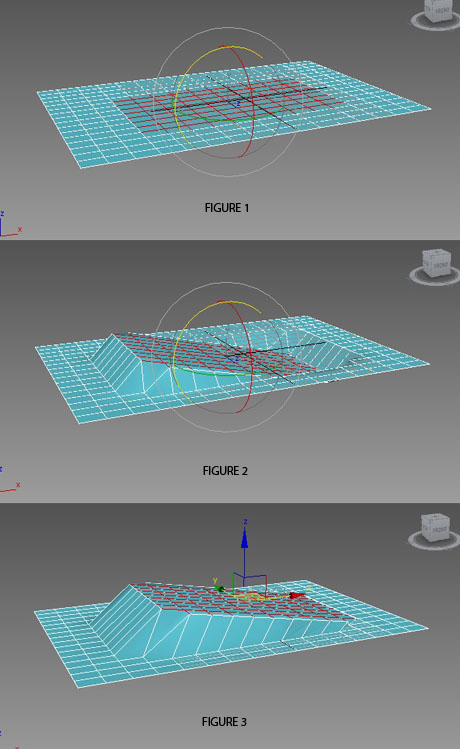
Hi. I am trying to rotate a selection along the edge of the selection. But unable to move the pivot to do so. In my attached picture I have the original selection (figure 1 ). In figure 2 is the incorrect rotation as the pivot is in the centre of the selection. Figure 3 shows the correct rotation. Any idea how I can achieve that? How to move the pivot to the edge of the selection.
Forum topic · General Scripting
pivot placement
By bobdihi · 2015-01-14
Downloads
- pivot_move.jpg — pivot_move.jpg86 KB
Description
Comments (5)
 barigazy · 2015-01-18
*Hinge* rotate method

Select some polygons that you want to rotate and follow this steps
1. Set "Reference Coordinate System" to GIMBAL and "Use Transform Coordinate Center".
2. Axis Constrain for this case is locked to X-axis.
3. For "Grid and Snap Settings" U can use "Vertex" and "Midpoint"
4. Check "Selection Lock Toggle"
5. Place cursor on edge untill snap marker popup.
Then just hold LMB and drag top to bottom
.
 miauu · 2015-01-18
I still wonder - the OP wants a script that will do the trick or he wants to know how to achieve this in 3dsMax with regular tools(not with script)?
barigazy · 2015-01-18
I don't know. From the text above I presume that he is looking for a way how to achive rotation around picked edge. Maybe I'm wrong
.
miauu · 2015-01-18
barigazy · 2015-01-18
@Kostadin
Yup. That's the way :) Nice!