ScriptSpot

Forum topic · General Scripting

Material control panel problem

By ste · 2014-06-30

Downloads
Description

Hi all,
I'm quite new to maxscript and I'm in trouble with a script I'm developing for a personal project.

The script will be applied to a control object, and consist in a simple panel where to change vrayLightMtl multiplier for some other objects in scene.

It works fine in current scene, but if I merge that scene in another one I get an error message ("--unknown property: "multiplier" in undefined").

I think there are some issues with material naming, but as I said I'm new to script :)

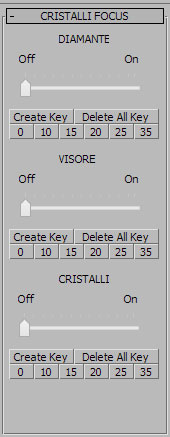
Here is the script (for 1st material, others are the same, or maybe not, but this could be another question), and attached you will find a screenshot of materials and panel:


plugin modifier MECHA_Focus_Cristalli
name:"MECHA_Focus_Cristalli"
classID:#(0x133078, 0x54377)
version:1

(
 rollout focus "CRISTALLI FOCUS" width:162 height:400
  (
--------DIAMANTE
  label focus_dia_lab "DIAMANTE" pos:[55,8] width:50 height:15		
  slider focus_dia_sli "Off                              On" pos:[14,28] width:136 height:44 range:[0,35,0] type:#integer orient:#horizontal ticks:10 animatable:true controller: sceneMaterials["FOCUS_dia_LUCE"].multiplier.controller
  button focus_dia_CK "Create Key" pos:[5,85] width:65 height:15
  button focus_dia_DK "Delete All Key" pos:[70,85] width:85 height:15

  button focus_dia_set_0 "0" pos:[5,100] width:25 height:15
  button focus_dia_set_10 "10" pos:[30,100] width:25 height:15		
  button focus_dia_set_15 "15" pos:[55,100] width:25 height:15
  button focus_dia_set_20 "20" pos:[80,100] width:25 height:15
  button focus_dia_set_25 "25" pos:[105,100] width:25 height:15
  button focus_dia_set_35 "35" pos:[130,100] width:25 height:15

  on focus_dia_sli buttondown do
   ( ( animButtonState = True
    addNewKey sceneMaterials["FOCUS_dia_LUCE"].multiplier.controller currentTime ) )
  on focus_dia_sli buttonup do
   animButtonState = False
			
  on focus_dia_CK pressed do
   ( addNewKey sceneMaterials["FOCUS_dia_LUCE"].multiplier.controller currentTime )		
  on focus_dia_DK pressed do
   ( deleteKeys sceneMaterials["FOCUS_dia_LUCE"].multiplier.controller #allKeys )
		
  on focus_dia_set_0 pressed do
   ( sceneMaterials["FOCUS_dia_LUCE"].multiplier.controller.value = 0
    addNewKey sceneMaterials["FOCUS_dia_LUCE"].multiplier.controller currentTime )
  on focus_dia_set_10 pressed do
   ( sceneMaterials["FOCUS_dia_LUCE"].multiplier.controller.value = 10
    addNewKey sceneMaterials["FOCUS_dia_LUCE"].multiplier.controller currentTime )
  on focus_dia_set_15 pressed do
   ( sceneMaterials["FOCUS_dia_LUCE"].multiplier.controller.value = 15
    addNewKey sceneMaterials["FOCUS_dia_LUCE"].multiplier.controller currentTime )
  on focus_dia_set_20 pressed do
   ( sceneMaterials["FOCUS_dia_LUCE"].multiplier.controller.value = 20
    addNewKey sceneMaterials["FOCUS_dia_LUCE"].multiplier.controller currentTime )
  on focus_dia_set_25 pressed do
   ( sceneMaterials["FOCUS_dia_LUCE"].multiplier.controller.value = 25
    addNewKey sceneMaterials["FOCUS_dia_LUCE"].multiplier.controller currentTime )
  on focus_dia_set_35 pressed do
   ( sceneMaterials["FOCUS_dia_LUCE"].multiplier.controller.value = 35
    addNewKey sceneMaterials["FOCUS_dia_LUCE"].multiplier.controller currentTime )
 )
)

Thanks everybody for any help!!

Comments (20)

GREAT!

ste · 2014-07-01

Thanks man,
your script works very well, you gave me a big big help :)

I modified it a little...just to complicate my life...

- "DELETE ALL KEY" now put value to zero
- I added a slider with automatic keyframing on currentTime
- I also added buttons to add exact value keyframe on currentTime

Did I worked well?


try(destroyDialog ::focus)catch()
rollout focus "CRISTALLI FOCUS"
(
	fn createKey mtlname: curtime: value: deleteAllKeys:off=
	(
		material = (getClassInstances VRayLightMtl target:rootScene)
		if material.count != 0 do
		(
			for m in material where m.name == mtlname do
			(
				if deleteAllKeys then deleteKeys m.multiplier.controller #allKeys else
				(
					with animate on at time curtime (m.multiplier = value)
				)
			) ; free material
		)
	)
 
/*	label focus_dia_lab "                DIAMANTE" pos:[5,5] width:150 height:15	style_sunkenedge:on
	label focus_dia_label "Materiak Name:" pos:[5,25] width:150 height:15
	edittext focus_dia_name "" pos:[1,40] width:154 height:17 text:"FOCUS_dia_LUCE"
	spinner focus_dia_time "Frame:        " pos:[5,60] range:[-1e9,1e9,0] type:#integer fieldwidth:80
	spinner focus_dia_value "Multiplier:    " pos:[5,80] range:[-1e9,1e9,0] fieldwidth:80
	button focus_dia_CK "Create Key" pos:[5,100] width:65 height:18
	button focus_dia_DK "Delete All Key" pos:[70,100] width:85 height:18
 
	label focus_vis_lab "                VISORE" pos:[5,125] width:150 height:15	style_sunkenedge:on
	label focus_vis_label "Materiak Name:" pos:[5,145] width:150 height:15
	edittext focus_vis_name "" pos:[1,160] width:154 height:17 text:"FOCUS_vis_LUCE"
	spinner focus_vis_time "Frame:        " pos:[5,180] range:[-1e9,1e9,0] type:#integer fieldwidth:80
	spinner focus_vis_value "Multiplier:    " pos:[5,200] range:[-1e9,1e9,0] fieldwidth:80
	button focus_vis_CK "Create Key" pos:[5,220] width:65 height:18
	button focus_vis_DK "Delete All Key" pos:[70,220] width:85 height:18
*/
	
	label focus_cri_lab "                CRISTALLI" pos:[5,245] width:150 height:15	style_sunkenedge:on
	label focus_cri_label "Materiak Name:" pos:[5,265] width:150 height:15
	edittext focus_cri_name "" pos:[1,280] width:154 height:17 text:"FOCUS_cri_LUCE"
	spinner focus_cri_time "Frame:        " pos:[5,300] range:[-1e9,1e9,0] type:#integer fieldwidth:80
	spinner focus_cri_value "Multiplier:    " pos:[5,320] range:[-1e9,1e9,0] fieldwidth:80
	button focus_cri_CK "Create Key" pos:[5,340] width:65 height:18
	button focus_cri_DK "Delete All Key" pos:[70,340] width:85 height:18
	
-------------------------------------
----EXPERIMENT-----------------
-------------------------------------
	
	slider focus_cri_sli "Off                              On" pos:[14,360] width:136 height:44 range:[0,35,0] type:#integer orient:#horizontal ticks:10 animatable:true value:focus_cri_sli.value

	button focus_cri_set_0 "0" pos:[5,420] width:25 height:15
	button focus_cri_set_10 "10" pos:[30,420] width:25 height:15		
	button focus_cri_set_15 "15" pos:[55,420] width:25 height:15
	button focus_cri_set_20 "20" pos:[80,420] width:25 height:15
	button focus_cri_set_25 "25" pos:[105,420] width:25 height:15		
	button focus_cri_set_35 "35" pos:[130,420] width:25 height:15		
	
	on focus_cri_sli buttondown do
	(	
		animButtonState = True
			
	)
	on focus_cri_sli buttonup do
	(
		createKey mtlname:focus_cri_name.text curtime:currentTime value:focus_cri_sli.value
			animButtonState = False
	)

	on focus_cri_set_0 pressed do
	(	createKey mtlname:focus_cri_name.text curtime:currentTime value:0	)
	on focus_cri_set_10 pressed do
	(	createKey mtlname:focus_cri_name.text curtime:currentTime value:10	)
	on focus_cri_set_15 pressed do
	(	createKey mtlname:focus_cri_name.text curtime:currentTime value:15	)
	on focus_cri_set_20 pressed do
	(	createKey mtlname:focus_cri_name.text curtime:currentTime value:20	)
	on focus_cri_set_25 pressed do
	(	createKey mtlname:focus_cri_name.text curtime:currentTime value:25	)	
	on focus_cri_set_35 pressed do
	(	createKey mtlname:focus_cri_name.text curtime:currentTime value:35	)
	
-------------------------------------
----EXPERIMENT END_----------
-------------------------------------
	
/* 
	on focus_dia_CK pressed do
	(
		createKey mtlname:focus_dia_name.text curtime:focus_dia_time.value value:focus_dia_value.value
	)
	on focus_dia_DK pressed do
	(
		createKey mtlname:focus_dia_name.text deleteAllKeys:on
	)
	on focus_vis_CK pressed do
	(
		createKey mtlname:focus_vis_name.text curtime:focus_vis_time.value value:focus_vis_value.value
	)
	on focus_vis_DK pressed do
	(
		createKey mtlname:focus_vis_name.text deleteAllKeys:on
	)
*/
	on focus_cri_CK pressed do
	(
		createKey mtlname:focus_cri_name.text curtime:focus_cri_time.value value:focus_cri_value.value
	)
	on focus_cri_DK pressed do
	(
		createKey mtlname:focus_cri_name.text deleteAllKeys:on
		createKey mtlname:focus_cri_name.text curtime:0 value:0
	)
)
createdialog focus 160 440 10 110 style:#(#style_titlebar, #style_sysmenu, #style_toolwindow)

(I commented first two materials just to made things easier)

barigazy · 2014-07-01

Yep. You complicate your life with a slider.
I will probably use Checkbutton control

checkbutton cb_animstate "Animate On/Off" highlightColor:[150,20,20]
on cb_animstate changed state do animButtonState = state

.

ste · 2014-07-02

Yes, but I like hard things, and with autokey I can save a lot of clicks :)

Maybe, do you know how to set In/Out Tangents to AUTO for created keys?

I tried with inTangentType = #auto but with no luck!

barigazy · 2014-07-02

For first key do this or loop trought all keys

meditMaterials[1].multiplier.controller.keys[1].inTangentType = #auto
meditMaterials[1].multiplier.controller.keys[1].outTangentType = #auto

.

ste · 2014-07-02

Thanks, tomorrow I will try!

barigazy · 2014-07-01

That's all you need. If you change name of material in Material Editor or Slate
then use same name in the script.
Code is not tested but you can extend my concept.
Cheers!

:)

ste · 2014-07-01

Very nice idea!!

It give me an error and it does not create keyframes, but maybe now it's time to go to sleep and retry tomorrow morning.

Stay tuned :)

And obviously thank you very much!

barigazy · 2014-07-01

Just post error message from listener

barigazy · 2014-07-01

I fixed the code by testing these tree materials which are nested inside Multimaterial, VrayBlendMtl and VRay2Side. Also works inside other materials also.Check again my last code.
Cheers!

ste · 2014-06-30

Nice script,
quite complicated to understand for me, but I'll try.

The updated version works fine, it shows me all vraylightmtl in the scene... but my script continue to give me the error, ahahh!

Another way I tried was to add variables for material name, something like this:


(
 local RABdia = scenematerials["RABBIT_diamante"].coatMtl[1]
 local RABvis = scenematerials["RABBIT_visore"].coatMtl[1]
 local RABcri = ???????
	
 rollout rabbit "CRISTALLI RABBIT" width:162 height:400
 (
  label rabbit_dia_lab "DIAMANTE" pos:[55,8] width:50 height:15		
  slider rabbit_dia_sli "Off                              On" pos:[14,28] width:136 height:44 range:[0,35,0] type:#integer orient:#horizontal ticks:10 animatable:true controller: RABdia.multiplier.controller

...
 )
)

It works fine for VISORE and DIAMANTE, that are vrayBlendMtl, but no way to make CRISTALLI to work, because this is a vrayBlendMtl in a MultiSubobjMaterial.

barigazy · 2014-06-30

Complicated? Come on!
You are trying to create scripted plugin. That's complicated :)

barigazy · 2014-06-30

Don't use scenematerial[#name] concept.
It's better to collect material by class and then make some changes of collected mtl's. I already show that in the concept.
It's simple

-- collect all blend materials in array
RABBIT = #() -- material array
allVRayBlendMtls = getClassInstances vrayBlendMtl target:rootScene
mtlNamesArr = #("RABBIT_diamante","RABBIT_visore","RABBIT_cristalli")
for m in allVRayBlendMtls where (idx = findItem mtlNamesArr m.mane) != 0 do
(
insertItem m RABBIT idx
)
RABdia = RABBIT[1]
RABvis = RABBIT[2]
RABcri = RABBIT[3]

ste · 2014-06-30

Wow...
I studied it and now I understand what it does [I went crazy to understand m.mane... :) :) :) ]

It returns:


FOCUS_diamante:VRayBlendMtl
undefined
FOCUS_visore:VRayBlendMtl

because FOCUS_cristalli is in fact a submaterial of FOCUS.

I'm loosing my mind... and something like this?


allVRayLightMtls = getClassInstances vrayLightMtl target:rootScene
TEST = #(allVRayLightMtls)
TEST[1] = a
TEST[2] = b
TEST[3] = c

It works and returns me lightmat names.
But now I have to play with them...

If I go on with this


plugin modifier TEST
name:"TEST"
classID:#(0x133067, 0x54378)
version:1

(
 allVRayBlendMtls = getClassInstances vrayBlendMtl target:rootScene
 TEST = #(allVRayBlendMtls)
 TEST[1] = a	

 rollout test "TEST" width:162 height:400
 (
  label test_lab "DIAMANTE" pos:[55,8] width:50 height:15		
  slider test_sli "Off                              On" pos:[14,28] width:136 height:44 range:[0,35,0] type:#float orient:#horizontal ticks:10 animatable:true controller: a.multiplier.controller
  button test_CK "Create Key" pos:[5,85] width:65 height:15
  button test_DK "Delete All Key" pos:[70,85] width:85 height:15

  on test_sli buttondown do
   ( ( animButtonState = True
    addNewKey a.multiplier.controller currentTime ) )
  on test_sli buttonup do
   animButtonState = False
			
  on test_CK pressed do
   ( addNewKey a.multiplier.controller currentTime )		
  on test_DK pressed do
   ( deleteKeys a.multiplier.controller #allKeys )
 )
)

I get an error... :(

barigazy · 2014-06-30

Why do you need modifier for this? You can use simple rollout.
It's much easier for testing.

ste · 2014-06-30

Mmmm... good idea, but as a newbie I'm doing sometingh wrong...


try(destroyDialog ::test)catch()
rollout test "TEST"

(
	allVRayBlendMtls = getClassInstances vrayBlendMtl target:rootScene
	TEST = #(allVRayBlendMtls)
	TEST[1] = a

	(
		label test_lab "DIAMANTE" pos:[5,8] width:50 height:15		
		slider test_sli "Off                              On" pos:[14,28] width:136 height:44 range:[0,35,0] type:#float orient:#horizontal ticks:10 animatable:true controller: a.multiplier.controller
		button test_CK "Create Key" pos:[5,85] width:65 height:15
		button test_DK "Delete All Key" pos:[70,85] width:85 height:15

		on test_sli buttondown do
		( animButtonState = True
			addNewKey a.multiplier.controller currentTime )
		on test_sli buttonup do
			animButtonState = False
				
		on test_CK pressed do
		( addNewKey a.multiplier.controller currentTime )		
		on test_DK pressed do
		( deleteKeys a.multiplier.controller #allKeys )
	)
)
	

createDialog test 200 300 10 110 style:#(#style_titlebar, #style_sysmenu, #style_toolwindow)

barigazy · 2014-07-01

:)

try(destroyDialog ::focus)catch()
rollout focus "CRISTALLI FOCUS"
(
fn createKey mtlname: curtime: value: deleteAllKeys:off=
(
material = (getClassInstances VRayLightMtl target:rootScene)
if material.count != 0 do
(
for m in material where m.name == mtlname do
(
if deleteAllKeys then deleteKeys m.multiplier.controller #allKeys else
(
with animate on at time curtime (m.multiplier = value)
)
) ; free material
)
)

label focus_dia_lab " DIAMANTE" pos:[5,5] width:150 height:15 style_sunkenedge:on
label focus_dia_label "Materiak Name:" pos:[5,25] width:150 height:15
edittext focus_dia_name "" pos:[1,40] width:154 height:17 text:"FOCUS_dia_LUCE"
spinner focus_dia_time "Frame: " pos:[5,60] range:[-1e9,1e9,0] type:#integer fieldwidth:80
spinner focus_dia_value "Multiplier: " pos:[5,80] range:[-1e9,1e9,0] fieldwidth:80
button focus_dia_CK "Create Key" pos:[5,100] width:65 height:18
button focus_dia_DK "Delete All Key" pos:[70,100] width:85 height:18

label focus_vis_lab " VISORE" pos:[5,125] width:150 height:15 style_sunkenedge:on
label focus_vis_label "Materiak Name:" pos:[5,145] width:150 height:15
edittext focus_vis_name "" pos:[1,160] width:154 height:17 text:"FOCUS_vis_LUCE"
spinner focus_vis_time "Frame: " pos:[5,180] range:[-1e9,1e9,0] type:#integer fieldwidth:80
spinner focus_vis_value "Multiplier: " pos:[5,200] range:[-1e9,1e9,0] fieldwidth:80
button focus_vis_CK "Create Key" pos:[5,220] width:65 height:18
button focus_vis_DK "Delete All Key" pos:[70,220] width:85 height:18

label focus_cri_lab " CRISTALLI" pos:[5,245] width:150 height:15 style_sunkenedge:on
label focus_cri_label "Materiak Name:" pos:[5,265] width:150 height:15
edittext focus_cri_name "" pos:[1,280] width:154 height:17 text:"FOCUS_cri_LUCE"
spinner focus_cri_time "Frame: " pos:[5,300] range:[-1e9,1e9,0] type:#integer fieldwidth:80
spinner focus_cri_value "Multiplier: " pos:[5,320] range:[-1e9,1e9,0] fieldwidth:80
button focus_cri_CK "Create Key" pos:[5,340] width:65 height:18
button focus_cri_DK "Delete All Key" pos:[70,340] width:85 height:18

on focus_dia_CK pressed do
(
createKey mtlname:focus_dia_name.text curtime:focus_dia_time.value value:focus_dia_value.value
)
on focus_dia_DK pressed do
(
createKey mtlname:focus_dia_name.text deleteAllKeys:on
)
on focus_vis_CK pressed do
(
createKey mtlname:focus_vis_name.text curtime:focus_vis_time.value value:focus_vis_value.value
)
on focus_vis_DK pressed do
(
createKey mtlname:focus_vis_name.text deleteAllKeys:on
)
on focus_cri_CK pressed do
(
createKey mtlname:focus_cri_name.text curtime:focus_cri_time.value value:focus_cri_value.value
)
on focus_cri_DK pressed do
(
createKey mtlname:focus_cri_name.text deleteAllKeys:on
)
)
createdialog focus 160 360 10 110 style:#(#style_titlebar, #style_sysmenu, #style_toolwindow)

barigazy · 2014-06-30

Let me explain the concept.

First we have dropdown list "All VRayLightMtl's" where you can get (collect) all VRayLightMtl's. Just press "Refresh". Then pick one mtl from list.

Next you can add new tag by adding CustAttribut to selected material. This way you can easely find your material in the scene even if you rename material.

And last you can search and collect all materials with specified tag name in the listbox.

If you want to see result open Listener and press "Print All Taged Light Mtls" button.
Cheers!

barigazy · 2014-06-30

Take look concept of this tool. I did'nt test this but idea is right.

try(destroyDialog ::bgaRoll)catch()
rollout bgaRoll "• • •"
(
fn AddMtlTag mtl tag: =
(
local caDef = attributes myCA
(
parameters main
(
filtername Type:#string default:""
)
)
CustAttributes.Add mtl caDef
mtl.filtername = tag
)

fn collectLightMtls string: mtlOnly:off =
(
array = getClassInstances VRayLightMtl target:rootScene
if mtlOnly do return array
if array.count != 0 do
(
array = if string == unsupplied then for m in array collect m.name else
(
for m in array where isProperty m #filtername and m.filtername == string collect m.name
)
) ; array
)
dropdownlist ddl_lightMtl "All VRayLightMtl's:" pos:[5,5] width:142
button btn_refresh "Refresh" pos:[146,24] width:48 height:19

label lbl_mtl "Mtl Tag Label:" pos:[5,54]
edittext et_tag "" pos:[1,70] fieldwidth:142 height:17 text:"CRISTALLI_FOCUS"
button btn_addtag "AddTag" pos:[146,70] width:48 height:18

label lbl_st "Search Tag:" pos:[5,94]
edittext et_searchtag "" pos:[1,110] fieldwidth:142 height:17 text:"CRISTALLI_FOCUS"
button btn_search "Search" pos:[146,110] width:48 height:18
listbox lb_LightList "" pos:[5,130] width:190 height:10

button btn_print "Print All Taged Light Mtls" pos:[5,268] width:190 height:30

on btn_refresh pressed do ddl_lightMtl.items = collectLightMtls()
on btn_addtag pressed do
(
if ddl_lightMtl.items.count == 0 then
(
messageBox "Press Refresh button to fill the list.\nThen pick material from the list." title:"Warning" beep:off
)
else
(
array = collectLightMtls mtlOnly:on
for m in array where m.name == ddl_lightMtl.selected do
(
if isProperty m #filtername then m.filtername = et_tag.text else AddMtlTag m tag:et_tag.text
)
)
)
on btn_search pressed do lb_LightList.items = collectLightMtls string:et_searchtag.text
on btn_print pressed do
(
if (material = collectLightMtls mtlOnly:on).count != 0 do
(
clearListener()
format "<<< LIST OF TAGED MATERIJALS >>>\n"
for i = 1 to material.count where isProperty material[i] #filtername do
(
format "#% -> Material Name: % ; Material Tag: %\n" i material[i].name material[i].filtername
)
)
)
)
createDialog bgaRoll 200 300 10 110 style:#(#style_titlebar, #style_sysmenu, #style_toolwindow)

ste · 2014-06-30

Yep,
obviously in my original scene the material is assigned.

In the new one the material should be imported, but I receive the error even if I assign it to my object, and if I delete and reapply my script.

I'm going crazy about it... I'm quite sure there is some issue with material path name, but I can't find the bug :(

I'll attach a sample scene and the whole script if someone wants to try...

Attachments

barigazy · 2014-06-30

You need to assigne this material to some object. That's why you recive error