ScriptSpot

Forum topic · General Scripting

I hate the curveControl UI!!!

By pacermike · 2010-10-05

Description

Hi, can anyone help me on this?

I put a curveControl UI item in a custom attribute applied to a Morpher modifier.

Then I put a script controller on a morph target so it can be governed by the curveControl. It all works fine until I close and re-open Max, and re-open the scene.

When I reopen the scene the script controller starts complaining that the curveControl is undefined.

I've tried pre-loading the curveControl's properties using the "on load do" handler but again, none of the curveControl's properties become valid until you physically click on the object and go to the modify panel containing the curveControl. Once the curveControl is visible you can re-evaluate the script controller and everything works fine again.

It is DRIVING ME INSANE! There has to be a way to load and access the properties before the curveControl is visible. This thing is the WORST!

Comments (16)

Reply to the last on top

Anubis · 2010-10-07

In fact the rollout ui controllers that can be linked to the parameter block types is limited to: spinner, slider, radioButtons, checkbox, checkbutton, Colorpicker, pickButton, mapButton, materialButton. Yes, the CurveControl is not one of them, and that w'd not be fatal if the Script Controllers recognize the CAs/plugins rollouts. I face this issue for a first time. Bug or not, its for sure is critical disadvantage of Script Controllers. In other words, we can hit that limitation in other ui items, not only with CurveControl. What a shame...

Now on the last reply...
I was thought that the SC executed too early, but as you said that floater fix startup errors, I thought that forced mod-panel + modifier selection (in "on load do") should be acceptable fix (w/o floater).

max modify mode
modPanel.setCurrentObject $box01.morpher

Another thought going in my head... It sounds sensibly or at least worthy to be tested. So, if you move the whole function and it result to the CAs, and add a float parameter to the parameter block which to hold just the result of the function. Then create a variable in the SC and associate with that parameter. That should work?...

Ah!

pacermike · 2010-10-07

Ok, I see what you're saying.

On your first idea. I will try that in place of the floater and see if "selecting" the object in the "on load do" handler will essentially pre-initialize it. The real test will be to see if that works when there are more than one unique instance of the CA in the scene.

For your second idea, that makes sense. The problem with my function though is that it doesn't seem to solve as quickly as the getValue CC method. I got it working, but only while manually moving the Time Slider, and it was noticeably choppier than getValue. I think I could do what you're saying and have the SC reference the function only when/if the getValue method suddenly becomes undefined, like during a CA redefine operation for example. Like an emergency backup.

I'm going to try your first idea first and see what happens.

Hey again,

pacermike · 2010-10-07

I tried:


max modify mode
modPanel.setCurrentObject $box01.morpher

and it still can't find the curve. Now I'm really confused because the CC is visible straight from the start and the script controller STILL doesn't recognize it. Maybe I could try a notifyDependents or something? But I'm still not totally sure how to use those functions with CA's.

Anubis · 2010-10-06

Uh, my Max crash on loading the scene file. I'm on Max 2009. The script looks fine. I guess that "on load do" should work, but I see you used it and still has a problem. Did you try "on postLoad do"?

Whoops!

pacermike · 2010-10-06

I should've specified that the file was created in Max 2010. Sorry about that. Here's a version made in Max 9.0. Should open in 2009 I think.

I'll give postLoad a shot and see if that helps at all. I have a feeling it has something to do with the visibility of the curveControl UI. I wish Autodesk would make this UI a little friendlier. It's a beast to work with.

Attachments

Anubis · 2010-10-06

yep, the CC is a pain, but the problem here looks more deeper... if type to the Listener (even before open the CA's rollout):

"$box01.morpher.morphTools.xyzSplit"

Max print:

Rollout:xyzSplit

that means it recognize the rollout, but in the script controller Max say:

-- Unknown property: "xyzSplit" in "$Box01.modifiers[#Morpher].morphTools"

. odiously...

Yes!

pacermike · 2010-10-06

I noticed that too! I have no clue how it's even possible for it to be valid one second and then unknown the next. Any ideas?

Anubis · 2010-10-06

well, i think this must be reported as bug to Autodesk.

P.S. - I need to go, but I have one idea in mind to test...
put your script expression "(getValue ...)*100" in a global variable into "on load do", and add to the script controller only the variable name.

Ok,

pacermike · 2010-10-06

I'll give the global variable a try.

The other thing I was thinking of was taking the curve data that I stored in the param block as a string and calculating the curve without using the CC at all.

I'll post back if I have any luck with either approach. Thanks again for your help :)

OK, forget the curveControl

pacermike · 2010-10-06

I think it is hopeless to try and use the getValue method of the curveControl to drive anything reliably using a script controller.

However, since I have the CC writing to an array which I'm storing as a string in the param block I have all the data I need whether I have access to the CC or not.

I wrote this code which takes the four points of a bezier segment (point1, point1 out-tangent, point2 in-tangent, and point2) and a given X-coordinate (xVal) and returns the Y-coordinate of the point on the curve!


fn bezierYval p0x p0y p1x p1y p2x p2y p3x p3y xVal =
( 
	local c = 3 * ([p1x, p1y] - [p0x, p0y])
	local b = 3 * ([p2x, p2y] - [p1x, p1y]) - c
	local a = [p3x, p3y] - [p0x, p0y] - c - b
	local d = [p0x, p0y]
	
	-- finds approx. percentage along curve where curve point x coordinate is approx. equal to xVal 
	percent = for r = 0 to 1.0 by .001 where \
	(a * ((r * r) * r) + b * (r * r) + c * r + d).x >= xVal - .001 and \
	(a * ((r * r) * r) + b * (r * r) + c * r + d).x <= xVal + .001 collect r
	
	-- finds the average of the percent array
	sum = 0
	for i = 1 to percent.count do sum = sum += percent[i]  
	avgSum = sum / percent.count 
	
	r2 = avgSum * avgSum
	r3 = r2 * avgSum
	
	-- uses avgSum to find [x, y] coordinate of curve where x coordinate is approx. equal to xVal 
	newPoint = a * r3 + b * r2 + c * avgSum + d
	-- returns just the y coordinate since x is already know (the xVal variable entered in to the function)
	newPoint.y
)

If I run the function using my curve values I get:

bezierYval 0 0 (0.862031 + 0) (0 + 0) (-0.605639 + 1) (0 + 1) 1 1 .5 = 0.24559

This is the same value that the curveControl method getValue returns, so my function works...

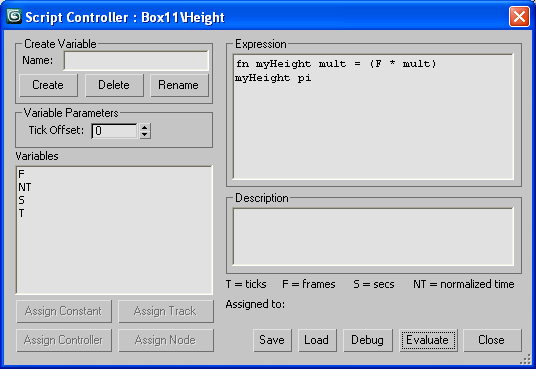
BUT! I don't know how to get a scripted function to work inside a script controller. The help files say you can use scripted functions in a script controller but so far all I get are errors.

Any ideas or examples?

Anubis · 2010-10-06

Oh, cool, you're almost there then. That's an easy. Here is a very very simple example - see the screeen shot.

Attachments

These reply windows keep shrinking!

pacermike · 2010-10-06

Almost there! But I can only get it to work when I hard-code the values. As soon as I try to use variables from the scene it starts throwing **unknown system exception** errors.


-- Error occurred in bezierYval()
--  Frame:
--   r2: undefined
--   newPoint: undefined
--   avgSum: undefined
--   xVal: 0.399926
--   p0x: 0.0
--   a: [2.58609,0]
--   d: [0,0]
--   sum: 0
--   r3: undefined
--   c: [2.58609,0]
--   p0y: 0.0
--   p1x: 0.862031
--   p1y: 0.0
--   p2x: 0.0
--   p2y: 0.0
--   p3x: 0.0
--   p3y: 0.0
--   b: [-5.17219,0]
--   percent: #()
--   called in anonymous codeblock
--  Frame:
--   p1: #([0,0], [0,0], [0.862031,0], true, true, false, false, true, false, true)
--   t: 2560.0
--   NT: 0.16
--   thing: undefined
--   x: 0.399926
--   this: Controller:Float_Script
--   curveData: "#(#(true, 3, [0,1], [0,1], #{1..3}, [120.909,120], [-28,-35], #move_xy), #(#("CrazyCakes_x", false, (color 255 0 0), (color 192 192 192), 0, 0, #solid, #solid, 2, 1000), #("CrazyCakes_y", false, (color 0 255 0), (color 192 192 192), 0, 0, #solid, #solid, 2, 1000), #("CrazyCakes_z", false, (color 0 0 255), (color 192 192 192), 0, 0, #solid, #solid, 2, 1000)), #(#(#([0,0], [0,0], [0.862031,0], true, true, false, false, true, false, true), #([1,1], [-0.605639,0], [0,0], true, true, false, false, false, false, true)), #(#([0,0], [0,0], [0,0], true, true, false, false, false, false, true), #([1,1], [0,0], [0,0], true, true, false, false, false, false, true)), #(#([0,0], [0,0], [0,0], true, true, false, false, false, false, true), #([1,1], [0,0], [0,0], true, true, false, false, false, false, true))))"
--   f: 16.0
--   s: 0.533333
--   controlMorph: 39.9926
--   CD: #(#(true, 3, [0,1], [0,1], #{1..3}, [120.909,120], [-28,-35], #move_xy), #(#("CrazyCakes_x", false, (color 255 0 0), (color 192 192 192), 0, 0, #solid, #solid, 2, 1000), #("CrazyCakes_y", false, (color 0 255 0), (color 192 192 192), 0, 0, #solid, #solid, 2, 1000), #("CrazyCakes_z", false, (color 0 0 255), (color 192 192 192), 0, 0, #solid, #solid, 2, 1000)), #(#(#([0,0], [0,0], [0.862031,0], true, true, false, false, true, false, true), #([1,1], [-0.605639,0], [0,0], true, true, false, false, false, false, true)), #(#([0,0], [0,0], [0,0], true, true, false, false, false, false, true), #([1,1], [0,0], [0,0], true, true, false, false, false, false, true)), #(#([0,0], [0,0], [0,0], true, true, false, false, false, false, true), #([1,1], [0,0], [0,0], true, true, false, false, false, false, true))))
--   p2: #([1,1], [-0.605639,0], [0,0], true, true, false, false, false, false, true)
>> MAXScript Script Controller Exception: -- Unknown system exception <<

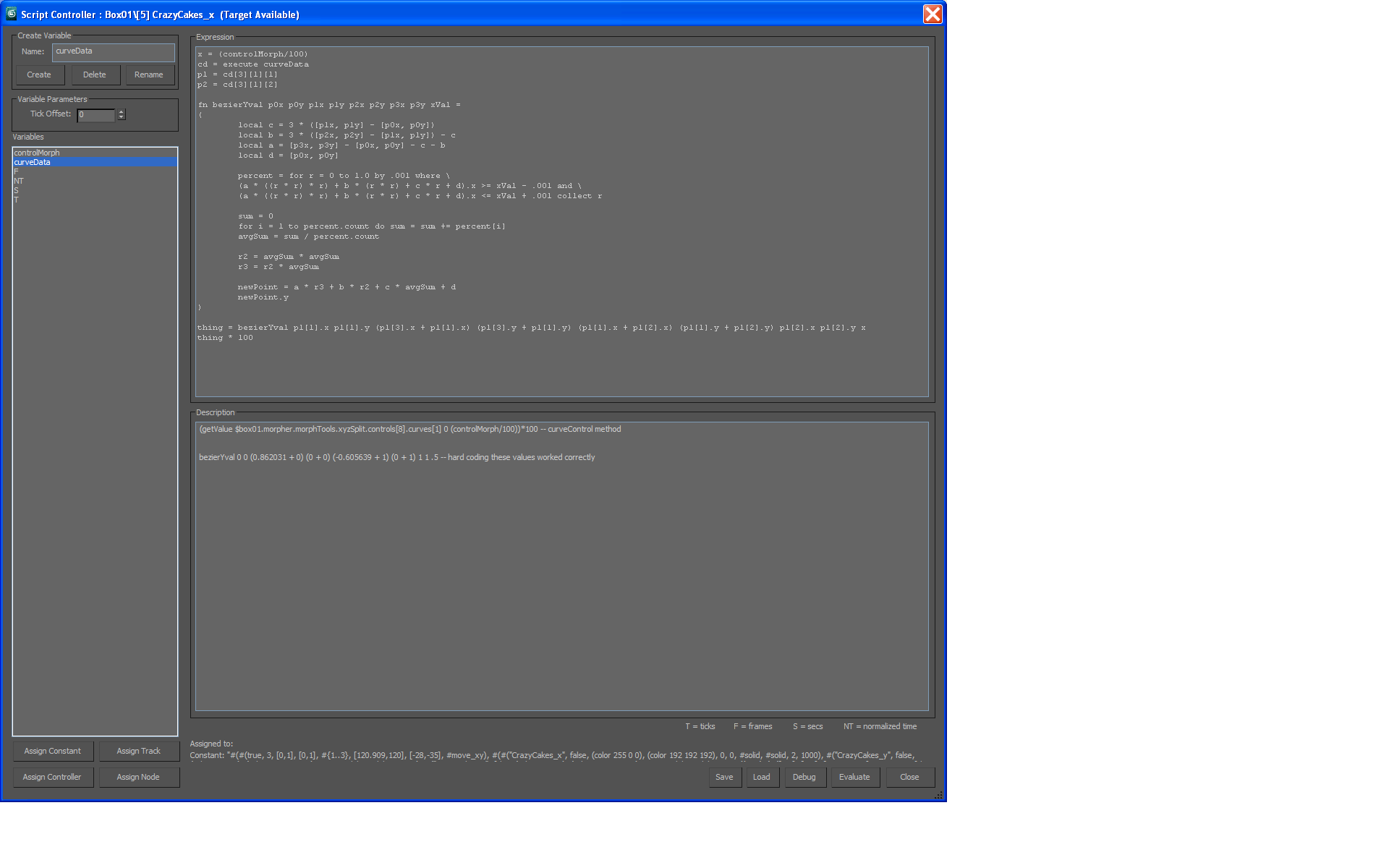
As you can see from the error readout it looks like everything is working except the for loop, which is no longer collecting any values for some reason ( -- percent: #() ) ???

Man, they sure don't make this easy. Did I mention that I hate the curveControl UI?

I'm attaching a screen shot of my script controller too.

Attachments

Maybe need to start reply on top

Anubis · 2010-10-07

This for-loop kill the whole function. With empty array the line: "avgSum = sum / percent.count" is evalueted as dividing zero by zero that for sure is a system exception.

Realy strange... the for-loops itself works fine in script controllers...

Sigh :(

pacermike · 2010-10-07

Ok, so here's the workaround for anybody following along.

First, let me just say that the curveControl... is garbage. Unless there's some secret way to use it so it's not the most cumbersome, user-UNFRIENDLY, Satanic demon-spawn of a system I've ever used then I'd have to say whoever is responsible for it should face some swift criminal charges. Seriously, it is a joke. I have been sitting at my computer for 3 solid days trying to figure out this one stupid thing: How to load a scene without breaking my script controllers.

Any object that I can think of that would use a curve would become dependent on that curve for guidance, so why it is that you must physically "activate" the curve before the scene will recognize that it even exists, despite it's data being permanently stored in a param block is beyond me. It makes it virtually impossible not to break the scene, right? This thing was written back in 1999 according to the SDK so how can more than a decade later it still be so freaking clunky and poorly implemented that regular people can't make any use of it?

So ANYWAY... the big genius fix for this is the following:
In the "on load do" handler of your custom attributes you create a function


fn rollOutAdder = 
	(
		curveFloater = newRolloutFloater "Curve Control Test" 500 400
		addRollout xyzSplit curveFloater	
	)

rolloutAdder()

This forces the curveControl on to a floater so it becomes visible and initializes before the script controller has a chance to complain about it.

The bad news of course is that the rollout can't exist in two places at once so as long as it's in the floater it can't be in your modify panel. Once you close the floater though, it will put itself back in the modify panel where it belongs. Once it's back on the modify panel it can't be detached again though, so it's an extremely cheesy fix and I would be surprised if it didn't open the door to a whole host of other problems.

My advice to anyone reading: Don't use the curveControl. Ever. For anything. It is WAY more trouble than it's worth and I despise it with a deep, religious zealotry for the days it's stolen from me. Because of it I doubt the tool I'm writing will ever be stable enough to use or distribute to anyone else.

If anyone knows of a way to make the curveControl not suck, please share. I'll take back everything I ever said. I just can't believe that any UI element could be this tortuous to use when all the others are so simple by comparison???

Anubis · 2010-10-06

Maybe the problem is in the script controller. Until the file is open you can select/deselect w/o errors? And has error only in new session? If so, looks like your script controller not access directly to the Custom Attributes but via some temp variable.

Hi Anubis,

pacermike · 2010-10-06

Here's the expression I'm using in the Script Controller:

(getValue $box01.morpher.morphTools.xyzSplit.controls[8].curves[1] 0 (controlMorph/100))*100

getValue is a curveControl method

morphTools is the custom attribute
xyzSplit is the rollout
controls[8] is MAXCurveCtl:cc_spltChnls.

Then I have the variable controlMorph assigned to:
Target:$box01.modifiers[#Morpher].'[2] CrazyCakes (Target Available)'

The Script Controller loses it's connection to the curveControl whenever I close Max and reopen the scene AND whenever I redefine the custom attribute.

I attached the files in case you had a few minutes to check them out. When you open the Max scene the script controller should immediately throw an error. Select box01, go to the modify panel then click evaluate on the Script Controller and it will work again.

Thanks for any ideas :)

Attachments