ScriptSpot

Forum topic · General Scripting

How to access at the Hierarchy/IK panel

By gianpaolo · 2007-10-17

Description

Hello all!

I'm a newbye here and a very novice scripter :) I've found a lot of interesting and useful information in this community, thanks to share!

My first post it's a question beacause I don't found solutions in any documentations that i've read...

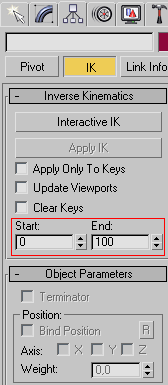
Does anyone know how to access via maxscript to the Hierarchy/IK panel in 3dsmax to change the START and the END parmeters?

thanks in advance!
gianpaolo.

Comments (3)

Aline3D · 2007-10-18

owww.. I understand other thing :p

I'm sorry...


I can't help you :(


Aline3D · 2007-10-18


---------------------------------------

$.controller.startJoint

$.controller.endJoint

---------------------------------------


type in Listener: "showproperties $.controller" (with a IK selected) and it's return the properties accessible of IK

---------------------------------------

.swivelAngle (Swivel_Angle) : angle

.startJoint (Start_Joint) : node

.endJoint (End_Joint) : node

.ikSolver (IK_Solver) : string

.autoEnable (AutoEnabled) : boolean

.autoSnap (Auto_Snap) : boolean

.dispGoal (Display_Goal) : boolean

.goalSize (Goal_Display_Size) : worldUnits

.dispEffector (Display_Effector) : boolean

.effectorSize (Effector_Display_Size) : worldUnits

.dispVH (Display_VH) : boolean

.vhSize (VH_Display_Size) : worldUnits

.vhLength (VH_Display_Length) : worldUnits

.dispSolver (Display_Solver) : boolean

.posThresh (Position_Threshold) : worldUnits

.rotThresh (Rotation_Threshold) : float

.iterations (Iteration_Limit) : integer

.useVHTarget (Use_Vector_Handle_Target) : boolean

.VHTarget (Vector_Handle_Target) : node

.SAParent (Swivel_Angle_Parent_Space) : radiobtnIndex

.IK_Goal : transform

.Enabled : float

---------------------------------------

gianpaolo · 2007-10-18

Aline, thanks for your reply but I don't have found the command to control the START and END time...

I've attached a .gif file for more clarity.

Thanks again for your time!
gianpaolo.

Attachments