ScriptSpot

Forum topic · General Scripting

Draw spline to closest points

By jbrehm2 · 2012-02-28

Downloads
Description

Hello, I am fairly new to scripting in 3ds max, but have been impressed with it's capabilities so far.

I have a project where I have received a file with a list of xyz coordinates and I would like to draw a spline between each point and a spline to each of the points around it.

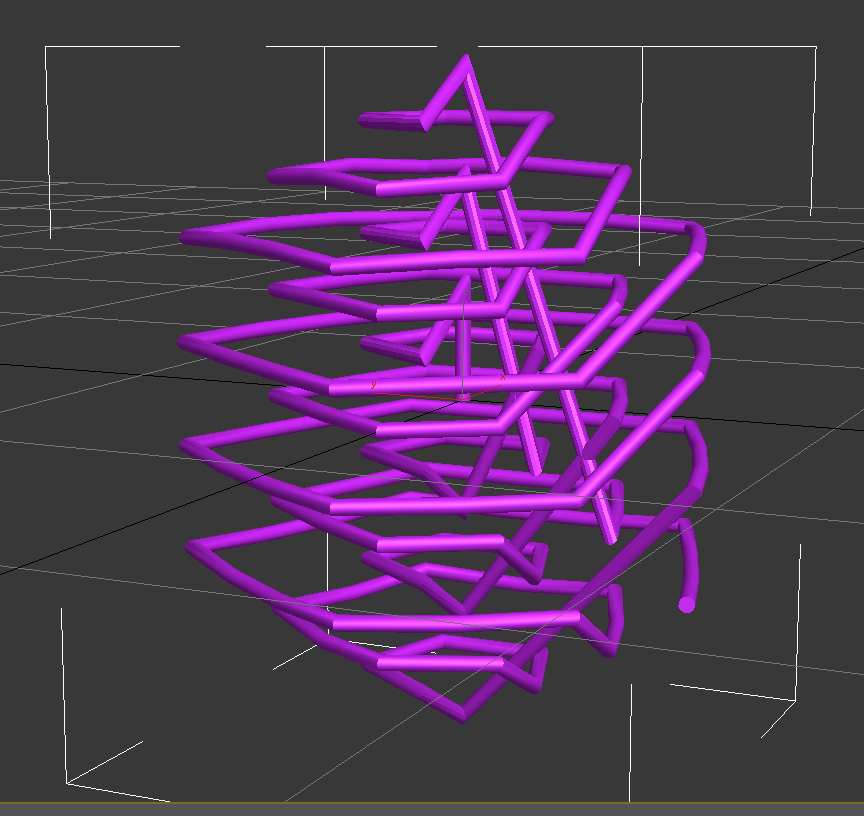
I have written a script that reads in all of the points and connects them with one line, which isn't exactly what I'm looking for. (goldcage2.jpg)

When I open the original xyz file with a program called ViewerLite, it correctly connects all of the vertexes, like this:
(goldcage.jpg)

Here is my script so far:

theFilename = getOpenFileName types:"Comma Separated Values (*.CSV)|*.CSV|All Files (*.*)|*.*"
if theFilename != undefined do ( --if a valid filename picked
local theFile = openFile theFilename --open the file

s = splineshape()
idx = addNewSpline s

while not eof theFile do (
addKnot s idx #corner #line (Point3 (readValue theFile) (readValue theFile) (readValue theFile))
)

updateShape s
)

Is there an easy way to connect all of the closest vertexes with a spline, sort of like ViewLite does? Am I even on the right track?

Thanks

Comments (3)

one hacky hit & miss

kilad · 2012-02-29

one hacky hit & miss approach:

First collect all point3s to an array.

Then for each point p collect the points that are within a threshold distance from p.

Draw a single spline from p to all these points.


Ofcourse you would get multiple splines at the same place..

To get around this you could create a struct that holds vector and lenght for each spline:


lines=#()

struct line (vector, length, on create do (append lines this))


fn drawLine p1 p2=

(

s = splineshape()

addnewspline s

addKnot s 1 #corner #line p1

addKnot s 1 #corner #line p2

updateshape s

)


Then in your loop you could check if there exist a line in lines that have the same vector and length that you are about to create. If not create it and a new line struct.


distanceThreshold=10 --or whatever the scale of your scene

for pos in point3Array do

(

closePositions = for i in point3Array where (distance pos i)> 0 and (distance pos i)< distanceThreshold collect i

for cPos in closePositions do

(

vector = normalize(pos-cPos)

sLength = distance pos cPos


doesExist = false

for line in lines do --maybe check to see if lines.count>0 first

(

if (line.vector == vector and line.length == sLength) do (doesExist = true; continue)

)

if doesExist == false do

(

drawLine pos cPos

line vector sLength

)

)


)


something like that...haven't tested it, so you might get some errors..

jbrehm2 · 2012-03-01

That's pretty much exactly what I was looking for. Made a couple minor tweaks, but it does the trick.

Thanks!

lines=#()
s = splineshape()
addnewspline s

fn drawLine p1 p2=
(
addKnot s 1 #corner #line p1
addKnot s 1 #corner #line p2
updateshape s
)

--Then in your loop you could check if there exist a line in lines that have the same vector and length that you are about to create. If not create it and a new line struct.

distanceThreshold=4 --or whatever the scale of your scene
for pos in point3Array do
(
closePositions = for i in point3Array where (distance pos i)> 0 and (distance pos i)< distanceThreshold collect i

for cPos in closePositions do
(
vector = normalize(pos-cPos)
sLength = distance pos cPos
doesExist = false

for line1 in lines do --maybe check to see if lines.count>0 first
(
if (line1[1] == vector and line1[2] == sLength) do (doesExist = true; continue)
)

if doesExist == false do
(
drawLine pos cPos
newLine=#(vector,sLength)
append lines newLine
)
)
)

)

Any chance you could detail full code

robinsb · 2013-09-23

Any chance you could detail the full code..is there a version that works on 2013. Thank you.