A dynamically rebuilding Custom Attribute UI
Hi,
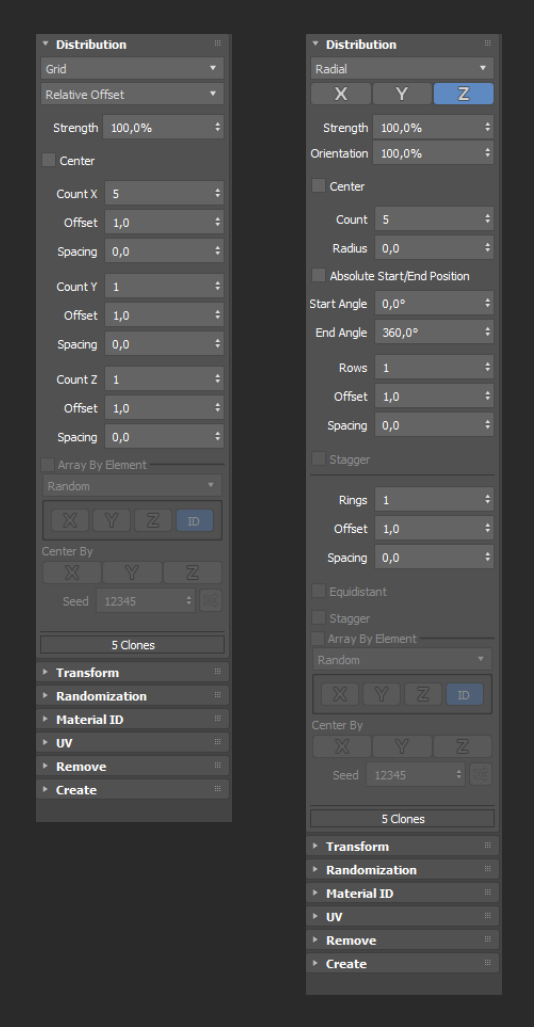
I am trying to build a dynamically rebuilding Custom Attribute UI in MAXScript, similar to how the standard Array modifier works.
More specifically, I want behavior like the Distribution rollout in Array: when the top dropdown changes, the whole visible set of controls below it changes immediately, the rollout height updates, and the rollouts below move accordingly — without leaving an empty vertical area, and without looking like a visibly nested subrollout.
I attached an example of the 3ds Max Array modifier UI showing the desired behavior.
In my own CA UI, the usual approaches do not seem to match that behavior:
hiding controls with .visible leaves layout/spacing problems
subRollout still creates a kind of fixed embedded area and does not feel like the whole rollout is rebuilt
separate rollouts become separate sections in the Modify panel, which is not what I want
So my question is:
Is there a way in pure MAXScript to make a Custom Attribute rollout rebuild itself in place like the standard Array modifier’s Distribution rollout?
Or is that behavior only possible through an internal / SDK-based UI mechanism that is not available to scripted rollouts?
Any pointers, examples, or documentation references would be very helpful.
Thanks.
| Attachment | Size |
|---|---|
| native_array_modifier.png | 103.27 KB |

Comments
It is possible in rollout,but i didn't test in Custom Attribute
Hello Vadim,
i think you can do that by using some position coordinates that aren't visible and use event to move them, here is an example for classic rollout:
additionally you can update rollout size by using:
in this example it is the closeup state that triggers the Rollout size change but it can be used in the first example to change the current rollout size if the amount of UI elements doesn't use the same amount of UI space between different states, here is an example:
Edit: in custom attribute it isn't as easy as .height isn't exposed, the only way i found is to use subrollout, and to rebuild them each time, here is an example:
to test, select an object and execute the script
Thank you so much for the
Thank you so much for the detailed response, this is very helpful!
You're welcome :)
In latest example, since the UI elements are rebuilt at each dropdownlist change, you'll have to store UI elements values , to be able to rebuild with accurate values, the current version "forget" the already set values.Here is a modified version that keep already set values:
Thank you so much for the
Thank you so much for the detailed response, this is very helpful!