ScriptSpot

Script

VrayProxy Switcher

By onodi.andras · Credited author: Andras Onodi | ZOA · 2010-02-25

Version
1.22
Version requirement
tested on max2016
Date updated
2018-04-19
Votes
35
Download
Download
Description

Select a bunch of objects and put unique nodes to a specified directory as separate max files with the related vrayproxy data saved next to it.
Istance copies will be replaced with the new vrayproxy object.
Get previously saved objects back to max whenever you wish.
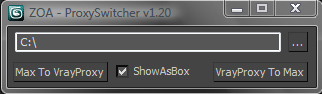
User Interface

Additional Info

-Instanced objects must end "kakimaki00" or "kakimaki_00". Any numbers is accepted at the end. -If exporting instances: "objectname_xx" will be exported as objectname.max - without the numbers -Don't use the name "objectname_xy" if it's not an instance of "objectname_xz". Ohterwise the script will try to overwrite the "objectname.max" file. -Reference copys not supported yet. They do make the script crcash! -Never Tested on groups -Trying to get a maxobject back to an invisible layer doesn't work yet. -While using the vrmeshes (I mean they are being used in current renders) the vrmesh files cannot be overwritten. I suggest to use two different folders to export to. Revision History: _v 1.22 - 19.04.2018 - Solved a bug when pressing "no" on overwrite _v 1.20 - 02.09.2011 - new simplified UI, works with linked objects, works with any numberings, wire colors stay the same, local separators can be "_","-",".", " ", project path is being remembered (Thanks for the fixes Andras Miklos!!!) _v 1.01 - 28.01.2010 - Minor bugfixes: fixed the mysterious kakimaki-bug, fixed the path-paste bug. _v 1.00 - 22.01.2010 - Added The "Back To Max" Function, Added filtering for geometry/vrayproxy objects to avoid crashes _v 0.12 - 20.01.2010 - Added postexport functions: show as box, selects the newly created objects _v 0.11 - 19.01.2010 - Added functionality for "bunch of objects selection" - added the unique_list filter _v 0.10 - 18.01.2010 - Created the original script for saving 1 object to a vrayproxy and replacing the related instances First script that I have uploaded. Please be patient! :) Any ideas and critiques are greatly appreciated! András

Tags: VRay, convert, Proxy, VrayProxy, geometry, Switch objects, vrmesh

Comments (30)

Zoa script no longer downloadable?

nnq2603 · 2021-10-24

I click and only see studio website, scripts sections or link nowhere to be found.

Thanks for alternative backup link

nnq2603 · 2021-10-28

Thanks you for help, Ali. Have a nice day.

Ali_essawy · 2021-03-09

any chance for group support ?

support of Group ?

Ali_essawy · 2020-03-11

export as single .vrmesh and call back as a group... at the moment if the group has 100 small object the script make 100 .vrmesh file and 100 max file ..taking a lot of time to export and may crash..
Thank you for your effort..

onodi.andras · 2020-03-12

Dear Ali_essawy, I doubt I will have the time to fix anything this script does at the moment. I suggest therefore to find a workaround. Something like attaching the objects first and export them after?
András

Ali_essawy · 2020-03-12

it could work with small groups .. but sometimes in large groups you have to keep objects separated for eazy editing...
anyway thank you for your effort

onodi.andras · 2018-08-23

Hi,
Can you please English? :)
Thanks,
András

suggestion

jnls · 2018-09-29

i try...
Add the option to save and remember the route or routes of the user (in my pc always appear in c: and appear message of error for writte in C),don´t save the last used route) , and add the option to save maps and .mat file for using proxies createds in other projects.

Agreguen la opcion de grabar la ruta

jnls · 2018-08-21

Mejoren el script agregando la opcion de que quede grabada la ruta o las rutas de los proxies y no que arranque siempre en C:, ademas agregar la opcion que los proxies se graben con materiales para poder ser utilizados en otros proyectos...

Error immediately when

d1myan · 2018-04-20

If you restart 3ds max and select the object. Error immediately when starting the script and clicking on "Max to Vray Proxy" without changing the settings. If you change the path, there will be no errors. There are no errors when running the script using Maxscript Editor. I'm sorry if my English is bad.

onodi.andras · 2018-04-20

I tried to do the same as you described in your comment, but it works for me.
What max version do you use? It does not crash here on my v2016.
Maybe I changed something... can you download it again? :)
https://www.zoa3d.com/maxscripts/zoa-proxy_switcher_v122.ms
András

d1myan · 2018-04-21

checked on 3ds Max 2012 and 2018. On v2012-error, on v2018-simply does not work if the default path. The new version proxy_switcher_v122.ms also doesn't work

Another Bug

d1myan · 2018-04-20

Does not save to default path. I would like to specify my default path

Attachments

onodi.andras · 2018-04-20

Hi, I cannot reproduce this. Can you please let me know when you get the error message?
András

One Bug

d1myan · 2018-04-18

Hi Onodi Andras. Very good script, but there is one bug: When the question:"Overwrite?" If you click cancel, the program starts to generate errors and glitch.

Attachments

Hi Onodi

tomastnt · 2011-09-15

Works great for me! already testet on another big project. I have also added a function for keeping object ID. That was quite easy for me to put this in script.
Thanks again!

HellO!

onodi.andras · 2018-04-19

I updated the script. Can you check whether it works for you as well?

Thank You

d1myan · 2018-04-20

Good work. Thank You!

New Update available: ProxySwitcher v1.20

onodi.andras · 2011-09-02

Hello Tomas,

Andras Miklos Balogh helped me out with this one. He always does. He is a genius. (btw: check out his teamwork script for large scenes too!)
New version features:
-new simplified UI
-works with linked objects
-works with any numberings
-wire colors stay the same
-local separators can be "_","-",".", " "
-project path is being remembered

http://www.zoa.hu/maxscripts/zoa-proxy_switcher_v120.ms
Let me know if it works for you!
Andras

onodi.andras · 2011-08-28

Hello Tomas,

First of all thanks again for your feedback. The holidays lasted a bit longer then planned.
I needed some time to get back to 3ds max, so sorry for the delay.
Back to your questions:
-I will fix the wirecolor thing.
-The idea with the proxy naming is great. Will look into it. At the same time I will have to change the naming thing, that was "limiting" the usage to 99. Actually it wasn't limiting. If you have box_01 and box_02, the proxy that is created on your disk is box.vrmesh. If you have box_001 and box_002 then the proxy is named box_0.vrmesh. Everything works well, the naming is a bit weird though.
-The idea with the two buttons is, that you are most probably always working into one direction: getting your models to proxies to save memory, or getting your models back to max to alter them. If you select a bunch of objects this is to avoid going into the two directions at one time, thus one button works for one type of object at the same time. BUT! When recompiling the whole script I will make a keyboard-shortcut version for you.
-Will check linking. I'm not a big scripter, just have a couple nice ideas. So please be patient! :)

Hi Onodi

tomastnt · 2011-09-02

Thanks for reply. I am sorry for many ideas...i know. It is impossible to satisfy everybody...i know. Especially me :D
Actually the most important update for me/us now is solve that problem with linked objects. We have done massive scene - 100km square size, a lots of buildings, trees and so one...Our workflow was based on separate scenes with buildings and other stuff. All objects was linked to one dummy object and point. This way, we can easily update one composition scene. Hard to explain, but this big scene is impossible do other way...
Yes, but the bug with linked object made work with this script a bit uncomfortable. We had to every time before switching to proxies unlink objects and then again link proxies.
Would be possible just don't save as file those objects which are linked to potential proxy and keep original linking in a scene to other objects? Easily saying: Keep linking of objects, but export to proxy just object which is selected. Not other ones, which are linked.
That massive scene showed us that this is at the time the biggest problem of this script. Other things like wire color and so one are just a little bugs.

Again thank you Onodi for your work. I am keen to try your new script about team workflow. Just looking to find some time :) Thanks! Tomas.

tomastnt · 2011-08-22

Hi Onodi Andras
Still keen on to see a new version :)
Thanks a lot!

One little bug

tomastnt · 2011-08-10

If instances are linked to another object...for example point, then the sript has a problem. If I push button to convert to proxy, everything works fine, but when I am trying to convert back to max format, then script crash and stop on:
y.transform = i.transform
Would be great to solve this problem and keep linking, because many people are using linking. Thanks a LOT!
Tomas.

onodi.andras · 2011-08-05

Hey Tom,

Thanks for your feedback. I am on a vacation right now. I'll be in the office next week. I hope you can use the script until then and go by the minor problems you have encountered.

tomastnt · 2011-08-09

Thank you Andreas. Yes. Your script is usable now. So don't be worries. Enjoy your vacation and if you would be able to add my features, would be great!!!
Also...I am stil wondering about that 99 objects limit. As far as I know, your script is taking last 2 numbers from a name of object? So it is a little confusing for me, what is it doing, if I have more then 99 instances. But I have usually more then 99 and it still works, but I think it mess file names little or not?
Best regards
Tomas

Wire Color

tomastnt · 2011-08-03

Hmm, but one thing...the wire color of instances is getting be random. Could be as same as an original?
Thanks :)

Oh thanks god!

tomastnt · 2011-08-03

Many thanks! It looks it is working! I was using Smart Vrmesh Converter but it is not working properly. Your script seems to be working nicely.
I would have a few ideas.
When you will close the window of script and open a new one, you have to write a path for saving files again. Could you add some feature to save path for next opening window? I think, that would be very useful.
Also could you add feature for shortcuts? I think, there is no need to have two different shortcuts for converting to proxy and back to max file. You could detect if an User selected a proxi or mesh. Then you could use just one shortcut for doing two things separately. Clicking buttons is fine, but shortcuts would be much better. :)
Might, there could be some user option to rename proxy file. I can do that manually, but every time I have to manually delete old files from hard-drive, which is a little slow.

But even this functionality are great! Again Thank you very much! I will appreciate if you will ad some of mine ideas. Thank you. Great JOB!!!

hey Tom

crystal3d · 2011-08-04

looks like you found your way out? message me through bora3d@gmail.com if the problem persists..

btw! scriptspot's messaging system is not working...duh!

tomastnt · 2011-08-09

Yes...this script is really great! With that smart vray mesh convertor I have lost almost 2 days of work :( But this script saved my life :)