
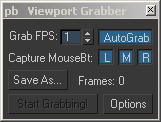
This script lets you grab the currently active Viewport and save the images. You can set a timer to grab sequences - or turn on AutoGrab - which will grab the viewport every time you change something.
Viewport Grabber
Downloads
Visit author’s download page
www.scriptspot.com
- 3ds Max compatibility
- See original listing claims
Community reviewsNo reviews yet.
Listing details
- From original requirements
- 5
- Original version requirement
- 5
- Legacy votes
- 5
- Listing created
How compatibility works
Compatibility comes from the author’s supported range or requirements in the original listing. A tested version records what the author tried.
“2020 unconfirmed” in the catalog means support for 3ds Max 2020 is still unknown.
Community reports record successful tests on specific releases.
Description
Setup & notes
View a screenshot of the ViewportGrabber interface
Install:
Copy pb_ViewportGrabber.mcr to your uimacroscripts directory - restart Max and you will find it under CustomizeUserinterface - Category 'Piranha-Bytes'
Install:
Copy pb_ViewportGrabber.mcr to your uimacroscripts directory - restart Max and you will find it under CustomizeUserinterface - Category 'Piranha-Bytes'
Comments (0)
Comment policy