ScriptSpot

Script

VFB+ : A Feature-rich Extension to the 3dsmax Frame Buffer

By rotem · 2011-08-19

Version
2.81
Version requirement
3dsmax 2009-2018
Date updated
2017-07-14
Votes
63
Download
Download
Description

VFB+ v2.81 is now completely free!

Click for Change Log

 Introducing VFB+ v2.81, the advanced virtual frame buffer for Autodesk 3dsmax.

VFB+ works with any renderer which uses the native 3dsmax frame buffer, such as Scanline, Mental Ray, Final Render, IRay, VRay, Corona (when not using the renderer's custom VFB).

The frame buffer has been designed and heavily tested to fit smoothly into any production pipeline, and to streamline the rendering workflow for anyone who renders in 3dsmax.

Version 2.8 is the most powerful and feature packed release yet!

A partial list of features:

  • 32-bit per channel color correction.
  • Various correction controls including exposure, gamma, multi-channel curves, vignette, chromatic aberration, bloom, glare, blur/sharpen, speckle reduction, noise reduction, etc.
  • Depth of Field based on Z-Depth.
  • VFB+ is active while rendering, including tweaking of color correction and stamping.
  • Captures Render Elements, G-Buffer channels, and RTT elements as well as the main pass.
  • Composition guides help you tweak your image.
  • Pixel Aspect Ratio correction display.
  • 4 different A|B comparison modes.
  • Display modes for all channels.
  • Support for 3D color LUTs.
  • Realtime RGB Histogram.
  • Rich WYSIWYG stamping system with virtually any imaginable variable including arbitrary MAXScript expressions.
  • Fully documented.
  • Customizable interoperability options.
  • MAXScript interface provides access to almost all features.

See the link for download and complete details.

Videos

Tags: render, history, vfb, color correction, frame buffer

Comments (287)

vfb frame buffer

zman · 2022-06-16

does it work in max 2023

Max 2020

cptSwing · 2019-05-09

Should a 2020 version pop up anytime soon, do notify us please - VFB+ is one of the must-have plugins!

rotem · 2019-05-10

That will take some time unfortunately

rotem · 2019-07-05

Its available now.

spacefrog · 2019-07-06

Thanks a lot for keeping it updated

cptSwing · 2019-07-06

Aye, thank you so much!

I get error (3DS Max 2019 and VRay NEXT)

JezUK · 2019-04-16

Error dialog box says the following (please note that D:\cgrepo etc etc is not a drive/directory that I have, so that seems like it's hardcoded in the program);

"Unhandled Exception: Broadcasting NOTIFY_PRE_RENDERFRAME"

"Last marker is at D:\cgrepo\vray\src\vrayrenderer.cpp, line 4056: Preparing global light manager."

"Please note that although this error is generated by V-Ray, it may not be V-Ray that caused it."

v-ray denoiser

titan3 · 2019-02-01

Hey guys, please help if you can ,
Can I get VFB+ to work with V-ray's Denoiser?
Thanks!

muchas gracias!

cptSwing · 2017-07-31

You're a star!

Max '18

cptSwing · 2017-06-13

I know this probably will take a while, considering you likely do not have the time to dedicate to VFB+ ... but a version compiled for Max 18 would be ace!

Royal Ghost · 2017-06-14

Yes, I'm waiting version for 2018 max too. Dealing with Arnold without VFB+ real pain.

rotem · 2017-07-14

A version for 3dsmax 2018 is now available.

spacefrog · 2017-07-15

Great !
Thanks for the heads up - and of course thank you for this absolutely fantastic tool...

Open .exr via maxscript

3dwannab · 2016-08-21

I've just downloaded the trail version and was wondering if it's possible to load an .exr into the vfb.

Code I have so far is:

pathVFBOutput = "C://VFBPlusTempEXR.exr"
if doesfileexist pathVFBOutput then vfbControl #loadimage pathVFBOutput

But this doesn't work. Is the loading controlled somehow by your code?

rotem · 2016-08-21

vfbControl is a command for Vray VFB, not VFB+. For the Maxscript reference of VFB+, check the help files:
http://www.monotoneminimal.com/VFBPlusHelp/

The command you need is

VFBPlus2.LoadImage filename

Works perfectly & thanks for the link

3dwannab · 2016-08-21

The reason I'm doing this is to have a btn to load an image from Coronas VFB to the normal (VFB+) one.

Is there a gamma option I can do when loading the .EXR to burn in the correct gamma or do I have to then use the

VFBPlus2ColorCorrection.Exposure = 2.2

Scrap that. I've just created a pre-render callback that opens the VFB+ before a render is taking place so it loads into VFB+.

Two more Q. Is there a maxscript exposed way to enable visibility of the film strip?

Will the Corona VFB be supported?

rotem · 2016-08-28

Filmstrip: there's currently no maxscript method to open it, sorry.

Corona VFB: What would it mean to 'support' Corona VFB?

3dwannab · 2016-08-31

Thanks. I hope you can add that in the future.

I mean, would it be supported so that it's docked to the Corona VFB in the future? And bypass the standard VFB?

rotem · 2016-09-04

Sorry, I still don't really understand what that means. If you're asking if I can override the behavior of the Corona VFB, then no, not really.

3dwannab · 2016-09-04

From my understanding your plugin works seamlessly with VRays VFB. The same can't be done with Coronas is what I mean.

rotem · 2016-09-05

VFB+ does nothing special to integrate with VRay VFB. For almost all purposes (other than the feature which tracks the mouse), it is unaware of VRay. Could you elaborate on how you feel it is better integrated with VRay?

Real time?

Guido · 2015-12-28

Hi,

Does it work with real time/interactive mode?
For example in corona, if I use "interactive" I'd like to see this frame buffer.

Thank you.

re: Real time

rotem · 2015-12-28

At this time, Activeshade mode is not supported.

lightcube · 2015-08-16

Thanks for the quick fix after 2016 sp1. This plugin rocks... everyone in Max should have it!

VFB+ v2.62 Released

rotem · 2015-08-15

This releases fixed an incompatibility issue with 3dsmax 2016 Service Pack 1.

Lantrancy · 2015-07-20

After install it doesn't show up in max frame window, nothing happen, please help.

Which version of 3dsmax?

rotem · 2015-07-20

There should be a message in the maxscript listener window. What does it say?

Lantrancy · 2015-07-20

Failed to Load VFB+. Error code: 5 what does it mean?

It means you are using a cracked license.

rotem · 2015-07-21

:)

Lantrancy · 2015-07-21

bullshit, there is no license reg cfg and I have deleted everything about crack just put a demo in plugin folder, if you really need to do things nasty to our computer, I had considered buying a license, now gfys, your 2.61 has been cracked anyway, enjoy the crack;)

rotem · 2015-07-21

I'm not doing anything to anyone's computer. You asked what the error code means and I told you. You're free to use whatever cracked software you want, I honestly could not care less. Just seems a bit ridiculous to complain to the developer when your crack isn't working.

Lantrancy · 2015-07-21

Like I said, I wanted to use a demo without crack, and I have deleted everything about crack that I know including reg, except "things" I dont know, obviously you mark our computer somehow.
The most interesting thing is, when I import that crack reg and it works like a charm, that means, your trick makes your demo not working, not the crack, that is your lost to put a potential customer away, I dont give a fxxk. please, enjoy the crack;)

rotem · 2015-07-21

There's no trick, just a registry key. Whatever protection the software has is as minimal as it can be. This is intentionally done as to not annoy validly licensed users with node-locking or other license management concerns.

If you received error code 5, then you did not successfully delete the previous cracked license from the registry.

As I said, I really don't care whether you use a valid license or not. That is your choice and your responsibility, not mine.

As with all users, I hope you enjoy using VFB+ and I'll be happy to hear any feedback you may have on the actual software.

Lantrancy · 2015-07-21

I understand, but you should provide a solution to completely delete them, as I have reverse what I have done still no go. since you ask feedback, you got one, if you make history feature behave like vray vfb, dont save frame buffer automatically, it will be much much better and I think I will buy a license

rotem · 2015-07-21

Thank you, I will consider it.

Rander Elements

3dbybrunolopes · 2015-07-07

Hello,

I love this, bought the latest version, BUT the save all render elements button doesn't work :(

Woops!

rotem · 2015-07-07

Sorry, not sure how that happened. I'll fix this and release an update soon.

3dbybrunolopes · 2015-07-07

Ok,

When you'll relaese de fix?

rotem · 2015-07-07

I hope within a few weeks. If you need it urgently, I can send you an unofficial build with 1-2 days.

3dbybrunolopes · 2015-07-08

Hi
If you could yes please!

rotem · 2015-07-24

This has been fixed in v2.61.

delte all images in frame buffer

dub73 · 2014-12-19

Hi Rotem, when I delete the complete history in the vfb, I don't get an image when I hit render again? At first I have to do a screenshot, then I get an image again and works fine

max 2012

thx

Confirmed & will be fixed.

rotem · 2014-12-19

Thanks, Not sure how that one slipped by for so long.

rotem · 2015-01-21

This has been fixed in v2.51

Save corrections in animation

andrian · 2015-02-05

Hi, ive been trying VFB+ with Octane and Redshift , the issue i faced is that it doesn't save the color corrections i add, like glow, vigneting, exposure, etc.. in the output images. Is this a limitation in the trial version or its how VFB+ works? Im planning to use it mostly for animations.

Best regards,
Andrian.

Octane

rotem · 2015-02-05

There is a specific issue with Octane that I have asked them to fix, I'm still waiting for OToy's response. There is not much I can do about it on my side.

I wasn't aware there is Redshift available for 3dsmax, so I can't really comment on that at this point.

Generally speaking, if a render engine properly broadcasts the appropriate 3dsmax SDK notifications then there should be no problem.

Redshift

rotem · 2015-07-10

I've contacted the Redshift team, and they have notified me that they will fix the issue that is preventing it from working together in their next release.

can it work with Octane render?

robobear510 · 2014-10-31

- it doesn't really work with octane render.. there are things here that would be much appreciated in octane community I would guess - I like what it does, but I don't use vray or standard render at all

rotem · 2014-11-09

Hi
It should work with any renderer which uses the 3dsmax frame buffer. Does Octane use its own frame buffer?

sort of works, but not really

robobear510 · 2014-11-13

octane has it's own octane preview window, which can be ported to max frame buffer, but it doesn't defult to vfb, like standard render does..
- and also it can be rendered via standard render button *which I almost never use..

Fails to initialize -- path too long

kanenas · 2014-02-21

I just tried 2.41 with 3ds Max 2014 on Windows 7.
I get a 'failed to initialize' MaxScript error and a popup that refers to path length being too long.

Failed to initialize VFB+. Errocode: 3010
Error:
The specified path, file name, or both are too long. The fully qualified file name must be less than 260 characters, and the directory name must be less than 248 characters.

I doubt it came across such a long file name/path in the filesystem.
But I suspect the problem is that the system's PATH is near its limit.
Not much I can do about it (I keep juggling it to get various dev tools to load up, though they are the ones that should know better how to set themselves up).

Assuming the long PATH is the reason, why is it so?
Why does the plugin need to modify/add to the path since it's already in Max's default folder?

Sorry but I get apprehensive when I see this. I got many systems messed up because some program tried to add to a full path, failed, and cleaned the PATH in the process. VFB+ is more careful and doesn't do that but once burned...

Thanks.

Path too long

rotem · 2014-02-22

Hi Kanenas

According to the error code, VFB+ is trying to determine is a previous version of VFB+ is installed (v1.52 and lower, script based), in order to remove it before initializing v2.XX.

The exact method that is failing, is Directory.GetFiles ( http://msdn.microsoft.com/en-us/library/ms143316(v=vs.110).aspx ). The error is an OS error, and has nothing to do with VFB+ or 3dsmax. As far as I can tell, it also has nothing to do with the PATH environment variable.
VFB+ is basically searching for the file VFBPlus.ms in the path returned by calling "getDir #startupScripts" from MAXScript, and all it's subdirectories.
You may have a very big hierarchy of subfolders inside that directory, resulting in a very long path.

In any case, VFB+ should handle this gracefully instead of raising an exception, and I will make sure it does so in future releases, but taking a look at that folder may fix problems you're having with other tools.

Regards,
Rotem

kanenas · 2014-02-23

Thank you Rotem.

MaxScript returns a single line:
"G:\Program Files\Autodesk\3ds Max 2014\scripts\startup"
No subfolders in it.

I'll have a look later with Process Monitor and try to figure out what folders it's getting mixed up with.
I'll post back if I discover the reason.

Thanks for your time.

v2.41

rotem · 2014-02-11

I've updated the release to v2.41, fixing the bugs that Shawn reported. Thanks again!

lightcube · 2014-02-10

Rotem,

As always, I'm always a fan of this tool.

I did have some issues with the update. The feature that I wanted most (that is added) is not working properly for me. I'm not sure exactly if it is local to me or not.

The Send To function now seems to remember my choice, but is not actually working properly. Instead, the app says it cannot open the "folder" I've got selected as the output folder (it's like the app is trying to open the folder instead of the file).

And when I choose Photoshop instead, I get this error:

-- Error occurred in sendToPhotoshop(); filename: C:\Users\Shawn\AppData\Local\Autodesk\3dsMax\2014 - 64bit\ENU\temp\VFBPlus2.mse; position: 4705; line: 159
-- Defined in encrypted script
-- Error occurred during fileIn in #C:\Users\Shawn\AppData\Local\Autodesk\3dsMax\2014 - 64bit\ENU\temp\VFBPlus2.mse; line number: 159
-- Unable to convert: 19 to type: String

However, the file still opens in Photoshop.

I know that I'm probably in the minority, but I prefer Corel PHOTO-PAINT to photoshop... and now that Adobe has moved to rental I'm completely boycotting the company. And although minor, this is a feature I have wanted in your tool! :)

(I cannot say with certainty that this isn't an issue with PHOTO-PAINT, but I'm hoping you could look into it. I hadn't used the send-to since updating PHOTO-PAINT a couple weeks ago, so maybe it was broken with that update... )

rotem · 2014-02-10

Hey Shawn

Thanks for the update, I'll check it thoroughly tonight and get back to you.

rotem · 2014-02-10

Hi Shawn

You're absolutely right on both accounts! Sorry, I'll put out a fix as soon as possible. Thanks!

Grab Viewport

dub73 · 2013-09-08

Hi, when I use the feature "Grab Viewport" Max regular crashes? On a system with a ATI or Nvidia graphics card. MAX 2012 Direct 3D 9.0. any ideas?

thx

dub

rotem · 2013-09-08

Thanks for the report. I can not seem to replicate this on my machine.

* Do you have any steps for reproduction?
* Does it happen with an empty scene or does some geometry need to be present?
* What is the render output size?
* Does it happen when no textures are in use?
* Are you using 32-bit or 64-bit 3dsmax?

Thanks!
Rotem

Bug fixed

rotem · 2013-09-11

The bug has been found. It would crash when you press 'Grab Viewport' with more than one object selected in the viewport.
It has been fixed and will be included in the next release of VFB+.

VFB+ v2.3 released

rotem · 2013-05-13

After a long wait, v2.3 is complete! The upgrade is free to all existing users. See the website for more details.

Fail ....

innocent · 2013-04-16

I have just dl the trial version max2012 64bit.
But on startup, listener tell me :
Failed to Load VFB+. Error code: 3

Help me please, I have tested and it's work fine on my laptop but not on my workstation.

thx

rotem · 2013-04-16

Try this: In 3dsmax preferences, in MAXScript tab, increase initial heap size to 60mb, and then restart max.

Please let me know if it works.

Nice !

innocent · 2013-04-16

yeah, thanks a lot.

rotem · 2013-04-17

Great to hear. This will not be an issue in the next release.

Photoshop import

dub73 · 2013-03-11

Hello, I have one question about the Photoshop button. How can I control the image format which will be used for importing images to Photoshop?
In one files it was suddenly 32bit EXR and now I ahve 8bit PNG ? In both files I used the "Save File" (*.tif) option in the render setup dialog.

thx

dub

rotem · 2013-03-11

It is dependent on the bit depth of the image in the frame buffer. If the image is 32BPP, EXR is used.
Otherwise, a PNG is used. I guess you get an 8BPP (instead of 16BPP?) image in Photoshop because it is using the current 3dsmax PNG output settings.

Would you rather have control over which format is used?

Send to Photoshop

dub73 · 2013-05-30

Hello, a bit late my answer but, yes it would be great if one could choose the image format. I am saving my images as 16bit Tiff (render settings). When I press the PS button in the VFB+ I get an EXR in Photoshop. Would be cool if could choose the format for this button :)

rotem · 2013-05-30

You can always add Photoshop manually to the applications list, select TIF output, and send it to PS using your newly created button. Does this fulfill your needs?

render region issue

dub73 · 2013-01-28

Hi, I encountered a issue with the render zoom function. When I set it to let's say 25%, render the image, everything is ok. I get 25%. I found the option to draw a region rectangle in the view port by pressing Ctrl + Shift + Drag - Render a region by dragging on the image. The rendering starts automatically, but this time with 100% and not the 25% which I set before ?

Thanks for the feedback

rotem · 2013-01-28

I'll see what can be done about this.

Render Passes

JD'angelo · 2013-02-18

Wonderful script rotem. THe post tools are amazing and do save a lot of trouble. I seem to have missed it still i'll ask. Isnt it possible to save all the render passes with just a click as the vray frame buffer does?. Clicking on the multiple save icon saves only the rendered rgb on each of the parts. i.e 1, 2, 3.

Thanks for your feedback

rotem · 2013-02-18

What you mention is not possible in the current version, but it has already been implemented and will be available in the next release.

Show Alpha Channel button

Vipera · 2012-12-28

I would like to see Show Alpha Channel button as a separate button or even make all channel buttons as separate small buttons instead of drop down menu which we have in version 2.2. In current version I have to click button to see Alpha Channel and find Alpha in menu instead of just one click. I like how it was done in vanilla max VFB for fast switch between Alpha/RGB colors. In VFB+ I cannot fast switch between Alpha and RGB at the same time looking at the rendered image because I have to look at the drop down menu for every switch.

rotem · 2012-12-29

Are you aware of the hotkeys? A, C, R, G, B make it faster than using the dropdown.

Hotkeys for image channels

Vipera · 2013-01-02

I didn't know I can use the hotkeys to show channels. It will help but better menu buttons would be good too.

Apply color correction to image sequence bug

Vipera · 2012-12-28

I wanted to check what "Apply current color correction to image sequence" button does. I clicked on this button and then I clicked Cancel. 3dsmax freezes for about 1 min after that.

rotem · 2012-12-29

I can't reproduce this. Can you say which max version, windows version, and any other specifics?

Apply color correction to image sequence bug

Vipera · 2013-01-02

I have tried this button one more time and max does not freeze this time. Maybe first time I used this feature some data was not initiated or image sequence path was pointed no network drive. I use VFB+ 2.2 on 3dsmax 2010 64 bit.

VFB+ saves wrong gamma

Vipera · 2012-12-28

I use Gamma 2.1 in 3dsmax. I have Input Gamma 2.1 and Output Gamma 1.0 for bitmap files. This means when I save image file from Vray VFB or Scanline VFB it will be saved in linear color space. But when I save the same image file from VFB+ the images saved with gamma 2.1 instead of 1.0. Make a quick test. Set gamma settings as I have and render sample object using Vray VFB, Scanline VFB, and VFB+ saving the image file from each VFB to .TGA. The saved images from Vray VFB and Scanline VFB will be identical but image saved from VFB+ will be brighter because it was saved with gamma 2.1 instead of gamma 1.0. I think, this is a bug which has to be fixed.

rotem · 2012-12-28

Thanks, I'll make a note of fixing this.

In the meantime you can either override the gamma in the VFB+ color correction to 1.0, or in Preferences -> Color Correction -> Save Mode set CC Disabled, 1.0 Gamma.

Gamma Switch button

Vipera · 2012-12-28

Thanks, I will use Preferences -> Color Correction -> Save Mode set CC Disabled, 1.0 Gamma.
Also, I would like to see the Gamma 1/sRGB switch button on main VFB+ panel to quickly see the difference between linear work space and sRGB similar as it was done in Vray VFB with sRGB button at the bottom.

rotem · 2012-12-29

Noted. I will see if and how this can be done in a convenient way.

32bit

Augusto Lombardi · 2012-11-15

"Support for 16-bit and 32-bit per channel (including HDR) images and color correction."

does this mena that I can save 32bit frames also using the scanline render?

for instance..actually i cant save fumefx renders with scanline in 32bit .exr, i can save 32bit but when i import in comp the sequence it has 16bit depht

rotem · 2012-11-16

VFB+ accurately represents the maximum depth provided by the renderer. If the Scanline renderer does not generate a 32-BPP buffer internally, there will not be 32-BPP data in VFB+. As far as I can tell the Scanline renderer uses a 16-BPP buffer at most.

Excellent

lightcube · 2012-11-05

I've been happily using VFB all week. Love it! I think AD should buy it from you! Anyway, glad you've built it. The filmstrip and split screen are really nice in my book. Other features will probably find a place for me too.

rotem · 2012-11-05

Thanks for the support Shawn :)

grain in vray render elements

dub73 · 2012-10-30

Hi, when we render with Vray and Render Elements we sometimes get grain in the passes? Multimattes or Vray Dirt for instance. But only when we use save in the VFB or the Photoshop button. When we use "auto save file" there is no grain in the passes? is there something wrong with VFB? We are not color correcting anything in VFB.

http://img204.imageshack.us/img204/2519/vrayv.jpg

cheers

dub

rotem · 2012-10-31

Thanks for the report, I've contacted you via email to try and resolve the bug.

Vray Lens Effect RE

jaxxtrend@gmail.com · 2012-09-27

Hi!
Very cool tool. But need litle bit changes ;)
Please add correct work VRayLensEffects(VLE) with VBF+2.1

now VLE add for image, need add for RE or image and RE or only image.

THX!

preview render

dub73 · 2012-09-27

the new preview render options is great ! and that it shows the new preview resolution as well. nice

Product key...

Braiz · 2012-08-28

Rotem I've send you a mail regarding recent purchase of VFB+ licence...

I've paid for it once more then a month ago, and just recently, and still have not recieved a product key.

Could you please look into the matter as soon as possible.

Thank you...

rotem · 2012-08-28

Hi Brian

I sent you the license the day I received the payment, I suspect you did not receive the email for some reason.
I am also trying to contact you via your e-mail. If you do not receive e-mails from me please let me know of another way I can reach you.

Regards
Rotem

preview renders %

dub73 · 2012-08-15

Hi, could you ad 10% as well to the preview render options? I mean it depend on your final resoluition and sometimes 25% is still to big. When working on 3k o 4k images 10% would be nice. Or the user could set the % by his own :) It would also be nice, if one could change the preview resolution, without starting the rendering by changing it. A second button perhaps?

cheers

dub

rotem · 2012-08-15

Thanks for you feedback!
 
  • 10% - You got it, no problem :)
  • Custom user % - Not sure, let me think about it.
  • Changing % without rendering - Another button in this already packed UI is not ideal, but how about it you change the % while pressing Ctrl it wont start the render?

composing

pit3ds · 2012-08-05

I would like to see the possibility of fine compositing in the script. For example that you could impose on the fly ao on the main picture and so on.

rotem · 2012-08-07

I've added the request to the wishlist. I doubt we will see this turning into a full compositing application, it is not the purpose. But what could be interesting is to allow different blend modes for composite AB mode.

sbk · 2012-07-28

Powerful tools! very useful, thanks you

dori3d · 2012-05-15

Congratulation man!
A very good tool for 3dsMmax. Really great extension to the Max basic vfb. Keep it up with the good work, looking for a 2013 version.

rotem · 2012-05-16

Thanks

Does this version not work with 2013? I've been told it does.

Many thanks for this great script Rotem

igamaximus · 2012-06-07

I have one wish that is based on many situations and it's about region rendering. It would be so great and so useful if render region size/position could be saved (stored in memory) so we could load it later again. Max VFB works this by default when save Max scene, so render region shows on the same position like last time. It would be much more powerfull if you could integrate region preset system, that would allow us to save more than one render region with its size and position, allowing us to load particular render region preset from drop down meny.

Thank you in advance.
Regards.

Thanks

rotem · 2012-06-08

This is already on the request list, I might implement it at some point.

Windshield Stickers

jacksprow9 · 2012-05-14

When Windshield Stickers to the stickers/preview the following css value performs perfectly in IE8 and Chrome and print header/footer on every web page.

Attachments

Error: No ""get"" function for undefined

Wilbert · 2012-04-16

I get this error >> MAXScript Callback script Exception: -- No ""get"" function for undefined <<
If I have a scene-explorer in a viewport and the viewport is active but I lock the renderview to a camera.

Confused ?
You won't be after this screenshot:

😉 

fn getViewportName =

(

case (local typ = viewport.getType()) of

(

#view_persp_user : "Perspective"

#view_camera : (viewport.getCamera()).name

#view_spot : (viewport.getCamera()).name

#view_iso_user : "Orthograpic"

default : 

(

local txt = (filterString (typ as string) "_")[2]

(toupper txt[1] + substring txt 2 -1)

)

)

),


Attachments

rotem · 2012-04-16

Thank you! This is extremely helpful and will be fixed for the new version.

Installation problem

niighthawk · 2012-04-12

I have windows 7 x64 3dsmax 2011 and the script dont work, i try your drag into viewport and nothing happen, i try to rename the .mzp to .zip but no .dll file in in the .zip only

-mzp.run
-vfbplus.dat
-vfbplus.ms

i put thoses files into script/startup like you said and restard 3dsmax ... and nothing ..

help me please. i need the A | B function.

sorry for my bad english not my language.

Installation

rotem · 2012-04-12

There is no longer a vfbplus.dll file, it has been renamed to vfbplus.dat in order to work around an issue with 3dsmax 2012 and network installation, so the files you have are the correct files.

Regarding drag-drop installation: it seems there is an issue with drag-drop installation on Windows 7 for non-administrator user accounts. 

However, copying vfbplus.ms and vfbplus.dat to your scripts\startup\ folder like you did should work. Can you please check if you are receiving any error message in the maxscript listener after starting 3dsmax? Or try to run vfbplus.ms manually after 3dsmax has started and see if you get any message?

Please send me a PM if it does not work, I'm curious to find out what the problem is.


problem

niighthawk · 2012-04-12

So i did what you said , i put the file in the good place, i start 3dsmax and no bug in the script listener only a Blank page, after that i load the .ms file manually and nothing happen no bug or error, still the same VFB panel.

do i have to activate something after that ? or add a new panel in my customize menu ?

let me know please, and by the way i dont see a private message option on this website.. me you should leave me your email.

Thank you

rotem · 2012-04-12

There is nothing else you should do, it should work automatically. I've sent you a private message with my email.

dz86 · 2012-04-04

thank you for the great script!

vfb

dub73 · 2012-04-06

lets say you set your final resolution to 4000x2000 pixel. Now you start lighting and testing. What do you do in max? I don't wanna render 4000x2000 px every time. So one have to change the resolution for preview purposes. In Maya you can change the render resolution to 10% 25% etc of the final resolution(4000x2000). There is a script called "RenderView Extension" that makes it quite handy in Maya. Perhaps there is a way too in Max?

http://s7.postimage.org/o4o60ajcb/vfb.jpg

one more thing :) can you integrate a preset curve which is similar to a Gamma of 0.454, like in the Vray VFB. Even though it is more then a just 0.454 correction. For preview purposes it is enough I would say.

The image history is cool !! The one from Vray is c...

rotem · 2012-04-07

Already implemented what you described in the new version :)

About preset curve, isn't it easier to just set gamma to this value?

nice

dub73 · 2012-04-27

Already implemented what you described in the new version :)

About preset curve, isn't it easier to just set gamma to this value?

nice :)

about the gamma, you are right too

thx

barigazy · 2012-04-27

I don't know why Autodesk did not integrate your script in max2013.
This tool is much more advanced than standard VFB.
Maybe in next version, who knows?
Bye the way, thank you for helping me to solve a couple of
problems on CGTalk forum.
Cheers, man. +1

rotem · 2012-04-27

Thank you, my pleasure.
Maybe in 2014 :)

Preview Resolution

dub73 · 2012-03-19

Hello, how about to integrate an option to set a preview resolution, like in Maya

10% 25% 50% 75% 100% of the final resolution / output size which is set in the render settings. I somehow miss it so far in Max

anyway, it is a great tool since the Maya render view is much more handy then the one from Max.

rotem · 2012-03-20

Could you please explain this a bit more? I'm not a Maya user so I'm not familiar with the features. What is the effect of setting a preview resolution? And where do you set it?

save file bug?

SaiLing · 2012-03-12

hi,rotem .
I notice when I save image from VBF+,it will ask me twice to save the same file,
it's a bug or I use it in wrong way?

Thanks a lot :)

rotem · 2012-03-12

I have not come across this bug, for me it works fine. Can you answer these questions:

1) Does it happen always or just sometimes?

2) What version of 3dsmax?

3) What version of windows?

SaiLing · 2012-03-16

It's not always happen,I will try to find the point
I use max 2012 ,win7 64bit.
thanks.

rotem · 2012-04-08

Ok, I managed to recreate this. It will not happen in newer versions.

Maya Frame Buffer

intheflesh · 2012-03-02

Hi,

I want to thank you for the great script! And I hope you will continue development, as I have found it to be so valuable in my workflow.

I have a request though. Instead of the History window at the top, maybe you could implement something like Maya's frame buffer? Instead of showing all the images saved, it has a scroll bar on the bottom of the screen, allowing to switch through. I have attached an image.

Also, as someone previously suggested, click to drag for render region would be a nice feature. You said it may result in accidental renderings and pissed off users, so maybe you could just have it as an alternative option in the settings?

Keep up the great work,

Daniel

Attachments

rotem · 2012-03-02

I want to thank you for the great script! And I hope you will continue development, as I have found it to be so valuable in my workflow.

Thank you for the feedback. There will be no more updates on the current version of VFB+. I am currently in the middle of development of version 2.0, which has been rewritten from scratch, and will have many additions and improvements.

I have a request though. Instead of the History window at the top, maybe you could implement something like Maya's frame buffer? Instead of showing all the images saved, it has a scroll bar on the bottom of the screen, allowing to switch through. I have attached an image.

That is what the blue arrows in the toolbar are for :)

Also, as someone previously suggested, click to drag for render region would be a nice feature. You said it may result in accidental renderings and pissed off users, so maybe you could just have it as an alternative option in the settings?

As I answered Martin, this feature already exists. You activate it by Ctrl+Shift+Dragging in the frame. I will try to make the shortcut keys customizable in future versions.


Luminosity

huschi · 2012-02-11

Hi,

thanks for this good script. What I dont understand: If I move the A/B line the luminosity will change in the rendered pictures. If I put it furher to the left it becomes darker, further to the right it tend to be almost wight. Is there something I dont understand?

Thanks in advance.

Cheers,
-Follyx

addition: I tried it again a couple of times and its not always. Try to figure out when it appears.

rotem · 2012-02-11

That sounds very unexpected. Please let me know if you find a way to recreate it.

NICE

ztravnicky · 2011-12-28

Hi,
very very nice script. ZT

Still great

Martin Breidt · 2011-12-21

Thanks again for making this available (for free!), I really like it. Is the source code still available?

I had a few quirks with an older version of VFB+ not capturing renderings in combination with mental ray in distributed bucket rendering mode and Copy To Clipboard seemed to ignore gamma, so I upgraded to the latest version.

Here's one more suggestion to make it even more powerful: \
How about a click-drag-release rectangle function inside the framebuffer that would set the region rendering parameters, all in one mouse action. This would be similar to how Maya does it IIRC - you just drag a rectangle and the renderer will start with that region only. Right now, one needs multiple clicks: click on the region button; click-drag the corners of the region box; click on the region button again to turn off the box mode; click render button. Repeat for a new region.

Also, it would be helpful if the rt-click color picker would report additional pixel data, similar to the built-in one. At least the alpha value would be good.

Keep up the good work!
Martin

rotem · 2011-12-21

Thanks again for making this available (for free!), I really like it. Is the source code still available?

Not the latest version, but I'll get to posting it this week.

Here's one more suggestion to make it even more powerful: \
How about a click-drag-release rectangle function inside the framebuffer that would set the region rendering parameters, all in one mouse action. This would be similar to how Maya does it IIRC - you just drag a rectangle and the renderer will start with that region only. Right now, one needs multiple clicks: click on the region button; click-drag the corners of the region box; click on the region button again to turn off the box mode; click render button. Repeat for a new region.

Already there. Ctrl+Shift+Drag in the frame buffer :)

Also, it would be helpful if the rt-click color picker would report additional pixel data, similar to the built-in one. At least the alpha value would be good.

Will add to the requests list, thanks.

> Already there.

Martin Breidt · 2012-01-02

> Already there. Ctrl+Shift+Drag in the frame buffer :)

Nice! Why not use a simply click-drag? It's not used anyway? Also, there seems to be a bug: when the active viewport is not the camera, the region isn't updated.

And just to let you know: the .mzp does not run properly on Win7 with a non-admin user account. I had to manually extract and copy the files to the scripts folder.


Cheers
Martin

rotem · 2012-01-02

Nice! Why not use a simply click-drag? It's not used anyway?

It is used in split A/B mode. And also I think click-drag is too prone to accidental use, would make for a lot off pissed off users :)

 Also, there seems to be a bug: when the active viewport is not the camera, the region isn't updated.

As far as I know, this happens only when the camera is locked, and it accurately reflects max's own region behaviour. Does this happen to you even if the camera is not locked?

And just to let you know: the .mzp does not run properly on Win7 with a non-admin user account. I had to manually extract and copy the files to the scripts folder.

Thanks, I will look into this!

Stamper parameters

Wilbert · 2011-12-21

Does the Stamper have parameters for Output Size and Pixel Aspect ?
I can't find them. 

(Is there a helpfile for VFB+ ?)

rotem · 2011-12-21

The stamper doesn't currently take pixel aspect into consideration, I will add it to the feature request list.
Can you explain what you mean by output size parameters? I'm not quite getting it...

There is currently no help file for VFB+. I never bothered making one because I thought it was kind of self explanatory, but it might be a good idea to make one.

Wilbert · 2011-12-21

I mean the parameters you can use to automatically insert text with the stamper. Like {CPUType} or {RenderTime}. I am looking for render Width, render Height and Pixel Aspect parameters. But I can't find them in the menu.

The main reason I asked for a help file was for an overview of these parameters.


rotem · 2011-12-21

Ah, now I understand.
It should be simple to add these parameters (ideally under the "Image" submenu), I will add it to the feature request list.

Pixel aspect

Wilbert · 2011-12-21

Is it possible to let VBF+ take the Pixel Aspect into account when displaying the renders ?

rotem · 2011-12-21

As far as I can tell it does - do you get a different image than the original frame buffer image when using pixel aspect ratio different than 1.0 ?

Wilbert · 2011-12-21

No VFB+ is not different from the original frame buffer because the Max buffer also doesn't compensate for other pixel aspect ratio's. Or perhaps it DOES (depends on what you interpret as 'compensating') but I would like an option to see the non-squeezed image like you see in Premiere (or likewise)

rotem · 2011-12-21

Oh I see, that's an interesting idea, I will add it to the feature request list.

holycause · 2011-12-02

I love the update.

Great job man. :-)

stealthx · 2011-12-01

Thank you for the fast implementation. Works great.

1.52 Reuploaded

rotem · 2011-12-01

There was a typo in the 1.52 MZP from yesterday. This has been fixed now. Thanks to Dom for reporting it.

v1.52 Released

rotem · 2011-11-30

Another small update, details at the top.

WOW!

Makoto · 2011-12-01

It works!
Thank you very much!!

network drive

Makoto · 2011-11-29

I get exception error on max2012, when I put vfbplus.* files on network drive. This problem didn't happen on max2011.
I want to share this script(and version) all machines in my office.
Can you avoid this problem?

Attachments

rotem · 2011-11-29

I can't reproduce this behaviour in max 2012. Try this:
When you go to the file properties of the vfbplus.dll - do you have a little button 'unlock' at the bottom?

Do you put your files on network drive?

Makoto · 2011-11-29

hmm, I cannot find "unlock" button on dll file properties.
So, all machines get this error message when I put files on network drive(actually this is my file server) and write this path in plugin.ini.
It was the same result, even if I change a server to put files.

rotem · 2011-11-29

Yes, I tried running the files from a network drive in max2012 and had no problem.

Let's try this experiment:
After you load max, if you do Maxscript -> Run Script -> run vfbplus.ms from network path manually... does it work?

rotem · 2011-11-29

Ok I've managed to recreate your error and explain the situation:

Usually max runs vfbplus.ms as a startup script, and vfbplus.ms loads vfbplus.dll manually.
Because you put it as a plugin.ini path, max is trying to load not only vfbplus.ms, but vfbplus.dll by itself at startup, which triggers the security exception.

I'll update it to a new version sometime this week, I will simply refactor vfbplus.dll to vfbplus.dat or something like that to avoid this problem.

Great!

Makoto · 2011-11-29

Thank you!

stealthx · 2011-11-28

Yes, it would help too.

ctrl+leftclick

stealthx · 2011-11-28

It's bad and what about ctrl+leftclick on the "Current Render A" or "Current Image B" cause delete the concrete image?

rotem · 2011-11-28

How about alt+click on delete image button will delete image B ?

But this will be some time from now, I have currently stopped developing the tool.

Delete button

stealthx · 2011-11-25

Hope somebody will like this idea:

rotem · 2011-11-26

I agree it might be comfortable, but there simply just isn't any more room in the UI

64 bits version

chakib · 2011-11-22

Please make a x64 version of this wonderful & useful script ;)

rotem · 2011-11-22

what exactly do you mean? It works fine in 3dsmax 64...

chakib · 2011-11-25

really ? but it doesn't work here it gives me error !

rotem · 2011-11-25

can you tell me what error? Also, what version of 3dsmax?

1.51 installator

Royal Ghost · 2011-11-22

Thank for the update! After install 1.51 auto updater still shows info that new version is available, bug?

rotem · 2011-11-22

doh! Yes :)
Fixed and updated, thanks

Small update released (v1.51)

rotem · 2011-11-18

Mostly to fix a few small bugs and interface quirks.

This will be the last update to VFB+ in the near future.

Thank you all for your support.

Vipera · 2011-11-11

VFB+ doesn't render Environment Lens Effects (Glow)

rotem · 2011-11-11

If what you mean is that it doesn't update the render effect interactively without re-rendering the image, that is true. Unfortunately, I don't think there is a way to implement that, there's no callback for 'post effect applied'.

VFB+ runtime error

Gspoutnik · 2011-11-08

hello,
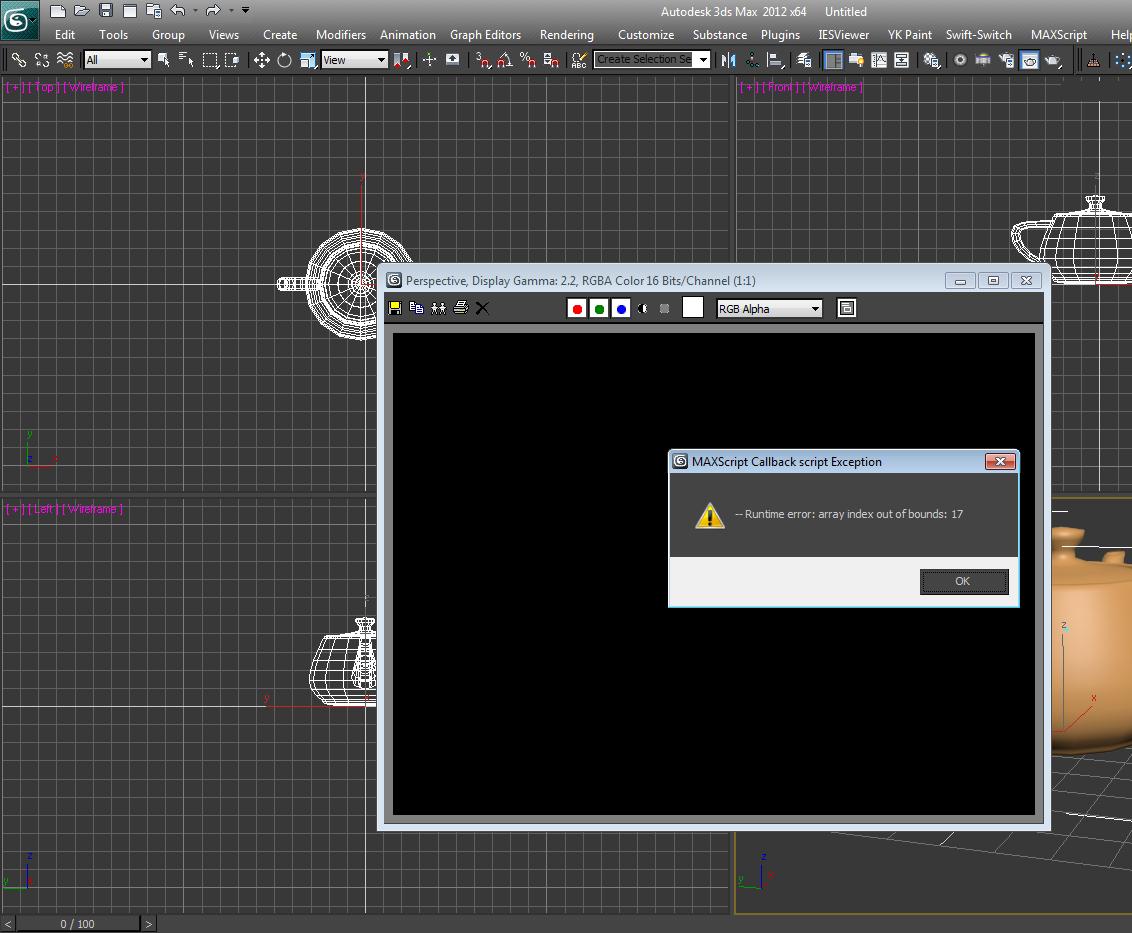
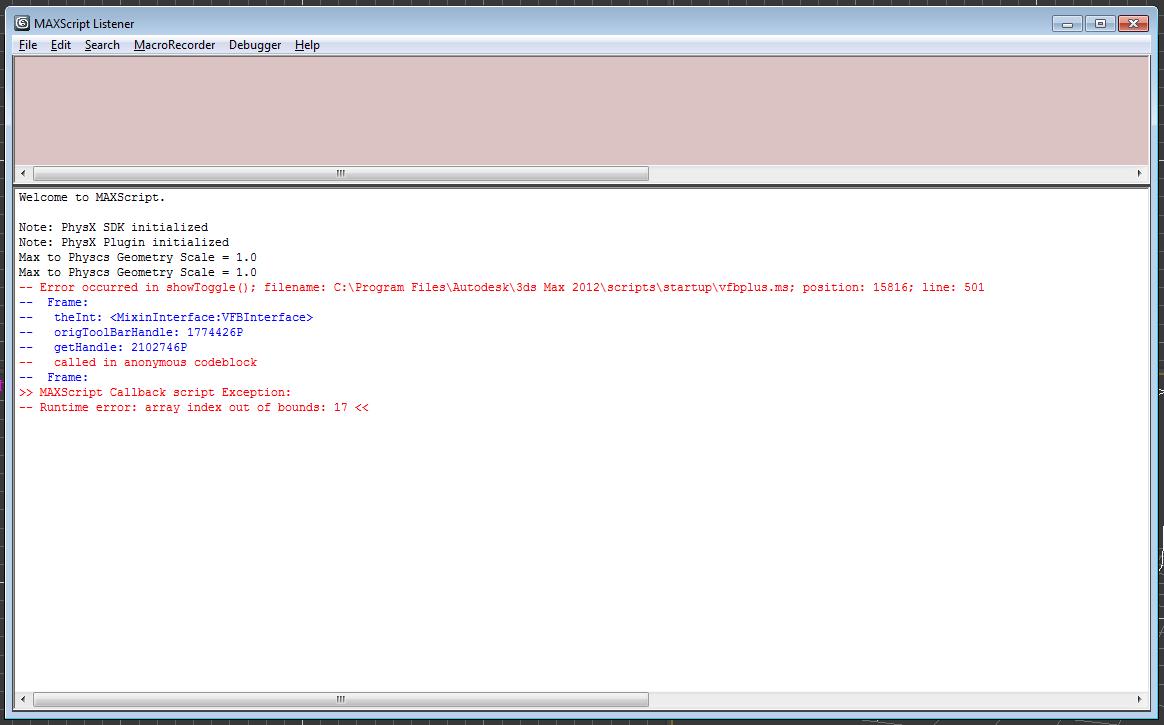
I was working with version 1.31 with no problem but when I wanted to go to the version 1.5 I had a message -runtime error: array index out of bounds:17-- now no versions do not work even after deleting the files and deleted vfb + and 3dsmax.ini

Help please.

3dsmax2012 64bits win7

rotem · 2011-11-08

That's odd, the place I suspect the error is happening has not been changed from v1.31.
Could you please attach a screen grab of how your default VFB toolbar looks? It will help me to determine the problem.
Also, a screen grab of the Maxscript listener after you get the runtime error will be helpful, so I can tell exactly what line is triggering it.

Thanks.

vfb+ runtime error

Gspoutnik · 2011-11-09

Heelo Rotem
Here my screenshot about the runtime error
Thank's
and now all the mental ray icons and the toolbar in frame buffer are missing.

Attachments

rotem · 2011-11-09

It seems that you are missing the file "...3dsmax 2012\stdplugs\stdscripts\vfb_methods.ms" for some reason. As a result, you don't have the default VFB UI extensions (that come with max, not mine), and therefore are missing the 'toggle UI' button from the default VFB toolbar, which is what is triggering the error.
Did you delete this file from your max installation on purpose?

In any case I will add protection against this situation in the script and will try to post an update on the weekend.

Regards,
Rotem

vfb+

Gspoutnik · 2011-11-09

hello
SUPER SCRIPT error comes from me.
you're right as version 1.3 did not uninstall I searched "vfb" and deleted all files not knowing that the vfb method.ms is a 3dsmax file.
No problem to get back my icons (control panel uninstall / change = repaired in 3dsmax2012 is great).

Best regard,
Spoutnik

moulder6 · 2011-11-02

"Frame B changes to (current frame)-1 frame."

I wouldn't call that a bug. It's actually expected and needed behavior. When u tweak the render u normally want to compare the last changes to the previous situation in a progressive manner, not to something u rendered a month ago...

In the best case it could be optional as i mentioned back when this was discussed:

- just as it is now, which on my side is the desired behavior;
- fixed "b" as Vipera suggests.

@ Vipera: "how about if frame B is image 1 (the earliest image) it will simply discard image 2 instead?"

Set the limit to 3 and VFB+ to discard the last rendered image. Then set "B" to image 1. Now, when u render, u have A-2, B-1... Next time u render u have A-3, B-1... Next time u render 2 is discarded, 3 is moved to 2, and u have the new render as 3 again, displayed in "A". U have "fixed" "B" that never gets discarded, and A that's the last render.

rotem · 2011-11-03

Decisions, decisions... :)
Anyways, currently I don't have time work on the tool but I'll try to see what I can do about this in a couple of weeks. Thanks.

Need frame B to be sticked.

Vipera · 2011-11-01

As I said, I need a checkbox to have frame B sticked. So, frame B will stay in this place even if I reach maximum stored images. I set maximum as 3 just for example. Usually I use 20-30 images to store but this maximum I can also reach very fast and I will lose frame B in this case.
Solution for sticked frame B could be a situation when we copy(or rename, what is better) frame B as a new file with the different name. In this case this file will not be overwritten or deleted when we reach maximum stored images.

rotem · 2011-11-01

I see... how about if frame B is image 1 (the earliest image) it will simply discard image 2 instead?

Frame B

Vipera · 2011-11-01

"how about if frame B is image 1 (the earliest image) it will simply discard image 2 instead?"
I'm not sure what you mean. The easiest way to lock frame B will be in coping current image in frame B as a new file, which we prevent from deleting in any case until we unlock frame B. We can even keep this frame to new the max session.
If we unlock frame B, then we show (current image)-1 by default or current image if have rendered only one image.

Need frame B to be sticked.

Vipera · 2011-10-29

I need an option to be able stick frame B, so it will not change after each render. For example, I need to make many renders and compare them with one master frame. Now we have frame B constantly changing. Would be good to have a check box near frame B to hold it.

rotem · 2011-10-29

That doesn't happen for me, frame B does not change on its own... can you give reproduction steps?

Vipera · 2011-10-31

Repro 1: Set maximum images to store to 3. Render 3 images. Toggle A/B ON and set B frame to 1. Render one more image. Frame B will go away.

Vipera · 2011-10-31

Repro 2: Set maximum images to store to 3. Render 3 images. Toggle A/B ON and set B frame to 1. Toggle A/B OFF and again ON. Frame B changes to (current frame)-1 frame.

rotem · 2011-10-31

Thanks for the detailed repros.
What your are describing is actually two different situations:

Repro 1: Image B is discarded due to the 3 image limit, this is the intended behavior. You have an option to discard the latest image, instead of the earliest, if that helps. Do you have a suggestion for a better solution?

Repro 2: This is a bug, and will be fixed.

Thanks again.

Edit render region button

ronin3d · 2011-10-27

it would be nice to have also the -Edit render region button- next to the render one.... and make them a bit bigger.... great script by the way

rotem · 2011-10-28

Thank you! I'll check it out and see if it is feasible :)

Stamper

Vipera · 2011-10-27

Thank you for the implemented stamper in VFB+! I would like to request changes to stamper button. Now, when I Left click on stamper button it shows current stamp and opens stamper controls window. Can we show stamp only, without opening stamper controls window? If I want to change the stamp I can always Right click to open controls. Thank you!

rotem · 2011-10-27

So what you're saying is you want left click to only toggle stamping on/off and right click to only show/hide stamping controls ?

Stamper

Vipera · 2011-10-27

"So what you're saying is you want left click to only toggle stamping on/off and right click to only show/hide stamping controls?"

Right.

rotem · 2011-10-28

That sounds reasonable.
I think I might have it also show the controls ONLY IF there are 0 Stamper layers, so a first time user will understand what it is.

too bad I can't press +1 twice ;)

mustafa mamdouh · 2011-10-26

Ok here is the only thing If you could achieved it, It will be more perfect for me and people using LWF with VRay.

I requested before some features from VRay VFB like (track mouse while render - grouping render elements in one FB - history list - view rendered image as gamma corrected while rendering) and the last one is the most important.

Ok you already added History list and the others unfortunately it couldn't be done because max script can't be implemented while rendering, BUT what about before it starts rendering, you may fix gamma problem ..

Here is the scenario:

  • I adjust my LWF (2.2) in max preferences and VRay
  • When I start render with normal max VFB i get washed out image while rendering and thanks to you I get it corrected in VFB+
  • To see it rendering correctly I must revert gamma in max preferences to default value (1.0)
  •  Then I adjust gamma again to (2.2) to see my scene in viewport gamma correctly again.

My request:

to force max before start rendering to revert back to default value (1.0) and at the end It gets back to adjusted value (2.2).

 I hope it is easy as I see it.

cheers, Mustafa

rotem · 2011-10-26

Thank you Mustafa :)

About the gamma override option, I'd rather not implement it in this script, it might be a bit confusing, but I can write you a small macroscript to do that.

Working Great!!

mustafa mamdouh · 2011-10-29

Thank you rotem =)

rotem · 2011-10-29

glad to hear :)

V1.5 Released!

rotem · 2011-10-25

See main post for change log. Main addition is the new Frame Stamper module.

How to Pick Things ?

kumodot · 2011-10-24

I've asked about this, but i don't know if it was solved. After Outliner installed and associated to "H", i can't use it to "pick" things...
For Instance : To pick a Morph Target > Press Pick Object > Press H and i can't "PICK" using outliner. :( The old Scene Explorer (H), accepts pick "behavior".

rotem · 2011-10-24

I think you posted in wrong place :)

su37 · 2011-10-07

I also found, and batch render is Incorrect ,After Render several scenes, do not render complete, it automatically stopped, the panel has red ×.

rotem · 2011-10-08

I can not recreate this behaviour, but in any case, I will fix compatibility with batch render for the next version.

bug ?

kumodot · 2011-10-06

I have the same proble here. Sometimes (not rare), the VFB just stops working, all the icons became gray and only the PLUS icon works, sometimes clicking it twice (on/off VFB+), it starts to work again.

rotem · 2011-10-07

I haven't had this happen, but I will try to reproduce it. Do you have any hints on how to trigger it?
Also, what OS and 3dsmax version?
Thanks.

Same problem here!

mustafa mamdouh · 2011-10-07

I don't know what exactly caused the problem but when it happened it sticks with the scene (Attached) and to get VFB+ work again I must create new scene ..

Max Version: 2012 SP2
Max File Version: 2010
VRay: 2.0SP1
OS: 7 64-bit

Attachments

Fixed!

rotem · 2011-10-07

The issue was that batch render was being used.
There is a safeguard in VFB+ to not try to capture the render if you are using batch render manager, though I now changed it to only disable capturing if there is more than one view in batch render.

Thanks for reporting it.

@kumodot: Is this also the case in your scenes? are you also using batch render?

machoman · 2011-09-27

While rendering, everything looks normal and the frame buffer doesn't show the VFB+ tool bar except the blue "+" icon on the right side.

That blue "+" icon is the button to disable/enable the VFB+, right?

I will try the new version when I get a chance.

rotem · 2011-09-27

I'd love it if you could send me the scene, even without the HDR file. This definitely sounds like it should not be happening.

just wanna ask

machoman · 2011-09-26

I was test rendering a close-up grass scene using previous VFB+(I believe V1.3, haven't installed the new one yet). The background image is HDRI with vraySun.

When I region rendered, the region area doesn't get blown out but it does when full rendered. I noticed in your previous comment that VFB+ works only 8bit but why the render region is fine?

What if I region render the whole thing?

BTW I reduced the Render mult value for HDRI so the BG sky color is different.

Attachments

rotem · 2011-09-26

This sounds extremely bizzare. I can't think of any situation where this might happen.
Is there a chance you could upload a small simplified test scene exhibiting this behaviour?
I am unable to reproduce it.

machoman · 2011-09-26

It's actually a simple scene with clear blue sky HDRI, default vraySun, VrayphysicalCamera(f#-5.6, SP-200, ISO-100), multiscattered grass blades(the tallest is about 20cm) on 400cm x 400cm square plane. Then I got the camera close to the edge of the grass plane. Since HDRI can't be uploaded on this site I thought simple scene setting would be helpful.

The attached is another shot from a bit above from the same scene. I did bunch of region renders in order to fix the blown out spots and left those regions due to long rendering time but am having no success, maybe because VFB+ works only on 8 bit? Surprisingly enough, though VFB+ is rendering fine other than those spots. After for awhile I got "Runtime error: dotNEt runtime exception: Parameter is not valid." I tried again and didn't get that error this time.

Anyway, VFB+ is not supposed to work with 32bit HDRI?

Attachments

rotem · 2011-09-26

I must admit. I'm quite confused. VFB+ does not render anything on its own. It merely copies what was already rendered into a display buffer.

Tell me this... while you are rendering, does everything look fine? VFB+ is not active while the render is in progress, and if that part also exhibits this behaviour, then the culprit is 3dsmax or vray.

Furthermore, what I mean by VFB+ working only on 8 bit is that color correction can only be done in an 8-bit spectrum, but whatever is already rendered should look 100% like it does when VFB+ is disabled.

Great script

noel_d3 · 2011-09-25

"The film strip has now been moved above the VFB window."

Thx U very much Rotem.

Léon

V1.42 Released!

rotem · 2011-09-24

A small stability release for some urgent bug fixes. See main post for bugs fixed.

su37 · 2011-09-23

When ctrl+ shift region render, Cancle render very slowy ,can't end Immediately, wait a long time, why ?
I use vray 1.50 sp2 render.

Render issue

rotem · 2011-09-23

Thanks for the report, there seems to be an issue caused by triggering the render from a dotnet handler. I fixed this and it will be included in the next release.

Some errors with saved images

Vipera · 2011-09-23

Error 1 - Image counter doesn't increase if I have in preferences 'Store rendered images when VFB+ is disabled' unchecked.

Error 2 - Set 'Maximum images to store' to 3. Render 2 images. Toogle A/B. Set B as 1 or 2. Keep rendering few more images. You will get 'Missing Image' error instead of image, because previous file was overwritten.

Thanks!

rotem · 2011-09-23

Very useful bug reports! I'll be sure to fix both of these for next release.

Vipera · 2011-09-23

I don't know what was the error with the images deleting I got before. I closed max, deleted script from max folder and installed again. It works, so far. I'll let you know if this happens again. Thanks for the script!

rotem · 2011-09-23

I can recreate it here without problem, like you said. It happens because the image in index 1 is deleted to make room for the new image, but it is not removed from the 'b image' slot of the display control. What should happen is that the 'b image' should automatically be reassigned if it gets deleted.

edit: I just realized you might have been talking about the GC error. Never mind then.

su37 · 2011-09-23

TIF: 31ms
JPG: 47ms
TGA: 31ms

You are right ,tif file format is fastest.

-

Vipera · 2011-09-22

Downloaded file saved with .zip extension by some reason. I have figured out that I have to rename it to .mzp extension.

rotem · 2011-09-22

That's odd. It downloads as .mzp for me. Is anyone else experiencing this issue?

miauu · 2011-09-22

There is a problem with IE or some download managers that save the file as zip.

Error when delete first file in stored images

Vipera · 2011-09-22

I've set 'Maximum images to store' to 10. When I have rendered 10 images and try to render next one I have an error:
MAXScript Garbage Collection Error
My temp folder for stored files is c:\Temp.
Update: I receive the same error when I try to delete images manually by Delete button on toolbar.

re: error

rotem · 2011-09-23

Can you please give me more information? I do not get this error, nor has anyone else reported it.

Can you please send me private message with this information:
1) Windows version
2) 3dsmax version
3) output from maxscript listener when you write "callbacks.show()"

Thanks

su37 · 2011-09-22

Tif format file save Slowly ,set jpg file format

File saving

rotem · 2011-09-22

What you say is curious, for me TIF saves the fastest.
It's true that the file sizes are big, but it is a lossless format, and all the files are deleted when 3dsmax shuts down anyways.

Can you please run this script? It's a file format saving benchmark.
http://dl.dropbox.com/u/2817180/fileSavingBenchmark.ms

Please run it and post the results from the listener.

Thanks

su37 · 2011-09-22

Thanks you,your script is very useful,Thanks.
A suggestion,Tif format file is too large ,in Settings dialog box,
set save file format ,for example :jpg 、tif、tga。

mustafa mamdouh · 2011-09-21

one of best scripts this year .. thanks for your time you made to develop it more and more :)

Thanks

rotem · 2011-09-22

Thank you Mustafa :)

Version 1.4 Released!

rotem · 2011-09-21

See main post for change log.
For all those wishing for a frame stamper, I will start working on it for the next release :)

Awesome

wobi · 2011-09-21

Thanks for this man. This is really an awesome addition to the rendered frame window. These are the things I want to see from autodesk, really. To bad, that they don't get it and someone like you have to spend there free time creating this. Keep up the good work!!!

rotem · 2011-09-21

Thank you for your support :)

amazing

Electro Magnetic · 2011-09-21

incredible man
i loved 3ds more because your script
really really amazing script
thank you very
i hope you can add one more thing to this amazing script
add stamp like vray frame buffer
in the bottom of the render frame
and let's say to this option (the water mark of the artiste)
i think it's better and i hope i can see it on the next release
again thank you very very much

by the way sometime the render window give me error in max 2012 x64 the render window is white and big red X. max tell me the error in net framework !?
after i change to normal frame buffer screen scan line or mr i got my render well
i hope you can fix it brother
greeting from egypt

rotem · 2011-09-21

Thanks for your feedback! I am happy to hear you find it useful.

about frame stamp: I will work on it, not for the closest version, but the one after that.

about error: can you please post the exact steps how to trigger the error? It will help me to find the source.

Electro Magnetic · 2011-09-21

thank you man
your script make me very happy
i will wait for next one
about error when give me error again i will capture my screen and give you the capture
many thanks

Laziness is an engine of progress

stealthx · 2011-09-19

to moulder6:
You can see that both ideas solve the same problem: do not have to click on the icon 20x when you are tuning render.

Really? That lazy?! Does it make that much of a difference that u have to move ur mouse a lil up to actually press the button, coz i honestly don't see another difference to the way it works right now. Shortcuts are nice things, that's for sure but in this particular situation, i wouldn't say one is needed. What i'd suggest is that if A|B is on, and u render another frame, it should stay on, showing in "A" the new rendering and in "B" what was last shown/or the previous "A".

rotem · 2011-09-19

you're right, it is annoying to have to turn split mode on every time. I'll try to make it sticky.

"Always on top" bug?

moulder6 · 2011-09-18

Just wanted to report, that if u have "Always on top" on and u press render, VFB is again on top of all the windows even if 3ds max is in the background.
That happens once the VFB+ window takes focus.
If u r to close the render window, reopen it from the appropriate UI button and click "render" str8, without clicking into the VFB, it behaves.
Another thing, that's kinda annoying is, that if u have the render region visible inside the VFB it changes according to the selected viewport, which is wanted, except if u have locked the render view. It does render the correct region for the locked render view, but it's a lil bit confusing when u see it changing though it's locked.

Thanks

rotem · 2011-09-18

I've logged all the bug reports in my spreadsheet, and will fix whatever I can for closest release.

stealthx · 2011-09-17

What do you think about this?
In situation when I see only one render (A mode) and left click on the image, would it be possible to auto set the A/B mode and instantly can move the line?

The question about hidding your toolbar. I don't know if somebody is using the old vfb during rendering, however I prefere your new vfb even with no/black image. Still there is on/off button in your toolbar.

rotem · 2011-09-18

In situation when I see only one render (A mode) and left click on the image, would it be possible to auto set the A/B mode and instantly can move the line?

I'll try it out and see if it doesn't disturb anything else

The question about hidding your toolbar. I don't know if somebody is using the old vfb during rendering, however I prefere your new vfb even with no/black image. Still there is on/off button in your toolbar.

The problem is that you won't be able to turn it on/off during rendering... and for example if you want to see the alpha channel of the image being rendered, you won't be able to, because the original vfb toolbar will be hidden...

I've contemplated this

moulder6 · 2011-09-18

In situation when I see only one render (A mode) and left click on the image, would it be possible to auto set the A/B mode and instantly can move the line?

Really? That lazy?! Does it make that much of a difference that u have to move ur mouse a lil up to actually press the button, coz i honestly don't see another difference to the way it works right now. Shortcuts are nice things, that's for sure but in this particular situation, i wouldn't say one is needed. What i'd suggest is that if A|B is on, and u render another frame, it should stay on, showing in "A" the new rendering and in "B" what was last shown/or the previous "A".

I've contemplated this feature in the past, but was worried about turning the tool into something else. If you say there is really a need for it, I will try implementing it.

Ok, i should admit, that i had the same thoughts in mind... Probably the stamp functionality would be better to implement as a separate render effect. To me it really doesn't feel like a logical part of the VFB. Though it sounds attractive to have every tool needed in one place, I'd rather leave this one out, not to turn VFB+ into a mess, of unrelated things, quickly put together.

On the other side we already do have the render time stamp (which by the way doesn't turn on/off with the "Toggle UI Overlays" button anymore) and a whole bunch of render settings listed into the "render settings browser". It's to be expected that someone would occasionally want to stamp them onto the frame itself. So an option for it, doesn't sound that irrelevant, after all... The thing is that the eventual implementation should be very well considered, to keep thing consistent with the already available toolset. Here are some basic ideas, how it might be nice to put it, in case u decide to go for it (not saying u have to). Hope it makes sense:

- In the "render settings browser" u are able to select which render settings u want to reaply to the current rendering - u can simply add another toggle button/check box in the browser, stating "Stamp selected settings".  It will show a separate overlay, similar to the layers/curves in the bottom part of the image with the values per image. This could be a lil confusing, though, since we don't want the info for a previous rendering stamped onto the current image.

- On the overlay itself add two buttons "x" to turn it and the "Stamp selected settings" button off, and another one, to save the overlay with the image.

- In preferences add "Stamp text" font selector (that's better to be separated from the general overlays' text); U could consider changing the "on screen controls color" to "overlays background color"  and adding a separate color swatch for the text. Another option would be to keep the "on screen controls color" the way it is and add somewhat contrast multiplier for the text. This way we could have darker background with a contrasty and readable text on top. Right now if u select a darker color, the text in the overlays is hardly, if at all visible.

- There are some things that are unavailable right now in the "render settings dialog" coz they r irrelevant with the current implementation, but will be worth adding them  to extend the stamp functionality:


  • render time - though it's shown on top;
  • frame number, camera and file name, date & time;
  • Custom text with an option to be interpreted as a generic MAXScript commands for custom frame information.


One thing that i am guessing is that with the absense of access to the frame buffer at render time stamp functionality is probably not  going to work with rendering animation sequences. But it isn't sumthing that i'd personally miss. Yet, this is one of the reasons to better have stamp stuff implemented as a render effect, than as a part of the VFB.

This came out pretty long... Hope u'r not bored :) As usual easier said, than done... I personally still hasitate if it needed to have it as a part of  the VFB+ but this is what the dialogue is for.

Thanks for ur time! Keep up the great work!

Pete

Wow

rotem · 2011-09-18

First of all, thanks for taking the time to write your very well-put opinions in such detail. I plan to deal with the whole stamping issue not in the very next release, but the one after that, as it's quite a bit of work, but your ideas are always good and I will make good use of them when the time comes.

Save the render time stamp with the file feature

Vipera · 2011-09-16

It would be nice to have a checkbox to save the render time stamp with image file when click on Save Image button.

moulder6 · 2011-09-16

"It would be nice to have a checkbox to save the render time stamp with image file when click on Save Image button."

Or push it a lil further to a complete stamp/watermark function? Where u can add custom text, image or even sum of the rendering attributes that were used for rendering the image - take a look at this one:

http://www.scriptspot.com/3ds-max/scripts/render-info-strip

- particularly good, but it would be far better to have it integrated str8 inside the frame buffer.

rotem · 2011-09-17

I've contemplated this feature in the past, but was worried about turning the tool into something else. If you say there is really a need for it, I will try implementing it.

holycause · 2011-09-13

I love it man. Great job

Thank you

rotem · 2011-09-13

Glad to hear :)

You are so fast

stealthx · 2011-09-13

I am not sure but maybe more logical is to have in A/B mode the first image the older one and second the new one by default.

In situation when I see only one render and left click on the image, would it be possible to auto set the A/B mode and instantly can move the line?

If I clear images history or start render, the bar with icons is hiding themselves (after render goes back), is this correct?

rotem · 2011-09-13

  • I am not sure but maybe more logical is to have in A/B mode the first image the older one and second the new one by default. In situation when I see only one render and left click on the image, would it be possible to auto set the A/B mode and instantly can move the line?

This sounds like it would be pretty confusing to the user, don't you think? It's built so 'A' is the master image that is currently in view.

  • If I clear images history or start render, the bar with icons is hiding themselves (after render goes back), is this correct?

This happens for two different reasons:

1) when clearing the history or discarding all the images: there are no more images to display so the toolbar closes... do you think it would be better to keep the toolbar visible, and show a black screen in the image panel?

2) when rendering: the toolbar hides itself before rendering because it is 'locked' during rendering so it would be useless, and if you wanted to use the original vfb's 'alpha' button you wouldn't be able to.

Bug in version 1.3

Vipera · 2011-09-12

There is a bug in version 1.3. When I click Save Image button I have error message "-- Unable to convert: undefined to type: FileName" and script stops on deleteFile tempBMPPathF.

fn saveImage =
(
local thePath = selectSaveBitMap caption:"Save Image"
if thePath!=undefined do
(
.....
deleteFile tempBMPPathF
)
),

I have changed temp folder for saved images to c:\Temp and I try to save to .JPG and .TGA. I do not have any problems with version 1.2.

Sorry

rotem · 2011-09-12

Thank you, I've updated the version to 1.31 to fix this bug.

su37 · 2011-09-11

Great work,I like It.Thanks
a possibility to compare twice Rendered (current render and last render) as a whole,or compare forth Rendered as a whole,
I think It will be very useful.

rotem · 2011-09-11

Thanks, I will add your suggestion to the feature request list.

V1.3 Released!

rotem · 2011-09-10

See main post for change log.

It's working

machoman · 2011-09-08

Ok, the rename trick and manual installation worked fine. The issue was that I had "Enable built-in Frame Buffer" under the VFB tab checked on. After unchecking VFB it works fine.

In fact it might have worked fine after the dragging installation process if I had VFB unchecked.

I always wanted Maya render buffer capability and this one has it plus extra more features. I like it a lot.

Thanks.

moulder6 · 2011-09-09

I keep UAC enabled, and start max as administrator - it's preventing a lot of issues, with plugins, scripts and network related stuff... granting max access to all files that it might need. The only problem is that if i try to drop a script in the viewport it won't let me...

V1.2 Released!

rotem · 2011-09-05

Mainly a stability release, but with a couple of small new features as well.
See top of post for change log.

Installation issue

machoman · 2011-09-07

The plugin looks nice so I downloaded the attachment(the actual downloaded file name is vfbplus_0.mzp Is that right?).

Then I dragged the mzp file over the viewport but nothing happened. It's not in the Startup folder either.

Any clue?

thanks

Strange

rotem · 2011-09-07

The file name does seem to be vfbplus_0.mzp, though I didn't call it that. In any case it works fine for me when I download and install it. You can try to rename it to vfbplus_0.zip and extract vfbplus.ms and vfplus.dll from it into the startup folder.

Please let me know if it works.

moulder6 · 2011-09-07

Well, i have to say that it has always been .mzp... The thing is that if u run Vista or Win 7, and u run max as an admin, dragging into the viewport won't quite work... Instead, i'm just MaxScript/Run Menu, and everything works fine...

rotem · 2011-09-07

That's very interesting, I've never had that problem with neither Vista nor Win7.

feature proposal

Daniel Wichterich · 2011-09-02

fantastic script! thanks. one thing that i am missing (maybe i haven't found yet): a possibility to compare A/B as a whole. like the snapshot function in After Effects: holding down the button shows B, releasing shows A. in my opinion that is more useful than sliding the line.

Great idea

rotem · 2011-09-02

Thanks! That sounds useful, I will implement it for the next version.

V1.13 Released!

rotem · 2011-09-02

See main post for change log.
Thanks again to all who reported bugs and requested features.

Great plugin!

stealthx · 2011-08-31

Would it be possible to make the line between pictures in Split A/B mode invisible or one pixel width?

Will be possible to use this plugin in render to texture window too? There is bug in 3ds max that you can't copy to the clipboard bigger rendered picture than it is your screen resolution. Your button open in Photoshop could help here.

Thank you

rotem · 2011-08-31

Would it be possible to make the line between pictures in Split A/B mode invisible?

Absolutely, I will add this option to the next release!


Will be possible to use this plugin in render to texture window too? 

Not how it's currently set up, but I will add this to the list of requested features and will try to implement.


Thanks for your feedback!

Excellent, Thank you!

joshpurple · 2011-08-31

Great looking script! Thank you very much!

Thanks

rotem · 2011-08-31

Expect a much improved version in the coming days!

New version released

rotem · 2011-08-27

I've released an update, covering almost all of the feature requests and bug fixes mentioned here.

Thank you all for your support.

vfb plus bugs

geo · 2011-08-25

thank you for this excellent script.
i have found a couple of bugs: vfbPlus 1.02 [08 23 2001]

1.

if you have the "browse Render settings" window open, and the "sho only different from current" option ticked, it will cull the render settings list to just the values that are different.

if you change frame buffer number while it is doing that list culling, it causes a Maxscript error

2. when sending an image to photoshop [cs4], photoshop opens; maxscript error: see attachment, photoshop disappears :-(

Max2011

XP64 pro SP1

Core2 Quad Q9450 @ 2.66ghz 8gb RAM

______________________________________________

request: could you add a color sample swatch?
and perhaps a slider to access stored frames?

thanks again

G

Attachments

Thanks

rotem · 2011-08-25

Thank you for the bug reports and suggestions!
  • Render settings - I don't get this bug. Could you please give me the entire maxscript listener output when this bug happens?
  • Photoshop bug - I don't seem to have this bug either in PS4. This code block is what puts the alpha channel mask on the image in photoshop. In any case I will put this whole block in a try-catch so if for some reason your photoshop doesn't support it, it will still open the image fine.
  • Color swatch - I'm not sure what you mean exactly, could you elaborate? Right-clicking the image give you a the color RGB values of the current pixel.
  • Slider - In the next versions I plan to add a filmstrip with thumbnails of all the stored images so it is easier to navigate.

Update

rotem · 2011-08-22

A small update mainly for bug fixes. Among the changes:

  • Save, Copy to clipboard and Open in Photoshop would raise exceptions on some machines.
  • Deleting images when curves are active would raise an exception.
  • Images opened in Photoshop would sometimes open with cut off alpha and/or ignored CC settings. They should now open with CC applied and a layer mask or channel representing alpha.
  • Added option to disable transparency of on-screen controls, as this could slow down performance on some machines.
Please let me know if the above points are still not working for you.
Existing known bugs:
  • Cancelling the Save dialog may sometimes raise an exception on some machines.
I realize the embedded nature of this tool requires it to be 100% stable, reliable and predictable for it to be valuable in everyday production work, and am determined to resolve all bugs and develop more features. Please help by reporting more bugs. Thank you all for your feedback so far.

Thanks very much for this script!

Artie · 2011-08-22

I'm going to use it every time. Just want to point a bug(?) i came at: it doesn't allow to save a rendered image after applying CC. Of course, it's not a terribly crucial option - just made a little feedback on it.
Thanks!

rotem · 2011-08-22

Thank you for the feedback. I am currently working on fixing a number of bugs and will post an updated version shortly.

Thank you!

Martin Breidt · 2011-08-22

Thanks very much for your replies and the link to the download (here's a shortcut to it, hpoe it works: http://tinyurl.com/3ba5dvk). I'll see whether I can repro the modality problem and let you know.

Martin

Looks great

Martin Breidt · 2011-08-22

This looks like a great script, loved the first few tests. Is it possible to save/restore different exposure/curve settings?

Thank you very much for sharing AND for posting source code. Would it be also possible to include the code for the dotNet DLL?

There seems to be a bug in how you handle the "sub-dialogs" - clicking on the 'x' to close them will not disable the button. Also, some dialogs are modal but do not stay 'in front', causing 3ds Max to look like it's frozen.

But again, looks like a very useful script!

Martin

Thank you

rotem · 2011-08-22

Thanks for the feedback, it is much appreciated. I will respond to your comments point-by-point.

exposure/curve settings: Not yet, but this is definitely planned for the next versions (I'll get to work on it after I finish fixing all the bugs).

source code: I've published the full source code including the c# code for the DLL on a thread on CGTalk. I can not post the link here, because it triggers the spam filter, but if you google "cgtalk vfb+ source code" you should find it. I will continue to update the source code there whenever I update the tool here.

closing sub-dialogs: Are you talking about the color-correction controls? If so, this is intended behaviour. It is for when you want to have color correction applied, but don't want the controls obscuring your image. To disable the color correction altogether, you need to press the CC toggle buttons from the toolbar.

modality issue: I've not experienced this issue, could you please give me an example and/or steps for reproducing the bug?

Bugs

rotem · 2011-08-22

I am currently working on fixing several bugs and will release an updated version in the coming days.

my mistake!!

mustafa mamdouh · 2011-08-20

Sorry it's working Great now ... it gave me error when i tried to run it from maxscript menu
that's really SMART script cares more about our needs and make the workflow easier & faster ...
I'm testing right now .. and very impressed with the features there but to be honest i miss some stuff in vary VFB like {track mouse while render - grouping render elements in one FB - history list - view render gamma corrected while rendering)

thanks

rotem · 2011-08-20

I agree that those are all great features in the Vray VFB. On top of that, the Vray VFB is HDR, while mine is 8-bit. Unfortunately, all or most of those features are not implementable using maxscript. There is no maxscript control of what happens during a render.

The exception is history list ... that is a feature I've been meaning to implement for some time... I will consider it for the next version, thank you.

A few bugfixes

rotem · 2011-08-20

A few issues have been fixed:

  • Previously the buttons of the standard VFB did not work when script was installed.
  • Zoom now does not reset if flipping through images of same size.
  • 'Open in Photoshop' image is color corrected and includes alpha.
  • Installing the script while the VFB is open could cause an execption.
  • When G-Buffer channels were enabled some buttons were missing from the toolbar.
I am still contemplating the issue of seperate CC settings for each image in the history. Moulder gave an example of when this would be desired behaviour, but I can think of other situations where it is not.

Thank you

rotem · 2011-08-20

@moulder6: Let me reply to your comments one by one:

  • The "PS" button: The frame buffer operates in 8-bit, so I'm afraid that's a limitation for now. You're right, it should be sent with the edits applied, I will fix this. The cut off alpha issue is a bit tricky, I will try to look for a solution.
  • Remembering CC settings per image: This is a very good idea, I will try to think of a way to implement it.
  • Zoom reseting: You're absolutely right, I will fix this.
  • Replacing the window entirely: I'm afraid this is not possible, as I have no access to the contents of the frame buffer window during the rendering itself. You'll notice that the script toggles off when you start a render and starts back on when the render finishes. So you will not be able to see the image during rendering if it were only using my tool... it's implemented as one ugly Win32 hack over another as is 😎.
@lucpet59: Thank you very much :)
@mustafa mamdouh: Hmm that's very strange, you're the first to report this error... could you give me details about your max version, OS version, and exactly how you are installing?

Error!!

mustafa mamdouh · 2011-08-20

I couldn't install it on 3ds max 2012 64-bi
get this error: --Runtime error: Missing or invalid zip package file:C:\..script path..\vfbplus.mzp

hope you find solution
thanks

lucpet59 · 2011-08-20

Brilliant! Thanks for opening up the source code as well

moulder6 · 2011-08-20

Thank you! This is really awesome! Craving badly for such a FB window since i started using Maya... Playing with it for a few hours... Haven't been any happier with anything new introduced to max for the last few years! As simple thing as the render window is, this is truly great work, really!

I would like to point few things, though that i think would have sum value:
-The "PS" button seems to send the image in 8 bits always and with a cut out alpha. It also seems to ignore all the CC tweaking that one does inside the FB. It would be nice if we can selectively send the image to Ps with the edits applied.
-It would be also nice if the tweaks r saved per image, so when u switch back n forth they change to show the tweaks for the specific image. Like if i load in the FB a image for comparisson saved with gamma 2.2 it gets double gamma corrected while the rendered image's gamma is correct. If i change the exposure to fix the blown out loaded image, the other one will show without any gamma correction.
-When u switch forth and back between the saved images, the zoom always resets. When u zoom in and u want to compare details, it would be nice if it doesn't.
-Is it possible to completely replace the default FB window toolbars with urs? I'd personally do it right away, n forget about the original piece of sh*t. I believe it will make it even more snappier and stop sum of the interface flashing.

Once again, thanks a lot! I do tons of renders each day n this will spare me from thousands of redundant clicks n help me save mad amounts of time!

Royal Ghost · 2011-08-19

Thank you! Now it works. I waited a long time for such VFB, thank you for sharing them!

rotem · 2011-08-19

Sure, thank you for your feedback. Please let me know if there is anything else not working or that you think is missing.

Royal Ghost · 2011-08-19

It seems not work at win7 x64 & max 2011. No errors but features not work.

rotem · 2011-08-19

Thank you, I'm working on fixing this error. It works fine for me on win7 x64, and I'm trying to recreate the error..

If anyone else has this error please let me know, I'm trying to isolate the cause of it.

Resolved

rotem · 2011-08-19

I believe this has been resolved. Please try to redownload.