V-RayMax Converter PRO

168 votes
Version: 
4.0061
Date Updated: 
06/02/2026
Author Name: 
3DZver

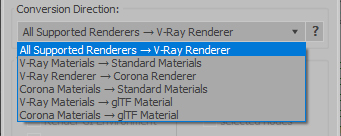
V-RayMax Converter PRO is the best tool for convert 3d scene (materials, maps, lights, cameras, proxies, modifiers, helpers, render elements, etc.) from other render engines to V-Ray and from V-Ray to Corona Renderer, and also for converting V-Ray and Corona materials to Standard/Physical/PBR/OpenPBR materials and to glTF Material.

Current version: 4.0061

Supported for conversion:

To V-Ray from:
  • Standard (Default Scanline)
  • Corona Render
  • FStorm Render
  • Octane Renderer
  • finalRender
  • Arnold
  • Brazil_Advanced (RS v 1.2) material
  • NVIDIA iray (unofficial) material.
From V-Ray to:
  • Standard / Physical / PBR / OpenPBR materials
  • Corona Renderer
  • glTF Material (3ds Max 2023 or later)
From Corona to:
  • Standard / Physical / PBR / OpenPBR materials
  • glTF Material (3ds Max 2023 or later)
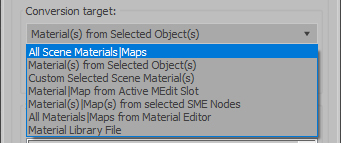
Сonversion scope:

Full list of supported conversions.

Main features:

  • Converts materials, maps, lights, cameras, modifiers, helpers and GI environment from other render engines to V-Ray and from V-Ray to Corona
  • Converts clouds from CoronaSky to VRaySun and vice versa.
  • Converts Night Sky system (Moon, Stars & Milky Way) from V-Ray to Corona and vice versa
  • Converts Render Elements to V-Ray (currently supported Scanline RE, Corona RE, FStorm RE, Octane RE) and from V-Ray to Corona
  • Converts V-Ray and Corona materials to Standard (Default Scanline) materials
  • Converts VRayMtl and CoronaPhysicalMtl materials to Physical Material and OpenPBR Material
  • Converts V-Ray and Corona materials to glTF Material (which is necessary for exporting to the .glb for corresponding 3d software: Blender, Gestaltor, Babylon.JS etc).
  • Converts proxies (currently supported from Corona, FStorm, Octane) to V-Ray Proxy (static and animated)
  • Converts V-Ray Proxy to Corona Proxy (static and animated)
  • Converts standard Bitmaps to VRayBitmap and vice versa
  • Converts standard Bitmaps to CoronaBitmap and vice versa
  • Converts 3ds Max Physical cameras to V-Ray Physical cameras and vice versa
  • Automatic configure ACEScg workflow in V-Ray
  • Batch processing for multiple 3dsMax Scene (*.max) or 3dsMax Material Library (*.mat) files
  • Programmatically interact with most converter functions using built-in maxscript methods (API), which allows you to use the converter without UI and in combination with other 3rd-party scripts.
  • ...and more additional tools for fixing and adjusting the scene.

Additional Info: 

More detailed information about the all features and capabilities of the "V-RayMax Converter PRO" can be found here: https://maxtools.3dzver.com/product?id=1

Also, on this V-RayMax Converter telegram channel, you can read about all the updates.

IMPORTANT: To convert between different rendering engines, it is necessary that these rendering engines are installed (alpha/beta/dailybuilds/rc versions are not supported).


PS:
Please, respect the developers and other users - do not post promotional messages in comments (ie spam).

If you have any suggestions or comments related to the work of the plugin, use the support form at this webpage: https://maxtools.3dzver.com/mxtsupport

Version Requirement: 
3ds Max 2018-2027
Other Software Required: 
V-Ray Advanced 5.xx.xx - V-Ray 7.xx.xx

Comments

Comment viewing options

Select your preferred way to display the comments and click "Save settings" to activate your changes.
3DZver's picture

New update v4.0061 are available

v4.0061 release notes:

  • IMPORTANT UPDATE: The license verification and activation mechanism has been updated following the license server domain migration.
  • Fixed error "Unknown property: "starsEnable"" that occurred when converting CoronaSun/CoronaSky from Corona v13 and older.
  • Fixet the error "Unable to convert: undefined to type: Integer" that occurred when converting from CoronaBitmap to VRayBitmap.
  • Improved conversion of Corona materials to Standard materials.
3DZver's picture

New update v4.0060 are available

v4.0060 release notes:

  • fixed a bug where "Crop/Place" properties were not transferred when converting from VRayBitmap to CoronaBitmap.
  • fixed incorrect conversion of the "Occlude other lights" property when converting from VRayLight to CoronaLight.
  • some improvements were made to the installer.


3DZver's picture

New update v4.0059 are available

v4.0059 release notes:

  • added conversion of VRayMtl and CoronaPhysicalMtl to OpenPBR material for 3ds Max 2024 Update 2 and newer instead of legacy PBR material.
  • added the "Display HD textures in viewport" option to the [Adv.Tools] tab in the "V-Ray Tools" section.
3DZver's picture

New update v4.0058 are available

v4.0058 release notes:

  • added support for Corona v14.
  • added conversion of V-Ray Night Sky system (VRaySun+Moon, Stars & Milky Way) to Corona Night Sky system (CoronaMoon, CoronaSky with Night sky) (static and animation).
  • added conversion of Corona Night Sky system (CoronaMoon, CoronaSky with Night sky) to V-Ray Night Sky system (VRaySun+Moon, Stars & Milky Way) (static and animation).
3DZver's picture

New update v4.0056 are available

v4.0056 release notes:

  • added support for converting the new [FStromMixMat] with multiple layers.
  • added support for converting the [FStormFrontBack] map to the [VRay2SidedTex] map for V-Ray 7 Update 2.
3DZver's picture

New update v4.0055 are available

v4.0055 release notes:

  • added support for V-Ray 7 Update 2: improved and adapted the core for added features.
  • disabled the "Convert [CoronaFrontBack to VRayOSLTex]" option for V-Ray 7 Update 2 from UI and API.
  • fixed minor bugs that do not affect the main operation of the converter.
3DZver's picture

New update v4.0054 are available.

v4.0054 release notes:

  • improved conversion from V-Ray to Corona: correct connection of [CoronaMappingRandomizer] and [CoronaTriplanar] map nodes and condense of identical maps used in one material into one map by creating a MultiOutputChannelTexmap with additional inputs and outputs.
  • improved conversion of proxies to VRayProxy with the "Optimize for instances" parameter forced on.
  • added automatic conversion of VRayMtl to CoronaPhysicalMtl if the "metalness" property in the original VRayMtl is greater than "0" or if a texture is used for this property.
3DZver's picture

New update v4.0053 are available.

v4.0053 release notes:

  • added new option "Convert [CoronaFrontBack] to VRayOSLTex" when selecting the conversion direction "All Supported Renderers -> V-Ray" on the [Scene Convert] tab.
  • added new function "Set "Opacity" mode for VRayMtl" in the "V-Ray Tools:" section on the [Adv.Tools] tab.
  • added new function "Set "Filtering" mode for Bitmap to [None]" in the "V-Ray Tools:" section on the [Adv.Tools] tab.
  • added new function "Set VRayMtls "Reflection Lock IOR" to [On]" in the "V-Ray Tools:" section on the [Adv.Tools] tab.
3DZver's picture

New update v4.0052 are available.

v4.0052 release notes:

  • added support for 3ds Max 2026
  • improved "ACEScg Workflow" function for processing some complex texturemaps with many nesting complex texturemaps nodes.
  • suppression of 3dsMax warning messages in the Maxscript Listener about the obsolete "edgeChamferType" property in Edit Poly, which sometimes appear when converting old scenes.
  • added saving of alpha channel to baked textures if the file extension is png or tga.
  • fixed error that occurs when converting Autodesk Bitmap if there is no raster image file at the specified path.
3DZver's picture

New update v4.0051 are available.

v4.0051 release notes:

  • added support for converting XRef Materials from XRef Objects.
  • improved conversion of Corona materials to V-Ray.
  • rewritten installer for more convenient use.

Comment viewing options

Select your preferred way to display the comments and click "Save settings" to activate your changes.