ScriptSpot

Script

V-Ray Elements Switcher

By henning · Credited author: Henning Krol · 2013-07-30

Version
2
Date updated
2015-02-17
Votes
5
Description

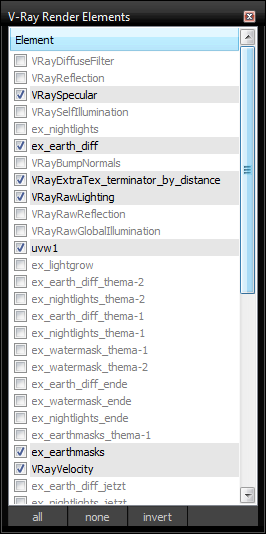
This script lists all created V-Ray render elements in a window for quickly switching their on/off status.
After running/installing you can find the script in the category "HoferKrol"
changelog:
v2: hopefully fixed bug "unable to access code block local or parameter: width"

Attachments

Tags: VRay, v-ray, Render Elements, renderlements

Comments (5)

bug fix

henning · 2015-02-17

Sorry! I haven't been looking at the comments here in a long time.
I've uploaded a new version that hopefully fixes the bug for everyone. I haven't had this error so I didn't look into it.
Please excuse my not very clean scripting skills.

The script file is now replaced.

asymptote · 2015-02-02

@ rpadc2002 , just tried it...doesn't work for me.

runtime error fix

rpadc2002 · 2015-02-01

i was able to run the scripts for 3ds max 2015 by changing this line

before:

rollout vrayElements "V-Ray Render Elements" width:width height:height

after

rollout vrayElements "V-Ray Render Elements" width:200 height:600

Also get runtime error

asymptote · 2015-01-25

Max 2015 throws up the same error, is there a fix ?

tia

"
-- Error occurred during fileIn in "D:\_Plugs & Scripts\v-ray_elements_switcher.mcr"; line number: 58
-- Error occurred in anonymous codeblock; filename: D:\_Plugs & Scripts\v-ray_elements_switcher.mcr; position: 1543; line: 58
>> MAXScript FileIn Exception:
-- Runtime error: Code block not created, unable to access code block local or parameter: width <<
"

Runtime error

kotork · 2015-01-24

when i drop the script into the viewport i get an error:
--Runtime error: Code block not created, unable to access code block local or parameter: width.

what am i doing wrong?