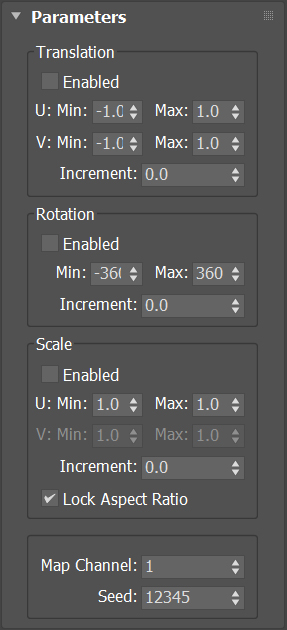
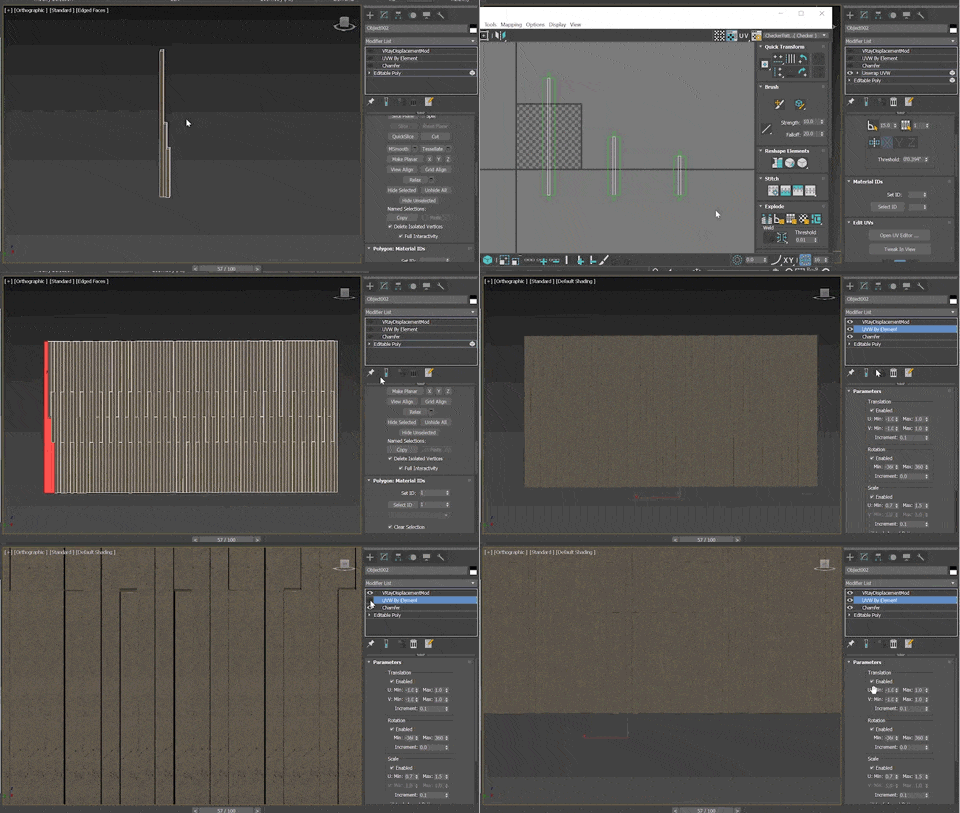
UV by element is a scripted modifier plugin. It will offset, rotate, and/or scale the UV coordinates of each element by a pseudo-random amount.
Script
 By chromium852 · 2019-12-13
Tags: modifier, Scripted plug-in, element, scripts, random UVW xform, random UVW, simpleMeshMod
UV by element is a scripted modifier plugin. It will offset, rotate, and/or scale the UV coordinates of each element by a pseudo-random amount.
Each transformation type can be turned on and off. The different transforms have a minimum and maximum for each available axis. The random offsets are selected from this range. Each transform also has an increment option, which locks the random values into steps. The Scale transform has an option to scale uniformly. There is a control for choosing the mapping channel, and a control for specifying the random seed.
Since this is a scripted plugin, it will not be as fast as a compiled one. Very large meshes will be painfully slow.
Installation:Place the script into either your plugins folder or your startup folder. Like compiled plugins, this script must be installed on every computer on your farm in order to work.
Place the script into either your plugins folder or your startup folder. Like compiled plugins, this script must be installed on every computer on your farm in order to work. Since this is a scripted plugin, it will not be as fast as a compiled one. Very large meshes will be painfully slow.
%localappdata%\Autodesk\3dsMax\ - 64bit\ENU\scripts\startupC:\Program Files\Autodesk\3ds Max \PluginsThis plugin should work with Max 2016 and above, though I have only tested it with 2018 and 2020.
Changes:Script needs to be loaded on startup
Kheng · 2020-10-13
Hello,
I am having an issue with 3dsmax 2021 where i will (about 90% of the time) need to run the script again before opening the file. If i open the file then run the script it will already have removed the UV by element modifiers from all my objects and i will need to apply them again manually
Thanks! - Kheng
RE: Script needs to be loaded on startup
chromium852 · 2020-12-01
Hi Kheng!
Sorry for the late reply.
I don't have 2021, so there may be an issue I am unaware of, but it sounds like you haven't placed the script in the startup folder:
%localappdata%\Autodesk\3dsMax\2021 - 64bit\ENU\scripts\startupOr in your plugins folder:
C:\Program Files\Autodesk\3ds Max 2021\PluginsRunning the modifier through Scripting > Run Script only works for the current session.
If you have installed it by placing it in one of those folders, then there is another problem, and I need more info.
some error
fajar · 2019-12-16
try to drag map channel , if there's no map channel more than slider value then its error. Can you fix it please.
Map Channel Error
chromium852 · 2019-12-16
I believe I have fixed this, try downloading the updated version from my site.
fajar · 2019-12-17
Thanks man for the fix , now its perfect.
+1
obaida · 2019-12-14
Very important and useful script thanks for sharing.