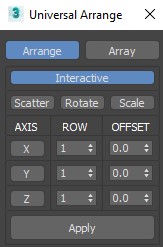
This Script for Arranging Selected Objects in 1 or 2 or 3 Axis . You Can Control the Offset on each Axis and the Number of Rows (When Using 2 or 3 Axis). Notes: Press Right Click on any Axis to Arrange the Objects on this Axis Only.
Version 1.2
- Add Array Button (its better to use it with Interactive unchecked) Work Only with One (Object or Group) Selected.
- Add Buttons for Fast Random Rotation (-360 360) and Scale (80 120) (Right Click on the Button to Reset it).
- Option to Apply the Random on Local Axis.
- Work With 2D and 3D objects .
Version 1.3
- Add Button for Fast Scatter .
- For Local Random (Rotate and Scale) Use Local Reference Coordinate System .
Version 1.4
- Faster Calculation (using "instance" instead of "maxops.CloneNodes" when no Groups Selected) .
Version 1.5
- Faster Calculation , When Switching to Array Mode the interactive button will be unchecked , you can checked it manually if needed .
Important Note : There is UNDO Option When Using The Spinners , But Using Apply Button has NO UNDO
 rusttm · 2021-08-29