ScriptSpot

Script

ThePuppetTool

By 1acc · 2010-04-29

Version
1.1
Version requirement
3ds max 2008, 2009, 2010, 2011, 2012, 2013
Date updated
2012-11-16
Votes
39
Download
Download
Description

Macroscript ThePuppetTool 1.1 for 3dsmax 2010 (also works in 3dsmax 2008, 2009)
Should work in versions 2011, 2012, 2013
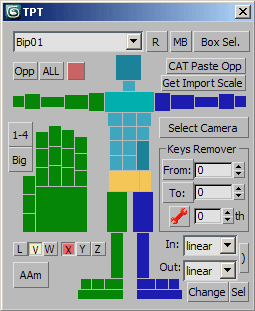
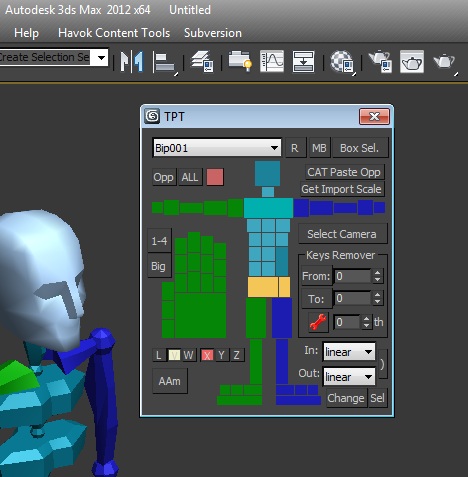
Cat/Biped selector with many powerful features, such as:

1. Automatically make Biped matched current human CAT-rig
2. Paste opposite for human CAT-rig
3. Select All, select Opposite, easy select any bones of human characters by clicking on ImgTags (also with dbl-click, alt and ctrl of course)
4. Keys remover
5. Keys type changer

New in version 1.1
1. Added some tags and buttons to select more limbs
2. Increased selection performance
3. aam removed
4. sss added - selection sets

TO INSTALL ON 3DS MAX 2013 USE THE SAME PROCEDURE AS DESCRIBED FOR BONYFACE HERE:
http://www.scriptattack.com/maxscripts/bonyface/Links.html

Install to older versions:

1. Copy file ThePuppetTool.mcr and folder ThePuppetTool to max folder \UI\MacroScripts.
2. Run 3dsmax, go to Customize\Customize User Interface\Toolbars, and create new toolbar.
3. Select "ScriptAttack" from Category list and drag label "ThePuppetTool v1.1" to your toolbar. The button will be created there.
If you wish, you may drag the label to any standard toolbar without creating you own toolbar.

Note:
Keep in mind, Biped or Cat character have to be in your scene before you run the script, otherwise script will be closed automatically.

Enjoy
1acc

Tags: Biped, CAT, selector

Comments (23)

Question

MyGalaxy · 2018-12-14

What does the "Get Import Scale", "X", "Y", "Z" buttons mean? Does anyone know?

Follow up on max 2016 compatibility

masterpj55 · 2018-08-19

1. Copy the script of kunst and change the paths
2. Change #UI to #maxroot
3. make sure its in the scripts folder in max.
4. Restart max when change is saved to script

Creator should really update the script and add instructions or an auto installer.

New issue when selecting finger or some parts of the bones:

---------------------------
MAXScript Rollout Handler Exception
---------------------------
-- Runtime error: operation requires a collection of nodes, got: undefined
---------------------------
OK
---------------------------

The color changing also doesn't work.. but this might because of CAT

Newest ver doesnt work well in 2016

masterpj55 · 2018-08-19

Bought the $10 version it claiming to work in 2016.
Tried all the tips listed here and now can get the program to open

First error:

---------------------------
MAXScript Rollout Handler Exception
---------------------------
-- Runtime error: Can't load Button images: bitmap: "C:\Program Files\Autodesk\3ds Max 2016\plugins\ThePuppetTool\Repair.gif"
---------------------------
OK
---------------------------

Then detects biped if I press R

Then when i click any bone:

---------------------------
MAXScript Rollout Handler Exception
---------------------------
-- No ""get"" function for undefined
---------------------------
OK
---------------------------

1acc · 2016-10-25

For those who interested in.
TPT v1.2 is available now on my site as commercial script ($10), as well as some other scripts to work with character animation. Tested in 3dsmax 2016.

It works !

LAOMUSIC ARTS · 2014-06-12

Smooth as a cool girl here in 3DS Max 2010 !

Thanks a lot for this !

It Does work in 2013

Kunst · 2013-09-30

Basically same fix I posted before.
The newest version lacks for me of the stability that the previous one had though, so Im still with the old one.
Still great script.

My MCR that lives in "X:\Users\USERNAME\AppData\Local\Autodesk\3dsMax\2013 - 64bit\enu\usermacros" is modified as follows:

------------

macroScript ThePuppetTool category:"ScriptAttack" buttonText:"TPT" tooltip:"ThePuppetTool v1.0" --Icon: #("SuperPainter",1) --silentErrors: true
(

global floaterThePuppetTool
global floaterThePuppetToolpos=[100,100]

on ischecked return try(execute "floaterThePuppetTool.isOpen")catch(off)
on execute do (
if (floaterThePuppetTool == undefined) then (
try (
check=(getDir #ui); check=substring check check.count 1
a="C:\Program Files\Autodesk\3ds Max 2013\scripts\ThePuppetTool\ThePuppetTool.mse"
if check=="\\" then a="C:\Program Files\Autodesk\3ds Max 2013\scripts\ThePuppetTool\ThePuppetTool.mse"
filein a
)
catch(ClearListener())
)
if floaterThePuppetTool.isOpen then (floaterThePuppetToolpos=GetDialogPos floaterThePuppetTool; destroyDialog floaterThePuppetTool; updateToolbarButtons())
else CreateDialog floaterThePuppetTool pos: floaterThePuppetToolpos
)
)

------------

Hope this helps!

Kunst method to install worked!

2DaMax · 2016-04-17

Read user 'Kunst' instructions below.

It's the only method(out of all the conflicting instructions
I've read) that actually worked!
(Copying the ThePuppetTool folder to your \scripts\ folder,
the .mcr file to the usermacros AppData folder and editing
its 2 lines to point the .mse file in the \scripts\ folder)

This last version seems quite buggy though.
Many items select the wrong Biped elements or don't select
anything at all (like the full foot button, lowest spine,
copy to opposite button etc etc).

Anybody having the same problem, you can try "Biped Helper".
Similar - even more - functions but doesn't have the same character
graphical interface (still color coded buttons though, so I like both tools)

Congratulations !

plasmagolem · 2013-03-05

I just created an account here to thank you, I am using your script The Puppet Tool all the time, i love it ! Really good job

I have a little question for you, is it possible to use keyboard shortcuts with The Puppet Tool ?

Example: I am using the select all bones button all the time, i would love to bind this action to the keyboard key "1" for example

1acc · 2013-02-22

Open mcr file (in notepad for example) and replace all #ui strings to #maxroot

my dream come true

Gspoutnik · 2012-11-28

i'm an old french cat user because biped is a nightmare for to conforming VS catrig but i know that biped is more efficient for pure animation...
1 little bug, the lenght scale of the foot is reverse int the cat to biped process...
cant you change that or perhaps the axis length of the cat rig has its important (i'm using the default axis orientation).
can you tell us the limitations of your script:
number of twist bones max, spines, quadruped? etc...

Thanks you are the best.

and in 2013...

Kunst · 2012-07-17

to make it work, I've found out you need to paste the puppettool archives (repair.gif and the.mse at least) on the appdata\usermacros folder like:

"C:\Users\USERNAME\AppData\Local\Autodesk\3dsMax\2013 - 64bit\ENU\usermacros\ThePuppetTool\ThePuppetTool.mse"

and when you run the puppet tool once as usual after the usual install from user customize in 3dsmax, it will give you the usual "isopen" error. Then change this line on the macroscript that automatically opens

if check=="\\" then a="HERE THE PATH THAT I'VE PASTED ABOVE".

and save the mcr.

That will do!

Cheers guys.

Can't make it work with max 2013.

Strob · 2013-02-15

Could someone please share its mcr file working with max 2103?

asymptote · 2012-05-16

@hakim_the1

You need to learn the basic functions of cat and/or biped then this script will make more sense to you.

hakim_the1 · 2012-04-26

I am using max 2009 .. and i need and video tutorial of this.. can u help me in that...

asymptote · 2012-04-13

Thanks for the info Kunst, it works perfectly.

Fixed

Kunst · 2012-04-13

I managed to fix the "isopen" error simply paying attention the
line that says where the macroscript should be installed.

So you need to put thepuppettool folder inside ui\macroscript folder
and run the mcr from 3dsmax2012\scripts.

Go to customize and choose the way you want it
to run (button or keyboard shortcut).

Just registered to tell you guys. This community has
done so well to me I felt like I had to do it :)

Attachments

asymptote · 2012-03-23

My bad , (it helps if you install it properly) works fine in 2010,If there's no update for 2011 or 2012, can anyone suggest a similar useful tool ?

asymptote · 2012-03-20

Doesn't work in Max 2010 after applying sp1, Unknown property: "isOpen"in undefined......looks like this is abandonware.....shame it was very usefull tool. Any way to get this working after updates and hotfixes ?

MarkD · 2012-01-05

Any chance we could get an updated CAT to Biped function that correctly creates the hands? With the addition of knuckle bones to biped I think the script breaks and fails to do the hands correctly, there are a lot of bones in the hands and having this fixed, would be great!

Bip to CAT?

GushingDizzy · 2011-05-24

I really love this tool. Is it not possible to go the other direction and have a button that makes a CAT rig based on an existing Biped rig?

Thank you.

Problem with max 2011

ZooM · 2010-12-17

It doesn't work for me neither in max 2011

does not work in max 2011

Strob · 2010-12-15

If you were asking.... it does not work in max 2011
I get isopen is undefined...