This script switches lights on and off whether they're inside or outside a mesh-volume. The main method is taken from cgtalk
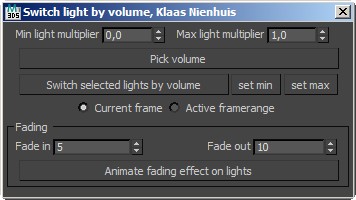
You can also animate the lights
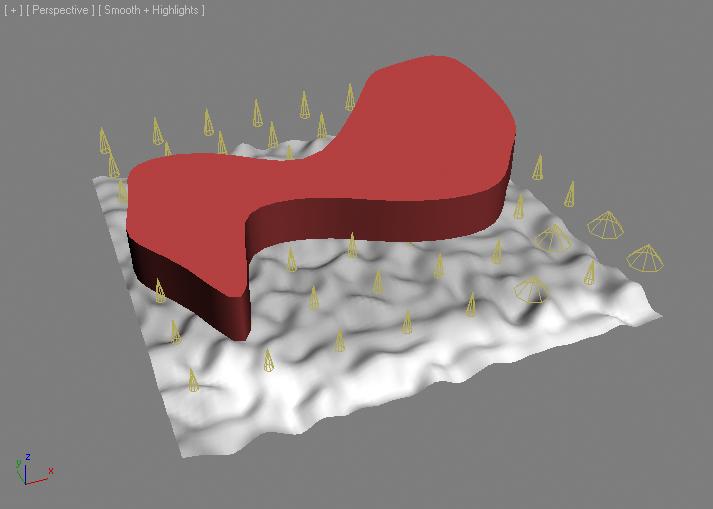
Use a volume to control the lights
Also see this article on my blog

Listing updated
Visit author’s download pagewww.klaasnienhuis.nl
No reports yet for the available releases.
Compatibility comes from the author’s supported range or requirements in the original listing. A tested version records what the author tried.
“2020 unconfirmed” in the catalog means support for 3ds Max 2020 is still unknown.
Community reports record successful tests on specific releases.

This script switches lights on and off whether they're inside or outside a mesh-volume. The main method is taken from cgtalk
You can also animate the lights
Use a volume to control the lights
Also see this article on my blog
Comments (4)
Comment policy
Sure Anubis,
I've posted the file on my blog, but here's the link direclty.
If the file doesn't work, you can easily recreate the scene by creating an array of 10x10x10 point helpers and a large torusknot in the middle. Let me know what you find out!
Klaas
Hey Klaas, nice script.
I wish to make some test with your example max scene, but I use Max 2009, so I'll glad if you can send me (at anubiss[at]abv[dot]bg) the scene saved in Max 2009 or export it to FBX. If you choose FBX, pleace be sure that the file format version is FBX200900 then export it.
Thanks in advance,
Anubis
Hey Insanto, I've tested it today. At first the method I used was waaay slower because of the repetitive adding and removing the normalmodifier. I've moved that part to a new location in the script, outside of the loop. Now my method (Matan Halberstadts actually) is a bit faster.
average of ten iterations running on a bunch of points and a single volume
10 points check
isPointInVol: 20ms
fn_isObjInsideVolume: 28ms
100 point check
isPointInVol: 199ms
fn_isObjInsideVolume: 144ms
500 point check
isPointInVol: 934ms
fn_isObjInsideVolume: 558ms
So my method is a bit faster. Also check out my blog for the testmethod and testscene.
thats quite a nice one, would you mind testing if your method of determining the volIntersect is faster than mine?