Script
SpreadSheet Editor
BBy Borislav Petrov · 2006-10-21
- Version
- 0.6.0
- Version requirement
- 7; 6; 5; 4
- Date updated
- 2004-12-09
- Votes
- 6
- External download
- External download
Tags: Tools
Description
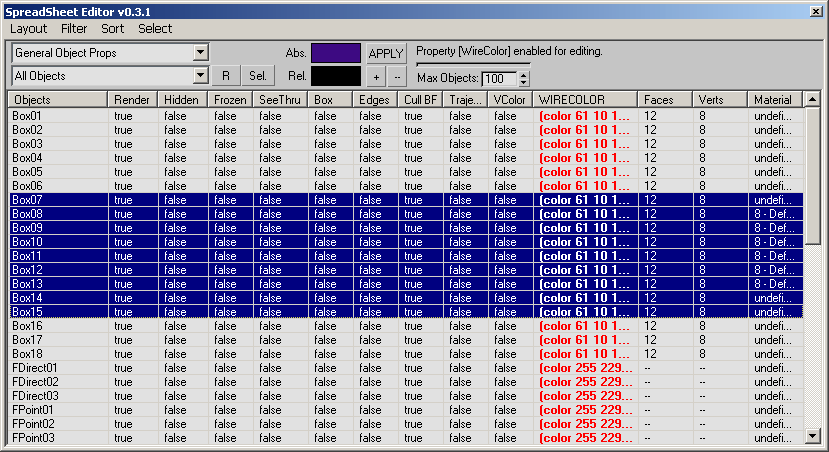
Provides a flexible and highly customizable base utility for mass-displaying and manipulating object properties.
The SSE can be freely rescaled to any desired size - even to a whole monitor.
Every column can be freely resized.
Columns can be reordered. (The default order is defined by the Layout - but is not intersession-sticky yet).
SSE can display ANY number of properties of ANY number of objects.
The properties displayed by SSE are freely customizable and can be ANY property accessible to MAXScript.
ANY number of layouts can be defined using short ASCII files - SSE will provide a list of all defined layouts for selection:
Sample Layouts include 'General Object Properties' - 'Bone Properties' - 'Light Lister' and 'ByLayer Properties'
Other possible Layouts include 'Materials and Maps' etc.
New Layouts can be created from any scene selection to match the properties of the selected objects.
ANY number of filter functions can be defined using short ASCII files - SSE will provide means for creating - editing and applying the filters on the fly.
Additional Info
View Interface Screenshotv.0.6.0 -12/09/2004 1pm CST -
BUG FIX AND BIG CHANGE: Fixed the typo in the global Layout array - 'SpreadSeet' has been fixed to 'SpreadSheet'. Note that you will have to manually edit your own Layouts to the new correct name. Sorry for the trouble! Changed the installation folder to be a sub-folder of the /Scripts directory.
This also means that all calls to Filters from inside of Layouts should use the new path 'ScriptsSpreadSheetFilters...' BUG FIX: Fixed the Column Width setting code to respect the first column width (Object Name) from the Layout. In previous versions - the first column had always a fixed width. Added HELP item to the Menu linking to the SSE WebPage - Boboland and ScriptSpot.com BUG FIX: Fixed Dialog Style bug which was broken in Max 6 and 7 While at this - added Minimize and Maximize buttons to the UI - so you can temporarily minimize or maximize to the whole monitor (esp. on dual-monitor systems)  kraj0t · 2012-02-26