 By spacefrog · 2012-10-12
SaveVersionHandler V1.10:
Making save to previous max version a bit easier to handle for the users was a thing i had on my mind for some time now. So finally a request by Nicholas Fox motivated me to put something together 😆
See more details below...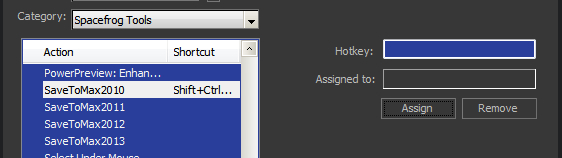
DETAILS:
SaveVersionHandler V1.10
-------------------------------------------------------------------------------------------------------------------------------------------
Global accessable Maxscript struct for easy SaveToPrevious Maxversions handling
Created: October 13, 2012
Modified: October 12, 2012
Requirement: Max 2011 and higher
-------------------------------------------------------------------------------------------------------------------------------------------
IMPORTANT: remove any previous copies of this script sitting in your "scripts/startup" folder !!! ( old install location)
HISTORY:
- Version: V1.10 - Hotfx Release, DC20121013
corrected install instructions, script should go to "stdplugs\stdscripts" folder !!!!
otherwise the created macroscripts would report "undefined", access via maxscript works though
saving now prints status info to the listener
Limited saving to three versions back at maximum ( This only will be relevant for future Max Versions )
- Version: V1.00 - Initial Release, DC20121012
INSTALLATION:
Copy this file ( "SF_SaveToPrevious.ms" ) to your "<3dsMaxFolder>\stdplugs\stdscripts" folder
As written above you should find that folder int your 3ds Max root directory
Re(start) 3ds Max, now a global struct called "SaveVersionHandler" is available to maxscript.
To make it available to keyboard/button/menu bindings, perform the following step ONE TIME:
Type SaveVersionHandler.CreateMacroScripts() and hit enter in the listener.
This should return "Ok". If "undefined" is returned , the script was not placed in the correct folder.
Otherwise several "SaveToMax201x" entries in the UI Configuration Dialog have been made available,
The entries appear in the "Spacefrog Tools" category ( called "SaveToMax2010" etc... ).
Use the usual means to map them to Buttons/Menues or Keyboard Shortcuts
The above steps ensure functionality of the script even with future versions of Max to come...
USAGE:
The struct "SaveVersionHandler" provides a "SaveToVersion" method taking the desired version number as argument
eg. "SaveVersionHandler.SaveToVersion 2010" saves the current scene as Max 2010 file, appending "_M2010" to the filename. If you pass an invalid Max version, a mesagebox will pop up.
Note: the freshly saved legacy scene will NOT become the current scene in the running 3ds Max session
This prevents accidently overwriting legacy scenes and dataloss ( legacy scenes loose support for all newer Max features ). If the legacy scene already exists on that place, a prompt is displayed, allowing to cancel or overwrite
A specific filename and path can also be passed via a named arguement: "fileName:<yourfilename>"
Another possible function argument is "quiet:true": if "true" is passed, no prompt is displayed when the targetfile already exists
Here's the syntax of SaveVersionhandler's methods:
SaveVersionHandler.SaveToVersion <MaxVersion> [fileName:<targetpath and filename>] [quiet:true|false]
SaveVersionHandler.CreateMacroScripts()
-------------------------------------------------------------------------------------------------------------------------------------------
AUTHOR:
Josef Wienerroither aka "spacefrog" www.frogsinspace.at
-------------------------------------------------------------------------------------------------------------------------------------------
 HamedAnimo · 2019-11-06
 kmerino · 2018-02-08
 nnq2603 · 2018-10-24
 Nafetsu · 2013-05-30
 asymptote · 2013-04-24