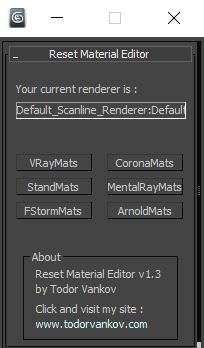
With this script you can reset all materials in your marerial editor to the Materials what you using in your workflow. For now you can reset to Standart marerials, Vray materials, Corona materials, Mental Ray, FStorm, or Arnold materials.
This script is tested at 3ds max 2016 and 3ds max 2021.
Version 1.0
- reset to Standart marerials
- reset to Vray materials
- reset to Corona materials
- reset to Mental Ray
Version 1.1
- reset to FStorm marerials
Version 1.2
- reset to Arnold marerials
Version 1.3
- Current render output window - You can see the current render in your 3ds max. If you have as default render Arnold, you can see it and change it, befor you start the script.
Additional Info
Script category: “#todorScripts” .
You can see an example here, how to install my script per Drag and Drop:
VideosComments (8)
EEdge · 2020-12-16
Thank you!!!
Thank you
todor · 2021-03-26
Im happy that you like it :)
SStormBrig · 2020-02-09
Can you add support for fstorm?
todor · 2020-02-10
Thank you for the feedback, I will see what I can do.
Thank You
SStudio2a3d · 2019-10-04
Yes! Why the mat editor doesn't reset to the assigned render engine default drives me crazy! Thank you.
Good Idea
todor · 2019-10-07
Thank you very much ! It is very nice Idea. I try to make a script for it.
 By todor