
"RecordNavigationPath (RecNavPath - RNP) allows you to record - save and load viewport animations - especially when using the new Walkthrough Mode in 3ds max 7.
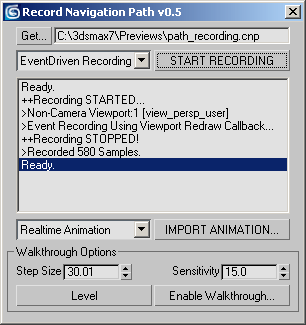
View the screenshot"
RecordNavigationPath
Downloads
Version 0.5.0Listed version
Listing updated
Visit author’s download pagewww.scriptspot.com
- 3ds Max compatibility
- See original listing claims
Community compatibilityNo compatibility reports yet
No reports yet for the available releases.
Community reviewsNo reviews yet.
Listing details
- Version
- 0.5.0
- From original requirements
- 7
- Original version requirement
- 7
- Author’s update date
- Legacy votes
- 9
- Listing created
- Homepage
- http://www.scriptspot.com/bobo/
How compatibility works
Compatibility comes from the author’s supported range or requirements in the original listing. A tested version records what the author tried.
“2020 unconfirmed” in the catalog means support for 3ds Max 2020 is still unknown.
Community reports record successful tests on specific releases.
Description
Setup & notes
"HOW DO I INSTALL IT?
Download the MS file - save under Scripts Unzip to Scripts In 3ds max 7 - go to MAXScript>Run Script... and select the file Go to Customize>Customize User Interface>Toolbars - locate 'Record Viewport Navigation' under 'Bobo_s Tools' category and drag to a Toolbar. Press the new button to open the dialog. "
Comments (0)
Comment policy