ScriptSpot

Script

Rapid Resize Modifier

By mjblosser · 2022-12-29

Version
1.4
Version requirement
3ds max 2010+
Date updated
2023-01-05
Votes
8
Description

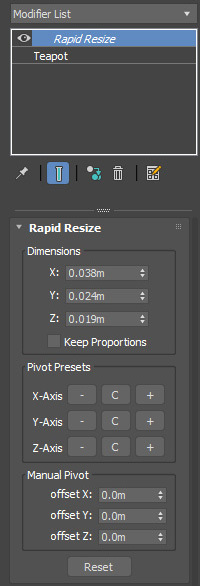
Scripted Modifier that extends the Xform Modifer.   Allows you to non-desctructively scale objects to precise real world dimensions.  Works on both single and multiple objects.

Version 1.4:  Fixed a major bug related to opening scenes that have the modifier in use where a script error would occur.  Pivot offsets are now stored and loaded with the scene.  Thanks to Yue Fan for reporting the bug.

Version 1.3:  Now correctly reports dimensions for mirrored and negatively scaled objects.   Although I personally recommend resetting XForms for mirrored objects as a general best practice.

Version 1.2:  Fixes pivot presets and dimensions for rotated objects. Thanks to titane357 for reporting the issue.

Features:

  • Works on single objects as well as multiple objects and groups.
  • Adjust pivot anchor to 27 possible locations around bounding box without changing object(s) original pivot
  • Fine tune anchor point using spinners


Additional Info

Usage:

  • When applied to a single object, scaling is performed using object's LOCAL bounding box.
  • When applied to multiple objects, scaling is performed using objects' WORLD bounding box

Based on zsResize by Jan Köhl, with extended functionality to work on multiple objects, and the ability to set anchor points.

Installation: Place in your plugins folder and restart 3ds max.   It will then be available in your modifer list as "Rapid Resize"

Attachments

Tags: modifier, scale, dimensions, resize

Comments (11)

Thank You, excellent :) !

joshpurple · 2023-01-06

Great script / work! Thank You!

Pardon my silly question, just wondering, -and probably no chance of something like this being possible :) , but has this been tested on re-sizing rigs? (a bad practice no doubt). Thanks again!

mjblosser · 2023-01-06

@joshpurple Thank you. To answer your question, no this won't work for resizing entire rigs. BUT...you can add this on top of a skin modifier of an already skinned and animated character to resize it. Now obviously this won't work for characters that are exported to game engines, but if you're just rendering out cinematics directly from Max it works just fine.

re: answer to resizing rig, THANK YOU :) !

joshpurple · 2023-04-09

Excellent, I appreciate it and Thank you :) !

New Version 1.3 Available

mjblosser · 2023-01-05

I've uploaded a new version 1.3 which now correctly reports the dimensions on mirrored and negatively scaled objects. Although I personally believe it's best-practice to reset XForms on objects after mirroring, the modifier will now work on these objects.

Hi, very nice much appreciated

AMIR ALKHAYAT · 2023-01-05

i found bug or limit that when object scale value in minus or we have mirror the object, modifier not working properly. thanks again

maybe suggestion

AMIR ALKHAYAT · 2023-01-05

to add gizmo like FFD with control points. thanks bro

I agree with this.

mjblosser · 2023-01-05

@Amir:  I agree with this. Unfortunately, the extends modifer type does not have the functionality to add a gizmo, it's a limitation of Maxscript. 

Hi, very nice much appreciated

AMIR ALKHAYAT · 2023-01-05

i found bug or limit that when object scale value in minus or we have mirror the object, modifier not working properly. thanks again

New Version 1.2 Available

mjblosser · 2023-01-02

I've uploaded a new version that fixes the pivot presets and reported dimensions for rotated objects. Thanks titane357 for reporting the issue!

titane357 · 2022-12-30

Hi, nice Christmas gift ! Thanks !
One problem : when the object is rotated, pivot presets don't really works.
( need to do manually )

mjblosser · 2022-12-30

Thanks for the report, I'm fixing the pivot presets for rotated objects and will post an update soon. In the meantime like you pointed out, you can do manual pivot placement using the spinners.