ScriptSpot

Script

Nitrous Set Texture Size Limit

By KellyMic · 2012-06-20

Version
1.3
Version requirement
3ds Max 2013
Date updated
2013-08-13
Votes
8
Description

UI

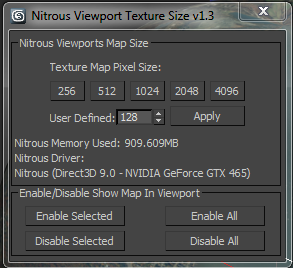
This is a simple script to set the Nitrous viewport texture limit size.

To run it just open the script and evaluate it (Ctrl-E). v1.1 now adds a "Kelly's Tools" category in UI customize which I will start using for all future scripts."

Kelly Michels

kelly.michels at autodesk.com

Senior 3ds Max QA

3ds Max Beta Manager

Attachments

Tags: viewport, textures, Nitrous

Comments (16)

script works with 3ds max 2014? Error!!!!

marche · 2013-09-17

Hello friends does this script works with 3ds max 2014? When I run it I get the following error:

-- Unable to convert: DefaultVraySky:VraySky to type: Material

Any suggestions? Someone happened the same?

Never mind...

marche · 2013-09-17

It works know!! =)

Be careful with the VRaySky

Rodman · 2013-09-28

VRaySky is in the material class. I think the script doesn't take into account this case. It's not about the 3ds max version.

Just delete the VRaySky from the scenematerials array.

Not working for me

alexyork3d · 2013-03-12

Hi,

This is not working for me on 2013 Design 64-bit PU6. If I use Environment as background, nothing. If I use Custom Image - nothing either. Enabling and disabling BG in viewport doesn't work either.

^_^ thx

clueme · 2013-02-22

i'm using 2013 version, it works well ^_^ than U for you works.
i really hate nitro resolution.

Don't work on iray and hdri

ziosavo78 · 2013-01-08

Hi, an error appear when i want to set the texture size with iray renderer and an hdri in the slot material.
Any suggestion?
Thank's
Luca

Hi, KellyI got error in max

SaiLing · 2012-08-16

Hi, Kelly
I got error in max 2012
-- Unknown property: "GetSystemMemoryUsed" in <<

any suggestion ?

Ooops,Sorry~ blind to see the 2013 only :P

Thank BUT :

chakib · 2012-08-08

It doesn't work in max 2012 x64 it gives me an error

KellyMic · 2012-08-13

This is a 3ds Max 2013 only script.

KellyMic · 2012-08-13

v1.3 now adds the ability to enable and disable maps. Once you click a setting you can refresh the materials with the new buttons to see the updated texture size.

I'm checking with the Nitrous team for a better way to force the refresh.

SMFoged · 2012-07-12

I made a small macro recording that looks like this:

macroScript Macro2

category:"DragAndDrop"

toolTip:""

(

actionMan.executeAction 0 "63544"  -- Views: Viewport Materials Display as Shaded


actionMan.executeAction 0 "63547"  -- Views: Viewport Materials Display as Realistic with Maps


)

 
I can hit the button after the switch and it seems to update all textures.
Enjoy.

Yes that worked.Also

SMFoged · 2012-07-10

Yes that worked.
Also switching to "Realistic materials without maps" and back to "Realistic materials with maps" does it globally to all maps in scene.

Maybe that could be worked in to the script?

SMFoged · 2012-07-10

Hmm.
When will I see the update in the viewport. I see no change at any button press or at ANY time.
(max 2013).

Stephen

hot chip · 2012-07-10

Hi

you must reset the "Map in Viewport" Option. I go to Material and set off and on the "Map in Viewport" Option. A Little bit complicated. *smile*

mfg
hot chip

Thanks a lot !!

Tommy_LedZep · 2012-07-02

This is a very usefull script because Nitrous resolution is set very low by default.

!!! Thanks a lot !!!

KellyMic · 2012-07-04

Glad you find it useful. If there are any feature requests just let me know.