
Script
Multipurpose selection bar
 By Raffaele Schiavullo · 2015-05-24
Community compatibilityNo compatibility reports yet
No reports yet for the available releases.
Community reviewsNo reviews yet.
- Version
- 1.5
- 3ds Max compatibility
- See listing claims below
How compatibility works
Choose the 3ds Max version you use. For example, selecting 2020 puts direct matches for 2020 first, followed by listings that say a supported version or newer.
Scripts that only mention an older version can still appear as “2020 unconfirmed.” Listings that rule out 2020 are excluded. Use “Show scripts with unconfirmed compatibility” to also see listings without a clear match.
Community reports show what worked for members on a specific release. They’re separate from the listing’s compatibility claims and don’t change the filter.
- From original requirements
- 2010, 2011, 2012, 2013, 2014, 2015, 2016
- Original version requirement
- 2010/2011/2012/2013/2014/2015/2016
- Date updated
- 2015-05-18
- Legacy votes
- 2
Downloads
Version 1.5Listed version
Listing updated
Description
Additional Info
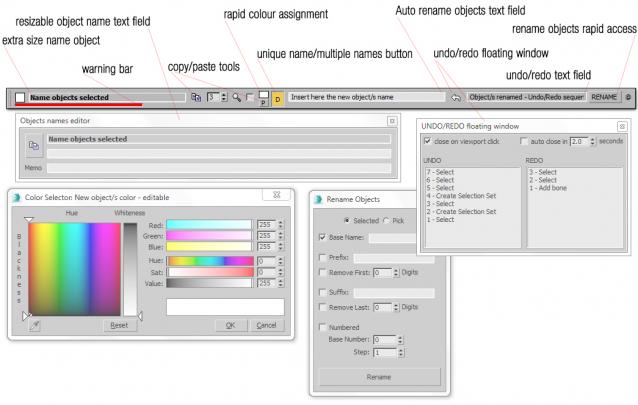
This script will open an auto resizable bar that is possible to place on top of 3DS Max window; it contains the following tools to enhance the following 3DS Max functions:
- Extra size object name text field: displays the name of the selected object or count the objects number of a multiple objects selection, solving the problem of the extremely small standard 3DS Max name field
- Resizable pop up extra size name text field: an extra horizontally resizable window to display extra long objects names, extremely useful to work with CAD models imported in 3DS Max with long names generated from exporting processes or laser scanning software
- Warning bar: the red color of the bar will indicate if the selected object or multiple objects selection have been transformed by the MOVE, ROTATE or SCALE tools; it is extremely useful to prevent accidental transformations (ex. accidental translation of the camera when the user click into a viewport to switch the view)
- Auto rename objects text field: without use the standard 3DS Max rename tool window, is possible to assign multiple objects names with an incremental index
- Unique name/Multiple names button: by this button the user can assign to the selected objects or to a multiple objects selection a unique or a duplicate name; extremely useful to create an objects name database without duplicated instances, to use to develop code into an external software or code editor
- Floating UNDO/REDO window
- UNDO/REDO text field: to read in real time the undo/redo actions performed without open the standard 3DS Max undo/redo list
- Copy and paste tools: to change or to copy and paste name and wire colors between objects or selection sets.
Comments (1)
Comment policy
Thanks to all of you for the 2126 downloads in 3 days!
S Scripts collection - 3DS Max scripts
Thanks to all of you for the 2126 downloads in 3 days!
http://www.raffaeleschiavullo.com/scripts/scripts.html ;