ScriptSpot

Script

Multi Slicer Pro

By 3D_Animator · Credited author: Vugar Naib · 2013-05-05

Version
1.2
Version requirement
this could be 3ds Max 2008 +
Date updated
2013-05-06
Votes
25
Download
Download
Description

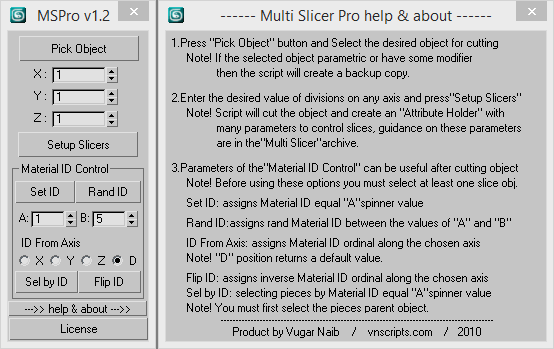
Multi Slicer Pro is a maxscript file that cuts your object with slicer modifier on any number of slicers, retaining at the same time the modifiers stack and providing you with an interface to control the parameters of the modifiers added to an object. As a result you have a setup that allows creating complex and unexpected animations of your object. Have free version.

Multi Slicer Pro is a maxscript file that cuts your object with slicer modifier on any number of slicers, retaining at the same time the modifiers stack and providing you with an interface to control the parameters of the modifiers added to an object. As a result you have a setup that allows creating complex and unexpected animations of your object.
I advise you to watch the quick demo reel and go in website for better understanding of the Multi Slicer Pro.
Best regards,
Vugar Naib
Version info:

1.2 -- Add "Sel by ID" button for selecting pieces by Material ID
-- Add UVW map in modifiers stack
Additional Info

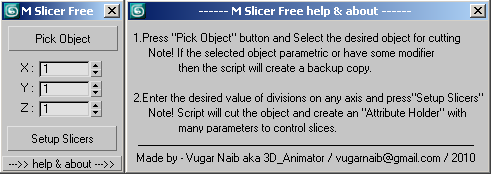
There is also a Multi Slicer Free version.

The free version has the following limitations:

1. Maximum number of slices on each axis is limited to 5.

2. Material ID Control is disabled.

3. Creates only one "Multi Slicer Control" roll.

4. Randomization effect coefficient is disabled.

Videos
Attachments

Tags: Animation, modifier, motion graphics, slicer modifier animation, slicer modifier, abstract animation

Comments (28)

Spammer

JokerMartini · 2015-12-06

Quit spamming Script Spot with fake updates to your tools. You are being disrespectful to the community.

agree with John..

vusta · 2015-12-06

This practice is SHITE...

JokerMartini · 2015-11-09

i understand. just want to put it out there. There are unfair side effects to you changing just the cover. It appears you are changing just the cover photo in order to get your tool on the front page of SS and kinda screw over those artist who actually have released new tools, or actual updates. If everyone did that then the front page would be filled with tools which are months old while the new ones are bumped. I've noticed this happening more and more, with this 'slicer' tool and the 'sci-fi' one especially.

I'm just trying to make it fair for everyone who actually make changes and release new tools. People can always up-vote tools which are popular and users can then search by that criteria. There is no need to just change a letter or image to become front page material.

I'm sure everyone would agree with that.
Just want to keep SS a friendly place for all tool and script creators.

Fair Play

3D_Animator · 2015-12-07

I was joking about the brothers…

I looked at this situation from your side and do agree that my actions may really look odd to someone.

First and foremost I have no intention to spam the Script Spot. This is a place to share and that’s what I do.

I don’t like static cover pages and I really like to alternate them to make my thread look fresh, colorful and attractive. So yes I was changing my cover page to achieve that goal. However, while in that process I discovered this bump up as a “positive” side effect.

I’ve spent real money to promote my scripts on the Script Spot. I know what the fair play means.

I hope the forum code will get updated someday to address this “effect” and changing a cover page will not bump up a thread. Until that to avoid the impression of me misusing the Script Spot I will be changing the cover page once a month.

Regards.

update?

JokerMartini · 2015-11-02

did you actually update anything, or did you just change text in your content to push your post back the front page of SS?

I don't see any actual changes or updates to this tool?

just periodically changed cover )

3D_Animator · 2015-11-08

I just periodically changed cover)
Actualy i have some idea for update to this tool, but no have free time for make it.
Regards!

MeHoo · 2014-11-06

I just picked this script up (pro version). Any chance to get an installer or something so I don't have to drag the .mse in everytime I want to use it? I'd like to add this to my quads. Thanks.

I might just make a loader script for it.

MeHoo · 2014-11-06

just in case someone else dislikes .mse's that you can't bind, I wrote a really quick script to bind:


macroScript RunMultiSlicer
category:"MultiSlicer"
toolTip:"MultiSlicer"
buttontext:"MultiSlicer"


(
	filein (@"C:\Max2014_x64\3ds Max 2014\scripts\Multi_Slicer_Pro_v1.mse") 
)

Just change the path to wherever you placed it.

MeHoo thanks for you macroScript =)

3D_Animator · 2014-11-09

MeHoo thanks for you macroScript, and thanks for your interest in my product =)
From myself I just can recommend this script

e_tsoom · 2014-09-02

Great tool for motion graphics! Thank you

3D_Animator · 2014-09-03

Welcome! =)

Added a link to manual.

3D_Animator · 2013-12-12

Hi everyone!
Today I added a link to manual in multislicer homepage =)
Regards for all.

Great image =)

3D_Animator · 2013-10-30

Great image, thanks for comment =)

Whoa Vugar!

artkitekt · 2013-11-04

Awesome to see that your beautiful script has been drawing the attention that it deserves, Joost Korngold (Renascent) is a prolific artist! As always, excellent work.

UI Refresh

Nick · 2013-10-16

Had a play with the free version; created a box and slapped 5 slices on all axes. After hitting "create slicers" the UI (specifically the slicer sub-panel) constantly refreshed itself for about 3 minutes - which is rather annoying, but I guess it does tell you that something is happening - is there a way to stop that?

WHERE IS MY DOWNLOAD LINK?

jannekyttanen · 2013-10-16

I just bought the PRO version, but then after I pay it (IDEAL), I just get a blank screen? Where do I download my pro version?

JK

payment

jannekyttanen · 2013-10-16

I just got an email that the payment is in progress...however it also says that it can take up to 4 days:-( how can i cancel my payment and just pay in a normal way with credit card, so it goes faster? can you please contact me directly: him@jannekyttanen.com

Do not worry you will get the product)

3D_Animator · 2013-10-17

My dear friend!
Do not worry you will get the product.
Please send me your Order ID!
Thanks!

vugarnaib(@)gmail.com

How to set the slice plane to fit on a path and not the object

orcanas · 2013-09-23

Hello,

I just buy the pro version of this script and after I look at the help file included with the archive I can't understand how to set the slice plane on the desired path. It seem that only the object can be set on the path and not the slice plane.
In the help file is provided and example of a letter "S" letter in this case and this letter have multiple slices along his generation path. Please can you explain how to set the slices on the path. In 3DMax the slice plane modifier is slicing an object and do not can be configured to slice the object based on a path but it can be animated to different positions in time. Please explain how to align that slice plane on a path with multislicer pro. Thank you in advance.
If you are kind you can mail me at dcapraru@gmail.com and tell me how to solve this problem.

I soon reply to you in the mail

3D_Animator · 2013-09-28

My dear friend Orcanas!
I soon reply to you in the mail.
Thank you for your interest and purchasing!

MatID, Node Pos and Simmetry

3D_Animator · 2013-06-16

Hi everyone!
Today I added another quick demo video about MatID, Node Pos and Simmetry in Multi Slicer Pro.

2 Xylonite
Thank you for your understanding and a funny answer =)

2 catfyn
My friend I'm sorry that this price is not everyone can afford
Given that Multi Slicer Pro strongly saves you time and thus gives you a tool for creativity,
I think that the price is quite fair
Just do not forget that there are also Multi Slicer free version)

PS. sorry for my english, i used google translate

Cool but

catfyn · 2013-05-30

Cool stuff but costly. $5-10 is affordable here, people will buy a lot.

Go and get a burger for your 10 bucks!!! =)

Xylonite · 2013-06-04

It is better support the developers.
If you don`t have money - don`t buy it.
The tool is Great !

Another quick demo video )

3D_Animator · 2013-05-25

Hi everyone!
Today I added another quick demo video about wave animation in Multi Slicer Pro.
I hope you like it)

This seems very promising!!!!

silencer77 · 2013-05-12

:-) Can't wait to try it out

artkitekt · 2013-05-10

Such a cool idea and excellent demos, Vugar. I can definitely see the sweat put into this! The best of luck to you.

Thank you very much!

3D_Animator · 2013-05-12

Thank you very much for the comments and for your wishes.
Regards,
Vugar