ScriptSpot

Script

Multi Map Loader

By Hani Tiby · 2010-11-04

Version
2.1
Version requirement
Max 2009 and up
Date updated
2012-04-11
Votes
38
Description

Loads multiple files from a folder into your choice of available materials & maps. Then puts the new created materials to the material library.
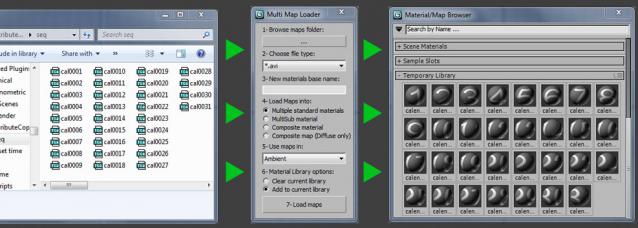
   

Version 2.1 updates:

  • ( Fix ) In v2.0 you would have an error if you select or change the file type dropdown list before sprecifing the bitmaps folder.
  • ( Update ) all the bitmap textures is now named after the filename ( Thanks for my Brazilian friend "Paulo belesa" aka "pfbelesa" for the constructive feedbacks ).

Warning:

  • Use the material library option with care so you don't loose any current library.
  • This script is not tested enough, So USE IT AT YOUR OWN RISK. 

Setup:

Put the file in Max>UI>macroscripts

Restart max if it's open

Customize your UI (find the script under category "Hani")

Additional Info

Version 2.0 updates: - Added file type filter. - Added map type dropdown list. - Fixed the "destroy dialog" bug. Version 1.1 - Changed a code order to prevent clearing the current material library in case of trying to load more than 10 maps into a composite material.
Videos
Attachments

Tags: I/O, Material, Tools, import, batch, maps, mass, load, Hani Tiby

Comments (18)

name material

thinkyogurt · 2016-02-10

Hi Hani.
it's a super script!
I ask, if possible have the name of the bitmap load into name of material?
thanks

Extend Script

Atelier Bump · 2014-05-21

Hi Hani.
Useful Script!. I want to ask you if I can extend your script to work with vray material, and select specific maps from directory rather than the entire dir. It would be nice to be able to set more than one map type at time.

Hani Tiby · 2014-07-09

Sure you can, and please share it back :)

Edit

barigazy · 2012-09-11

Also i have some new ideas for future update if you're interested.

roosterMAP · 2012-08-13

Could you add an option to cap the number of files you can load in? Either you make it so that you can only load in 500 textures max, or add a different way to browse for textures to add/load into a multisub object. Loading all textures of a single directory is too much and it always ends up loading my specular and normal maps (since i keep them in the same directory).

I also had to add this: 'TB_StndrdMat.name = TB_F as string' instead of what you had before (TB_StndrdMat.name = TB_MatName+TB_num as string) because I wanted my mat name to mirror the texture I have loaded.

Fantastic work tho. I'm gonna continue editing it to meet my specific needs. But this is still a very good base. Thank you sooooo much!

Options are endless

Hani Tiby · 2012-09-11

Hi RoosterMap,
Options are endless regarding importing and putting maps in different materials and map slots.
Anyway I'll change browsing so the user can select specific files.
I can also make a naming option to choose between "file name" or "user defined name".
Thanks for the nice feedback. and please keep sharing your updates.
Tiby

thinkyogurt · 2015-09-03

is there the possibility to load only the name without the address?

Not working with max 2012

pfbelesa · 2012-03-26

Same problem , the script does nothing.

can anyone help?

thanks a lot

Hani Tiby · 2012-03-27

@ pfbelesa, would you tell me how did you install & use it?

Hani Tiby · 2012-09-11

Hi pfbelesa,
From our chat on linkedin, I remember that you've solved your problem, but please share with us what was the problem, and how was it solved.
Thank you

Hi Hani Tiby,

barigazy · 2012-09-11

I optimize your script code and works fine on max2013
and probably later versions.
If you want to see the result send me your email.

vidivini500 · 2013-06-19

Hi, barigazy, can you upload your optimize version? It would be great if you could create Vraymaterials too

@vidivini500

barigazy · 2013-06-19

Sorry I accidentally deleted script. I hope that author see your request and update this tool.

juumax · 2011-04-11

Great Script, life saver when dealing with lots of textures. Some more features would be awesome, like choosing type of material to create and use maps in different slots other than diffuse.

Hani Tiby · 2010-11-06

Guys,
Any comments?
I'd really appreciate your critiques, specially from the scripters.
Thanks

dose not work with 3dsmax 2011

absuk · 2011-03-21

Hi,

tried to use the script but it failed to do anything, in 3d studio max 2011, i load the material editor and nothing appears to have been done.

any ideas. is it something am doing wrong. tried all sorts of options and nothing seems to work.

it would of been a very helpful script. please help me! ;)

absuk · 2011-03-21

Ops, on reading this back to myself, i think i had to create the material first, then the multimap loader would work then, do you know if you can have it create a standard mutlimap material and create the matching number of sub materials as per artworks in the folder.

so if you have 5 textures in one folder the script would create then load these 5 textures in 5 materials under the multi-map Material

hope that makes sense ;)

Max 2011 compatibility

Hani Tiby · 2011-03-23

Absuk,

I've just tested it on (Max 2011) and it's working fine.
Here are the full steps:

- after you browse to the folder containing the maps
- type a base name for the new materials
- choose the type of material you want to create
- choose the material library option (clear or keep)
- Then load maps
it creates the new material/s in a material library called "Temporary Library"

But still I think it may needs some tests to make sure it's working fine in all conditions.

Tiby