 By Admin · 2007-12-17
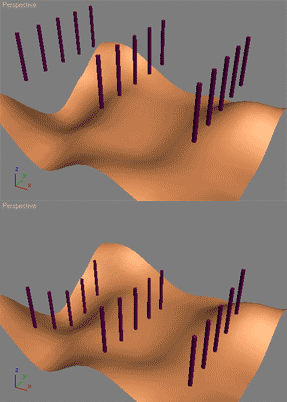
The following will let the user move objects along their Z axis to fit a specified surface. Such a script can be used to automatically plant trees, poles etc. on the ground.
This script is straight out of the 3ds Max MAXScript reference file. Its part of the MAXScript 'How To' lessons that teaches how to use MAXScript with practical problems. Load your MAXScript reference (the one that ships with 3ds Max) and do a search for 'align surface' and it'll be the first result.
I did not write this script I merely copied the code here as aligning to a surface is a very common request. Make sure to read the other 'How To' tutorials in the 3ds Max MAXScript reference - they're all really good!
 martincg · 2008-12-11