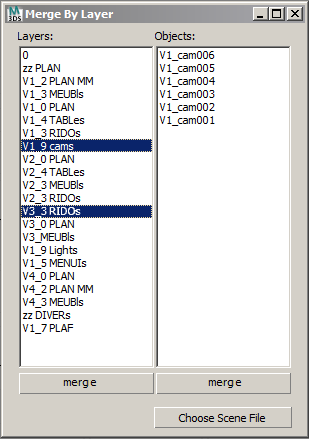
A self explained script, I think. Enjoy
Script
 By Anubis · 2011-01-27
Tags: layers, anubis, merge, max files, objects by layer
A self explained script, I think. Enjoy
v0.1 - initial version
v0.2 - now dialog resizeble
v0.3 - ugly mistake fixed
v0.4 - now multi-select & merge layers/objects
v0.5 - alphabetic sort added for layers/objects
I has a mail request/wishlist to sort layers in alphabetic order.
I add this option for both - layers and objects lists.
The option should been checked before choose scene file.
v0.5 UI:

Thanks
Draftsman35 · 2021-03-29
i was looking for this
Save
 MyGalaxy · 2019-06-07
Why the script save current scene before opening the script-window? Without this, no way?
.
 miauu · 2019-06-07
What the script does:
1- save the current scene
2- open the from scene which you want to merge objects by layer
3- read all needed information from the opened scene(layers structure, objcets inside layers, etc.)
4- open again your main scene
5- now you see the UI and all information there is correct, so you can merge by layers.
Maxscript not allows rading information of layers from non opened scene.
Adding a "Selections Set" feature..?
dori3d · 2018-11-07
Great script. Congratulations Anubis.
Is it posible to add a "Selections Set" feature?
Thanks!
i use 2011x64 and now
 harumscarum · 2011-02-03
i use 2011x64 and no containers or groups are in scene. actually it is good if it will merge all relative objects but not empty layers
thank you!
confusing but not fatal
Anubis · 2011-02-02
What is your Max version and did you use containers? I asking because I suspect that merging via max script is not updated correctly in the last Max versions. I still stay on Max 2009 as I found it as enough scripting stable. If you can find the 'bug' in the code, I'll glad to fix it.
emply layers are merging
harumscarum · 2011-02-02
when i try to merge one single object - got merged some other layers with no objects in it
here is illustration image attached
PS and i have suggestion - make merged objects or layers visible (unhidden, unfrozed and etc.) even if they was invisible in source file
Finally!
Script_Butler · 2011-02-01
We have been banging on about wanting such a script for ages! Thanks for doing it!
But I seem to be having issues! When I choose a scene file, it seems to want to merge the entire file straight in to max to normal way.......
It doesn't list anything in your script window and just crashes.....
It works on a simple file with a few boxes on layers, but not a more technical file that we have for a big job.
Any ideas what might be causing this?
no idea
Anubis · 2011-02-01
Hi Script_Butler,
I not hit any problems yet,
so this sounds mysterious to me.
Ok...
Script_Butler · 2011-02-01
It seems to work with some files but not others.
I'll see if i can find a reason for why it doesn't work with some. Perhaps its a problem with some plugins we use here. I'll let you know what I find, if anything!
Anubis · 2011-02-01
Ok, i update the script, enjoy.
thanks for the feedback
Anubis · 2011-01-31
Hi Titane,
well, the idea was to merge by layer, but your request sounds sensibly. What if the objects list is MultiListBox and then double click on layer to merge selected objects? Also maybe the objects will been selected all by default? I just think how to keep the UI simple as is. What you think about?
titane357 · 2011-01-31
It is just an Idea :
- you could select/multiselect in left column layer(s) to merge
then all objects of these layers will be merged
then click merge button
or
- you could select/multiselect in right column object(s) of one selected layer u want to merge.
then click merge button
cheers
sounds good
Anubis · 2011-01-31
just wonder what will display objects (right) list then multiple layers selected (in left list), if display all objects (of selected layers)... is w'd be clear.
titane357 · 2011-01-31
perhaps nothing or the list of all objects contained in selected layers...
 tassel · 2011-01-30
Very nice script. Going to help me every day at work.
thanks
Anubis · 2011-01-28
nice to heard its ok :)
[Edit] oh, a fatal mistake i found, pleace redownload the last version 0.3
titane357 · 2011-01-30
hello Anubis,
please correct "double click to megre " -> merge (I can't sleep)
Could it be possible to merge just some Objects of one layer ?
Max's merging is awfull : impossible to see in which layer objects are, your script is cool (for people using layers), we could merge objects from layers seeing in which layer thay are. :-)
I like resizable window ! Thanks
Great
 JokerMartini · 2011-01-27
This is a great script. Thanks Anubis
Hi Titane
Anubis · 2011-01-27
its just a quick script and making it resizable is not a problem, but the rest notes is not clear to me. just double click on item in Layers list to merge. and how much old scenes? layers was added in Max 4.
titane357 · 2011-01-27
sorry, the 3 first scenes I tried was 2009, and didn't work with 2011 I use.
Now I can't reproduce this.... works perfect. :-)
titane357 · 2011-01-27
hello
Nice script but I have some comments :
- window should be resizable : it is better to see much item of same layer without scrolling.
- you type "Double click to megre" (ooohh)
- this don't work with scene form old version of max
Thanks