ScriptSpot

Script

MaxScriptManager

By Norman3D · Credited author: Norman Schaar · 2011-06-08

Version
0.2 BETA
Version requirement
3dsMax 9 SP2, 3dsMax 2008, 3dsMax 2009, 3dsMax 2011, 3dsMax 2012
Other software required
The latest Microsoft .NET Framework
Date updated
2011-06-08
Votes
46
Description

MaxScriptManager

Installing scripts for 3dsMax has never been easier!

MaxScriptManager is a tool that will help you keep track of installed scripts, help you install new ones in a number of different ways, get notified if updates are available and even apply updates automatically. Developers can create script repositores so that users can access their script without leaving 3dsMax.

It will also help you find updates for all the scripts that have a ScriptSpot page.
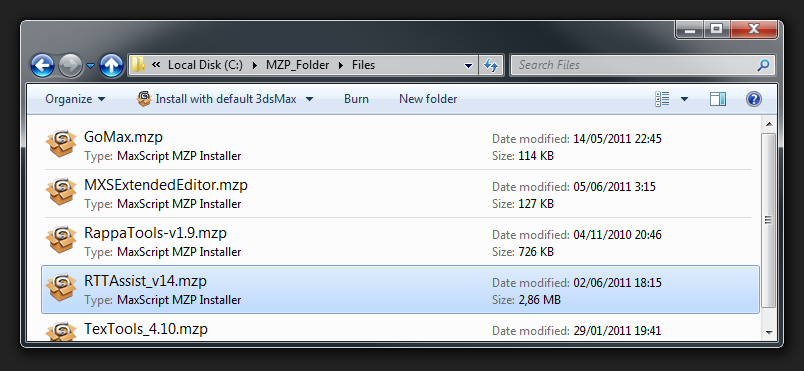
MaxScriptManager MZP Icons

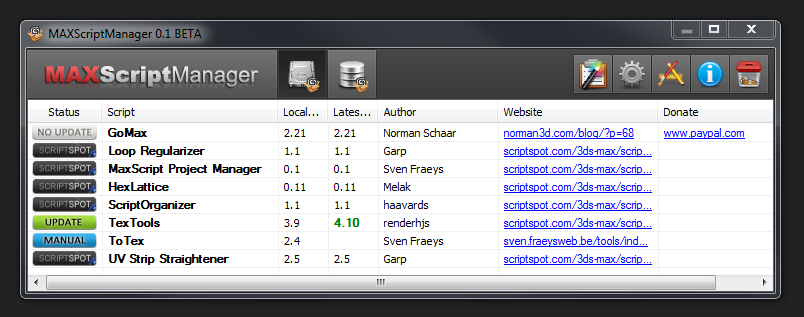
MaxScriptManager Main Window

(Note: Only scripts that are "standalone" or packed in a MZP can be installed through MaxScriptManager. Scripts that are inside ZIP files with manual install instructions only can't be installed through MaxScriptManager)

To find out more please head over to MaxScriptManger's page.

http://www.norman3d.com/MaxScriptManager


Tags: Installer, manager, maxscript, wizard, mse, ms, mcr, scripts, repository, msr, mzp

Comments (25)

fake updates

JokerMartini · 2017-11-27

Are you actually updating this tool or do you just keep making fake changes to push this to the top of scriptspot. I see this a lot at the top and there is never any updates?

Norman3D · 2024-12-28

I have only just seen all these comments! I can guarantee I wasn't doing any fake updates or anything of the sort. I had no idea this was at the top of scriptspot o_O

.eb · 2017-10-01

Norman, if possible, would you Github the source for us ?
I'd update this on a rainy day..

WARNING!!!!!

victorwol · 2014-04-04

DO NOT install this with MAX 2014 or you will end with an unusable 3DS MAX.... this script should be taken down or include a warning on not use it in MAX2014

2014 Fix on Win x64

3dwannab · 2013-09-12

Delete the appropriate folder at C:\Users\xxxxx\AppData\Local\Autodesk\3dsMax\2014 - 64bit\ENU\scripts\

Delete:
MSM_mzptmp_Timer.ms
MSM_Startup.ms @ C:\Users\xxxxx\AppData\Local\Autodesk\3dsMax\2014 - 64bit\ENU\scripts\startup

Sadly this does indeed break MAX

casinowilhelm · 2013-05-24

so don't install it...

Using max 2014, it generates errors on startup and is hard to remove.

spyker · 2013-06-03

Ican't install it, can't delete it, have u find a solution ?

when max 2013 launch: --Type error: HKey requires HKey, got: undefined

anyone ?

edit:

Find how to delete:

C:\Users\_____\AppData\Local\Autodesk\3dsMax\2013 - 64bit\ENU\scripts

delete MaxscriptManager

This is s**t

joe8104 · 2013-04-18

This script breaks max. It is not working, don`t try it because then you will have to reinstall 3ds max.

intheflesh · 2013-01-19

Any chance on seeing updates for this? Such a great concept

Unfortunately, I'm having the same error as others:

"Type error: HKey requires HKey"

3ds Max 2012 Product Update 10 x64

3dsmax 2013 error

fed_86 · 2012-11-23

hi norman3d, i just try your script but when i install it, 3dsmax give me this message:

runtime error: fileIn: can't open file -
"C:\users\_____\appdata\local\autodesk\3dsmax\2013 - 64bit\ENU\ui\usermacros\norman3d-maxscriptmanager.mcr"

and now when i open 3dsmax the script always give me the message!

how can i resolve or unistall it?

(3dsmax2013-64bit-win7)

not working on Windows 8

SMFoged · 2012-11-22

I have a new install with windows 8 and max 2013 64bit. This script is not working causing max to never start. the only way to get max to start is to delete anything with max script manager from the scripts folders.

I have a suspecion that it has something to do with .NET but I am not sure.

I really miss this plugin :-\

Stephen

maxScript command in install.ms Error~!!

naxer · 2011-06-17

my System info:
os: win7_ultimate X86
maxVer: max2008

Type error: HKey requires HKey, got: HKEY_LOCAL_MACHINE
** thread data: threadID:7524
** ------------------------------------------------------
** [stack level: 0]
** In fn_Starter_N3D_theTimer(); filename: C:\Users\ADMINI~1\AppData\Local\Temp\mzptmp31\install.ms; position: 12911
-- Locals:
-- RepoCount: undefined
-- MSM_Inbox_theFiletype: ".mzp"
-- repository_list_index: undefined
-- new_repository_index: undefined
-- MSM_Inbox_theFiles: #("C:\Users\Administrator\AppData\Local\Autodesk\3dsmax\2008 - 32bit\enu\scripts\MaxScriptManager\Inbox\MaxScriptManager.mzp")
-- theMSR_Timer_URL: undefined
-- we_have_the_repo: undefined
--

Norman3D · 2011-06-17

hey naxer, could you send me a PM with your email address so that we can talk about the bug?

Same error - SOLVED! but now new errors!

broken22 · 2011-07-30

Hey I was getting the same error trying to install. Type error: HKey requires HKey

My solution. Right click max icon and choose run as administrator. Then the script installed just fine. Hope this solution works for you too. ;)

Shoot. Okay so it installed and I was able to also get one script installed as well. However trying to get a second script installed is proving to be impossible.

I figure I will wait for an update. I went to uninstall this script and now my run maxscript option is missing. I now have to reinstall max because I don't know how to fix that problem. :(

Cool idea for a script nonetheless. I will try again after some updates. Good luck.

Using Max 2012

Basic use for artists

trixian · 2011-06-16

Hi.
First of all I want to applaud you for taking this initiative. This really has a huge potential if other scripters start using it.
My thoughts are more aimed at how this can benefit regular (non-scripting) artist.
I think scriptspot could actually serve as the home base for scripts accessible through your repository system, where users could search for scripts through your script-manager, and directly install \ uninstall them. Then there could be some predefined repositories set up for different workflows, so users could mass-install scripts (resinstalled machines come to mind).
There could also be a much needed sepparation between free and commercial scripts (scriptspot is a mess regarding this), and you could even incorporate a rating system (using scriptspot's user logins).
All we need is that other scripters out there adhere to some publishing standards so the scripts show up properly in your manager with all credentials and extra info etc.
I'd really love to see this (or some of it) come into fruition.

hey trixian

Norman3D · 2011-06-16

thanks! The good news is pretty much everything you mentioned has been on my mind at some point. I also plan on adding a feature to sort of "pack" the installed script in a file and take it wherever you want.

Regarding the idea of sort of "browsing" scriptspot from within MaxScriptManager, it's something I had planned originally. But there seem to be some problems, on one hand Chris still needs to figure out a way of "exposing" scriptspot to an external program. But te bigger problem in my opinion is that the content on scriptspot is quite a mess. Don't get me wrong, but the truth is that there is no consistency at all, as to how scripts are published. Some scripts require manual install, others are simply zipped, and if you are lucky you get MZP installer.
So this is where the mayor problem relays. Even if you could manage to "browse" scriptspot through MaxScriptManager, you probably wouldn't be able to automatically install a big chunk of the scripts.

So my alternative right now are the repositories. There is a Developer Tools button in MaxScriptManager that will give you the tools in order to create a proper installer and it will help you to create and manage repositories as well.
I even plan on having other developers send me their repository URLs and I'll be pre-installing them with MaxScriptManager, so that everyone can have access to the scripts hosted at those repositories.

Ideally, scriptspot's content would follow some sort of guidelines. I'm not blaming scriptspot at all, the reason why it's a mess is because there are no standards set by Autodesk. So everyone is simply doing the best they can. And I'm just trying to make sense out of it the best way I can as well.

trixian · 2011-06-17

Would it not be possible to let ScriptSpot publish external info through rss feeds?

hey trixian

Norman3D · 2011-06-17

Hmmm... maybe, it's something that's more on Chris table than on mine, my hands are tied. Last thing I heard, he was kind of busy, but he would look into the more optimal way of "exposing" the information. Whether that's through RSS or through another system is up to him to decide.
In any case I'll try to integrate it as soon as it's "exposed".
If you were referring to the current RSS feed, Download URLs and other information can't be found through them. :/

Thanks

lucpet59 · 2011-06-09

This is sooo cool, The donate rollover is :D

haavards · 2011-06-08

Hi Norman,
when I click the repository browser while inside the repository browser, the same repository adds itself to the repository list and appends the scripts inside. See image:
901096

Besides that, the script is looking good. I like the donation button's mouseover!

Norman3D · 2011-06-08

Hey haavards! I also sent you a PM, let's debug this :)

MAXScript FileIn Exception

Script_Butler · 2011-06-08

Hello. When i drap your .mzp in to my max viewport i get this error.

--Runtime error: array index must be positive number, got: 0

I'm trying to install on 2010 64bit.

Have i done something wrong?

I see 2010 isn't listed in your compatible formats!

Bug

Norman3D · 2011-06-08

Aha! interesting! It's working on my machine. 3dsMax 2010 - 64bit SP1, Win7.

Could you copy & paste the MaxScript Listener output? It should pinpoint what line in which script exactly it's failing.

Does the error pop up right after drag&dropping?

Could you perhaps try to install the script through "MaxScript/Run Script..."? Does the error go away?

Service pack and .NET

Script_Butler · 2011-06-08

Hello. On closer inspection of my machine, I'm running XP64 bit Service pack 2. I don't know what .NET frameworks i have installed but probably not the latest one! Perhaps this is why it errors?

Here's the error from the listener window

-- Error occurred during fileIn in
>> MAXScript FileIn Exception: -- Runtime error: array index must be positive number, got: 0 <<

It opens MAXScript and highlights line 35 Design3dsMax = (c[c.count - 3])

Does that help?

Yes it pops up right after dragging and it still does the same thing if i run it through max.

UPDATE. I've installed that latest .NET and it still doesn't work.

Bug

Norman3D · 2011-06-08

Hey Script_Buttler, I sent you a PM ;)