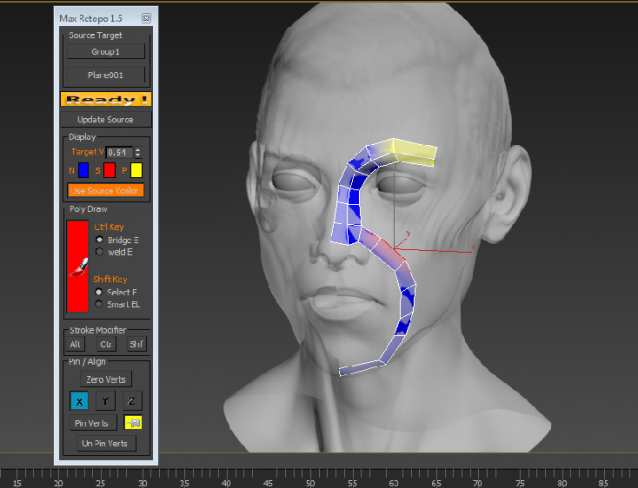
Videos :
http://www.youtube.com/watch?v=n724G7uMuPE
http://www.youtube.com/watch?v=u-icAsOZbJc
http://www.youtube.com/watch?v=SrhOiCHd-To
Script
By cyfer · Credited author: Mohab Gamal · 2009-04-08
Tags: Retopology, Remesh, Zbrush, MudBox
Videos :
http://www.youtube.com/watch?v=n724G7uMuPE
http://www.youtube.com/watch?v=u-icAsOZbJc
http://www.youtube.com/watch?v=SrhOiCHd-To
1.5 version
Should've been uploaded at least 3 years ago
Sorry for that
--------Under Brush Mode -----------------
-press alt and click near the verts to move them
-select Edge by pressing Shift
-Click after Selecting and it will extend the edge
-Selecting an Edge and then pressing Ctrl and selecting another one will bridge or
weld them
-Smart E is a feature to auto select the suitable edges for extending and
then clicking will extend them all
-there is a vertex color option to aid in working ... try it :)
-press F2 to toggle "Shade selected faces" or this option will not be helpful
-modifier keys at the bottom change the functions of alt , Ctrl , Shft
play with them .. some of them for collapsing edge rings and for removing edge loop
error when installing
AndyW · 2014-09-01
it works on 2014 but I do not have 2012 to test. Is there any way to get a different version to test on 2011? ... 2011 does not have nitrous viewport but your old script works, is this a requirement for this version of the script?
install error.
AndyW · 2014-08-20
Hi,
Great script, I use the old version, however the latest version(1.5) gives an error when installing. I drag onto the viewport or use run script and I get the error message below.
(using max2011 32bit)
---------------------------
MAXScript FileIn Exception
---------------------------
-- Unknown property: "isEnabled" in undefined
---------------------------
OK
---------------------------
cyfer · 2014-08-21
2012v
this is must be due to Nitrous viewPort
I don't have 2011 any more , could you please test it on 2012 and tell me if it
has the same issue ?
Cool
 Nevil · 2014-07-31
Tank you for update ;)
Can you ?
Nevil · 2014-03-01
Can you add Undo function for your great tool ?
cyfer · 2014-07-04
there is undo mechanism.. sometimes max internal undo system doesn't allow it
Greate
Nevil · 2013-05-11
This is even better then the Topogun. faster and easer. but i think a regular close and Help button is better than attached text file for tutorial.
thank you ;)
 Nik · 2013-02-15
Useful script!
But:
1)It is strange why you have not created mcr file that registers these tools in 3dsmax?
Now, who needs - I created him
So: Max_Retopo.mse copy to Scripts folder
And Max_Retopo.ms drop to viewport
to find - category "Max Retopo"
Author, can include this file in the archive.
2)Did not immediately find a way to close the tools. Helps shotcut Alt + F4
Enjoy :)
In the 2012 version of 3dsmax normal flight.
where 1.5?
 camorsildecarper · 2011-10-07
i´m looking forward to 1.5 version
where 1.5?
notapix · 2011-07-24
hallo.
tnk for your max_retopo v1.0 script, work very well in my max 2008 :)
i see on youtube your version 1.5. is possible download it?
where?
tnk.
cyfer · 2011-08-26
2-3 weeks maximum and v1.5 will be published
i'm sorry , i got busy and forgot about publishing v1.5
thank you all for the kind words
Mohab
kanga · 2010-09-01
Man that is one sweet script! Well done. Tried version 1.0 with max 2011 on win 7 and it works really well. When I middle mouse on the dialog I get a magnifying glass graphic, no help files. Apart from that,.... super.
Thanks a bunch.
jeuh · 2010-08-05
Hey,
I'm using Max9 and the plugin installs on Windows XP but it won't work/install on Windows 7
Do you know about this issue ? thx
 jonahhawk · 2010-07-09
BIG Plus from me. Awesome tool. So fast and easy. Very intuitive.
 le1setreter · 2009-12-08
hey cyfer,
a colleague in my company has been in trouble to retopo lots of objects and i remembered your script and gave him a link. hes using your script now for a few days and he says it really allready saved him ages of time. we are working with max 2009 and he came up with an empty buglist (i told him to create one). great script. great work.
many thanks!
mafida · 2009-12-06
Works great in max 2010:)Thanks man-it's much better than standard 2010 graphite retopo:)
capcaverna · 2009-11-27
man, its very good. you script is the most. Thanks
titane357 · 2009-11-19
pretty cool and free !!!! Thanks man !!!
 br0t · 2009-11-18
Funny thing, i can turn a head into a boxhead now :D
I used this to retopo a mudbox default head onto a faceworx head mesh to get a starting point for modeling...weird but hey, it worked :P Thanks for this.
 111 · 2009-06-05
I cannot make it work :(
Taalart · 2009-05-02
Thanks mate for the script. Thats all I ever wanted! a way to have the mesh conform to the hi poly, no fuss, no fansy tools and most importantly its free :D
cyfer · 2009-04-16
if i get what you mean
LiveMesh is a way to relax TheSource over the target ... you can do that for the whole or part of the mesg depending on your selection .
when you reach a desired result , deselect the SO element or deactivate LiveMesh .
as for previewing higher density mesh , you can activate the Nurms , or add a TurboSmooth on top , however i wouldn't compare a script with a stand-alone Application .
.
 noel_d3 · 2009-04-14
Topology with smooth is the only way :
jrulier · 2009-04-10
it seems it does not work with Max 9, am I right?
cyfer · 2009-04-10
unforunately , only 2008 and higher
jrulier · 2009-04-10
Thanks anyway. Funny because scripts and plugins that work with 2008 are doing fine in 9. I was curious about your process. I am using Topogun at the moment to retop and I must confess it is a great tool. I am looking forward to get my hands on Wrapit too.
cyfer · 2009-04-11
when autodesk changes the SDK or change the compiler version of visual studio .. plugins need to be recompiled to work properly . (c++ plugins)
however , even if none of those happen , every max version has fixes or additions regarding maxscript it self , and hence even if plugins may be compatible , scripts may not !
to be honest , i didn't dig this much .. but may be it is possible to make this tool work on max 9 , unforunately i don't have max 9 now
jrulier · 2009-04-12
no worries and thanks for your reply. Keep on the good job.🙂
cyfer · 2009-04-11
totally agree on the Edit_poly modifier issue , its frustrating to have less options !
however , when i look at it , it opens lots of possibilities , what if a guy is stacking 3 edit_poly modifier for Whatever reason ?
what if he suddenly changes the order of the stack , rename the mdifiers ..etc ?
- as for the second question .. i don't mind publishing the MS file not the mse , but
unforunately i Can't
i Can simply answer the Voxel question with yes or no , but i don't think this will be of any help
-my original intention was to build a voxel grid in C# , compile a dll and stream the data between maxscript and the assembly
the problem with that is the speed will be capped by maxscript speed , so .. i didn't do it .
to tell what i can tell ... this script is simpler than most people think , its only using what is available in maxscript to work .
there is no extensive calculations , math , algorithms on my side .. its a simple thing used in a strange way .
cyfer · 2009-04-09
thanks guys
EditablePoly Only i'm afraid
is there a specific reason why you need Edit_Poly modifier during remeshing ?
 renderhjs · 2009-04-11
well first off again - very nice script I recommended it my other colleagues as well.
Why I would like to have editPoly modifier support? - simply because it allows me to work in a more complex way without destroying previous levels/layers of the model. I can always reduce the modifier stack to 1 editable poly base object.
another question though if you don't mind:
obviously you don't use camera or perspective rays in order to project the selection - did you by chance used a voxel quadtree?
darwin · 2009-04-09
Ahhhh..... Very very good! Thanks
renderhjs · 2009-04-09
very nice script,- it works already very nice. Does it work with editPoly modifier`s as well ?
su37 · 2009-04-09
A very good script, I like it!