

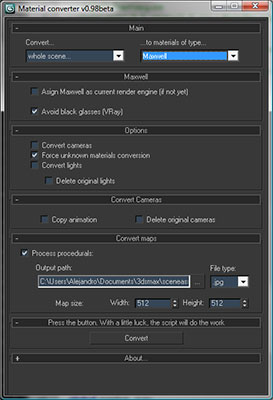
Description:
Simple utility to make it easier to move scenes from a rendering engine to another. Some work have to be done in terms of materials or types of engines, but it will progress step by step. In the following table you can appreciate the possibilities of the script at this moment:

Help file explaining the whole process included with script.
Comments (19)
Comment policy
Is this still being developed ? final render support would be priceless, nothing exists other than a basic standard to fr convertor, which is pretty much useless as most models are vray / mr ready.
Hello,
an update will be published in a couple of weeks or so. About FR support, sorry, but it's not possible, since we are not final render users and, as far as I know, there's no demo.
Regards
After pressing the convert button it gives "Process finished in 0.078 seconds" in max script Listener but doesn't change the material slot.And removes the texture applied on the mesh.
Find some Solution
The script changes materials assigned to objects, not the material editor. If you check the material of any object you will see that has changed. In the same way, textures are not removed, only are disabled in viewport since the "show in viewport" button have not been pressed yet in the new materials.
If you still thinking that there's bug, please send the scene (or a part of it) to the mail included in the "about" rollout of the script.
Regards
Alejandro
Hi...
great script !!
Is there a possibility that it can convert to 3D max Materials too?
I have bought Octan Render but he can only use Max materials.
would be great ....thank you
Hello,
Is there any plan on adding finalRender support ?
Thanks.
igamaximus -> I'll take a look to this, but I must first to finish with brazil and thea translations and some other minor fixes. I'm not a finalrender user, so I don't know the engine. There are some trial version?
subburb -> thanks for your words
Damn Dude ! This is the project of the year !!
You got my vote !
First of all, huge thanks for your script, it's a must, for some people i know. Now, the question: what about finalRender? fR R3 SE is brand new and very very powerful renderer used by many vfx houses and individuals, so i think it would be great if you could include either fR-advanced or fR-architectural (which is basically the same material as mental ray Arch&Design, with few details added) material in converson. Thanks again, much appreciated.
Brazil is planned, but there's a lot of work pending. Sorry for that
Any plans on adding Brazil support?
error in Max 9!!
Sorry, but it's for the encrypt system. This "new" system only works since 3dsmax9 SP1 or higher.
Is there a way to convert the vray lights into mental ray lights with matching lm values?
Also is there a way to change vray ies lights to photometric ies lights?
Aside from that this script is great. Keep up the good work.
raginlam -> It's not easy, since in vray values change completely if you're using a physical camera. I'll take a look to this.
i find this thing long ago & i find now thanks
Salve of Allah
thanks usefull
url download isot avaliable
Link corrected. Thanks thimarcondes