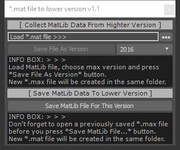
This tool will convert Material Library file (*.mat) which is created in latest version of 3ds max to previous version.
Script
*.mat file to lower version
 By barigazy · Credited author: Branko Živković · 2013-09-14
- Version
- 1.1
- Version requirement
- 2011+
- Date updated
- 2013-09-14
- Votes
- 6
Downloads
- bga_mat_to_lower_version_v1.1.ms — bga_mat_to_lower_version_v1.1.ms5.1 KB
Tags: Mateial Library
Description
Additional Info
How it works.
Let say we have *.mat file created in 3ds max 2014 and we want to contert it for 3ds max 2012.
#1 Open max 2014 and run the script.
#2 Load *.mat file by pressing "•••" button
#3 Pick version from dropdown list (default 2012)
#4 Then by pressing "Save File As Version" button, this tool
will create empty *.max with same name as mat-Lib file and
place it in the same directory.
#5 Open previously saved *.max file (in max 2012) and run the script.
#6 By pressing "Save MatLib File For This Version" button,
this tool will create new *.mat file with sufix of current max version and place it in the same directory where is original file.
UPDATE 1.1
>> support for future versions of max
Comments (17)
It works in Max 2025 - 2021
atomica · 2024-09-12
Its a bit trickly to do but it works ! . . . make sure you have Vray set to the renderer or it will only save a very limited number of materials ! ! !
Max 2025
Basically you have to go back through each Max version starting at highest and run the script which saves a max file in a lower version you choose (no more than 3 versions back) - eg Max 2024
Max 2024
Then open up that max file in that version - eg max 2024 - run the script and load up the .mat for previously saved for max 2024. Then choose which version - eg max 2021 - hit save .max file and it will save a max 2021 file.
Max 2021
Open up the max 2021 file (this file has all your texture maps buried in it). Run script again. Load up the max 2024 .mat file. Choose from drop down max 2021 and hit save .mat button
It should now save your max 2025 mat file as a max 2021
Hope this helps :-]
Really great, but would be perfect if could be run as a batch!
JezUK · 2021-07-15
Would be *really* great if you could run this as a batch for many .mat files you may have.
With V-Ray 5, we now have a V-Ray Material Browser into which we can add our own libraries, I added about 35 of my own.... using 3DS Max 2021...
When I needed to save these down to version 3DS Max 2020, I had to close and restart the script each time for each mat file (35 times).
Would have been nice if it could have simply been done as a script to run for the entire set of *.mat files in a particular folder :)
Either way, thank you! You saved me a potential headache and a lot of time anyway!
2021 to 2018
Fixtion · 2021-01-26
save my time, thx!
it doesn't work for the version 2018
nferh · 2019-05-22
i save my material library in a 2018 version and now i can't opened in the version 2015, i try the script bt it doesn't work :(
Thank you!
 kmerino · 2019-04-22
Thanks for the script! Worked well for me going from 2019 down to 2016!
how!
nferh · 2019-05-22
hi!! how do you do it?
i save my material library in a 2018 version and now i can't opened in the version 2015, i try the script bt it doesn't work :(
Cant load material lib from Student version
matasoy · 2017-12-29
I have a student version (2015) on my school. And can not open that file from a normal 3ds max (2013). Autodesk do not allow to open student versions to open a normal 3dsmax program.
So i decided to export scene as fbx and its ok. But my textures broken so i export material lib to a file. And this time too, Max do not allow to load material (.mat) file to a normal 3ds max program. Because that material lib was created on a student version.
Your script creates a max file. But that file is still a student version, and i can not open it.
Is there an another way by not to open any max file and get the lib :D
Thanks by the way, thats a brilliant script.
Attachments
- 001340.jpg — 001340.jpg44 KB

Carol Rein · 2016-03-08
Thank you for the update, I appreciate it so much.
I´ve tried it in max design 2013 and it now shows the dropdownlist with max 2010 option, and it saves the file (overwritting it, I guess) and shows the message as successfully done, but unfortunately the matlib won't open in max 2010. Unless I´m missing something... I'm lost
I actually have 2013
Carol Rein · 2016-03-07
I actually have max 2013 installed and tried to save as 2010 but in the dropdownlist it only says 2011 as the lower version available.
Am I missing something?
barigazy · 2016-03-07
I updated the tool. I hope it works ;)
Max 2010
Carol Rein · 2016-03-06
Amazing tool!! Autodesk should have done something like this!
Well, it might sound silly in 2016, but for a lot of reasons, because of plugins compatibility I still use max 2010.
So, is it possible to extend the "save as" to max 2010?
Thanks!!
barigazy · 2016-03-06
Only if you have installed max2013. From max2016 you can save in 2013 version and from max2013 to max2010
Version
and2012 · 2014-06-03
Then, I will need to instal the 2014 version anyways? ;) I'm glad with 2012 ;(
 steyin · 2014-04-08
Any way to convert the file while using a lower version of MAX? I have .mat files from others made in 2014, but I run 2013 and can't use them.
barigazy · 2014-04-08
No. You need to process lib from max2014.
what is the problem
hsk1972 · 2013-09-14
well i never faced problem open mat file in older version??
barigazy · 2013-09-14
Are you sure? *.mat file has always had a problem with different versions of 3ds max. Can you explain your workflow ei. trick for this problem?