
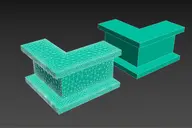
This Script will Solve the problem of Activating Edge Mode in iToo Forest Plugins .
- WORK WITH V-RAY AND CORONA ONLY (UPDATE 1.02 Support All Materials) .
How to Install :
- Drag and Drop the File or Run it from Scripting Menu\Run Script
UPDATE v1.01 :
- The 2 New Items are shown in QuadMenu when no object is Selected , Fixed .
- Drag and Drop the File or Run it from Scripting Menu\Run Script , it will Remove the Old QuadMenu Items and Add New Ones .
UPDATE v1.02 :
- According to some difference between Forest Versions i made this update , now it'll work as expected .
UPDATE v2 :

- Completely Rewritten .
- Should Work on All Materials Classes (Also You can Edit the Script and add any Exceptional Classes) .
- Option to Apply/Remove The Forest Map on Opacity Map or Opacity and Transparency Map , (Some Material Classes has No Opacity) .
Comments (10)
Comment policy
Amazing script!!! Does it work with Forest 7.12?
Thx!
Thanks
it should work unless they switched between "i.arboundchecklist[1]" and "i.arboundchecklist[2]"
with corona I didn't check it with the new physical material (but I'm sure it'll not work) .
Documents of Forest Pro Maxscript
Hi there. I want to write some small scripts for ForestPro, but I don't find any documents of maxscript one Itoo website. Can you help me? Thank you
Hi
You can use macro record for simple tasks , or search in itoo Help for specific things.
script?
where is the script download?
if the Script not switching automatically the forest boundary modes (Point-Edge) then open the file (Forest EdgeMode.ms) and replace all "i.arboundchecklist[1]" with "i.arboundchecklist[2]"
Material Optimiser
Looks handy, thanks for creating it. Just wanted to mention that Material Optimiser, which can be launched from Forest's Material rollout can also add Forest Edge maps to all materials automatically. Cheers!
Thanks for the info , i didn't know that.
But its far more Better coz its Switcher , it can Remove the Forest EdgeMap also .
UPDATE v1.01 added .
excellent thanks was always wanting something like this
thanks
I'm Glad you like it , its annoying issue ,Hope iToo will Fix it Soon for all Type of Renders !!.