ScriptSpot

Script

Hex Them All!

By Eternal_Dreamer · 2017-12-07

Version
1.1
Version requirement
2008+
Date updated
2017-12-06
Votes
6
Description

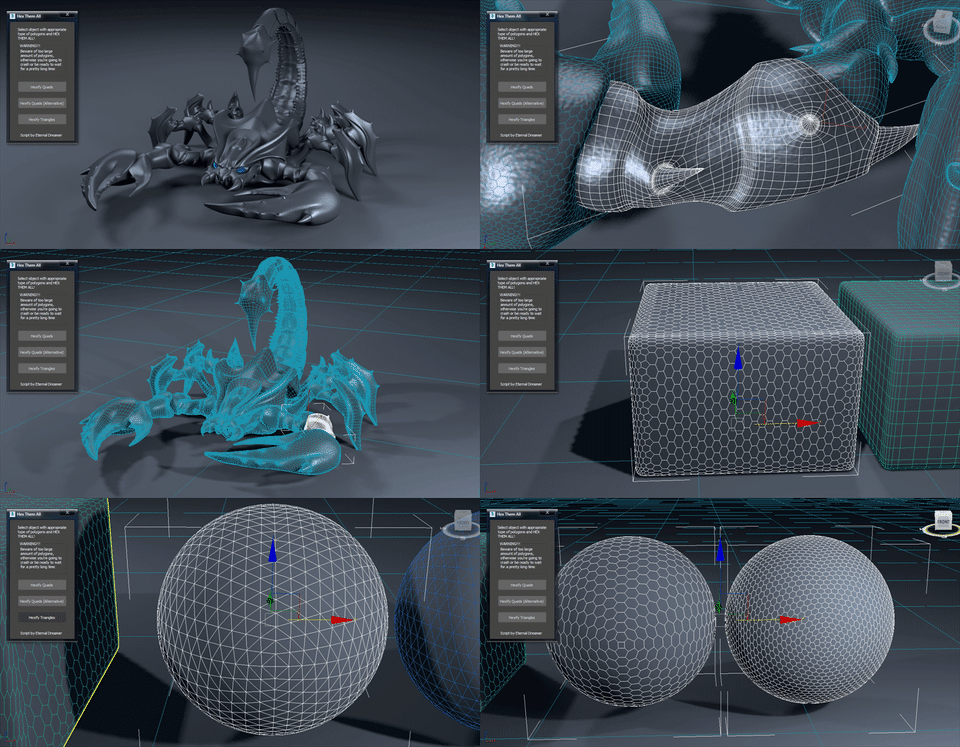
UPDATE v1.1 brings 3rd option for quads conversion, minor interface changes and fixes the bug with giant n-gon.

Hi there people :) This is my first attempt of creating script, no coding, just using standart 3DS Max actions (+500 to compatibility, -200 from speed). I haven't used any tutorial as a foundation because i found this method myself while experimenting with edges.

So, this script converts quads or triangles topology to hexagons (better not to have n-gons). For quads there are 3 options avalible. Once conversion is over script adds Edit Poly modifier on top of your geometry, so that you can easily toggle between results and get back to the original if needed.

Some tips: I reccomend you to have evenly spread quads and triangles if you want to get evenly spread hexagons as well, and in case where you're not happy with the way hexagons are rotated, you can delete the resulting modifier and manually retriangulate original polys.

I hope you guys will find it useful ;)

P.S. I've got to tell that it becomes pretty slow when it comes to 10k polys and higher. If someone could code this scipt as a mini-plugin in C++ it would be awesome! Steps are easy and pretty much readable from the script itself.

Attachments

Tags: topology, Hexagon, Hex

Comments (19)

Purchasing PolyUnwrapper

solozar · 2026-02-25

Hello.
I’m interested in purchasing PolyUnwrapper and had a quick question.
When 3ds Max 2027 is released, will the updated version be included for those who purchased the 2026 version, or would it require a separate purchase?

Thank you in advance for your help!

StormBrig · 2019-09-28

I hope the OP will fix it for the latest releases of 3ds max

Will not work in Max 2019.2

stevesideas · 2019-09-23

No matter which type of object I try to get this to work on it just hides most of the object and leaves 2 tri faces. Not sure why this is the case.

solozar · 2019-09-24

The same in 3ds max 2020

Good job

jimmylee · 2018-01-12

Hi, Eternal_Dreamer
Love you from China!

Jimmy lee

Happy New Year!

Eternal_Dreamer · 2018-01-01

Happy New Year my friends!!! Let our community grow even more in this year, so that we could create even more extraordinary tools, cuz they allow us to create extraordinary art! I hope every single one of us will eventually find their own way into perfection, become more wise and rational, make others happy and just continue being good person. Congratulations!

Wo It is a long story

jimmylee · 2017-12-21

Ha Ha,It is a long Story..to make it Powerful

hehe...noice....

vusta · 2017-12-07

but it somehow doesn't work on 2D objects...ie. a simple plane

(if at the end you could somehow remove the BIGGEST poly, it'll work )

Bug

Eternal_Dreamer · 2017-12-08

Fixed

al.........................most

vusta · 2017-12-08

now works great for 2D...but say you got a sphere (normal one, not a geosphere) it will delete the top/bottom coz they're sorta odd ones out...dunno how you can get around this tho....

(bit lame but, I thought I should put my thinking cap on....cap...hmmm...cap.....hmmm....that's it.....CAP it !!!
Still, how do you know when to cap or not? Maybe just provide the user option 2D/3D...so if user picks 2D, you delete, if not...don't delete as previous version)

Request

Eternal_Dreamer · 2017-12-08

I don't know how much that cap can be useful since it's being produced from bad topology (n-gons and vertex-stars), also there are no edges left after conversion to support the shape. Even if assume that it may be useful (in very rare cases) you can just add cap holes modifier. If you'll provide me with more examples where it can be useful i'll add an option to HEX without removing n-gons.

It is a Bug,Sir

jimmylee · 2017-12-09

I tested it In Max2014,It cann't work.
It said on bent pressed do,$.modifiers[#Edit_Poly].ButtonOp #Retriangulate this line stop!
msgbox:ButtonOp indefined

Button bug

Eternal_Dreamer · 2017-12-09

That's strange, cuz I've made and tested script exactly in 2014 (but with extensions and updates). I'll look into that issue and see why it does happen.

Bugs

jimmylee · 2017-12-11

Dear Sir,
Thanks for your reply.
Have you re-test the scripts yet?It not only one button but four botton.
Only the first botton can work 90% sucessfully with a error message.
The others botton fuction can not go on..
Msgbox :the same ....indefined..

Bug

Eternal_Dreamer · 2017-12-12

Unfortunately no, still cannot recreate the issue to solve it. Also I can barely see my PC during a day (only for this week) so as soon as I get some results I'll answer back again

Bug repair

jimmylee · 2017-12-17

Hi,Eternal_Dreamer

Have you have time to fix the Bugs?
please don't let the good scripts sink to the seabed.

Bug tracking

Eternal_Dreamer · 2017-12-20

No, unfortunately still can't reproduce the issue. I'll ask you to send me a video of a whole process and also some insights in maxscript window.

Bugs is not Bugs

jimmylee · 2017-12-21

Hi Eternal_Dreamer,

Sorry for making you much troublesome.
Finally I Find that Bugs is not bugs,
It is because this scripts can run well in English version 3ds Max 2014 not Chinese Version 3ds max 2014.

By the way, can it be design to use customize "2D shape" as the structure line of 3D object and cover the surface of the 3D object?

Happy End :)

Eternal_Dreamer · 2018-01-01

Glad that you solved your issue yourself, cuz I would never think that it was caused by Chinese Max.
About the request: what kind of shape and where would you like them to be placed (along edges or on vertex)?