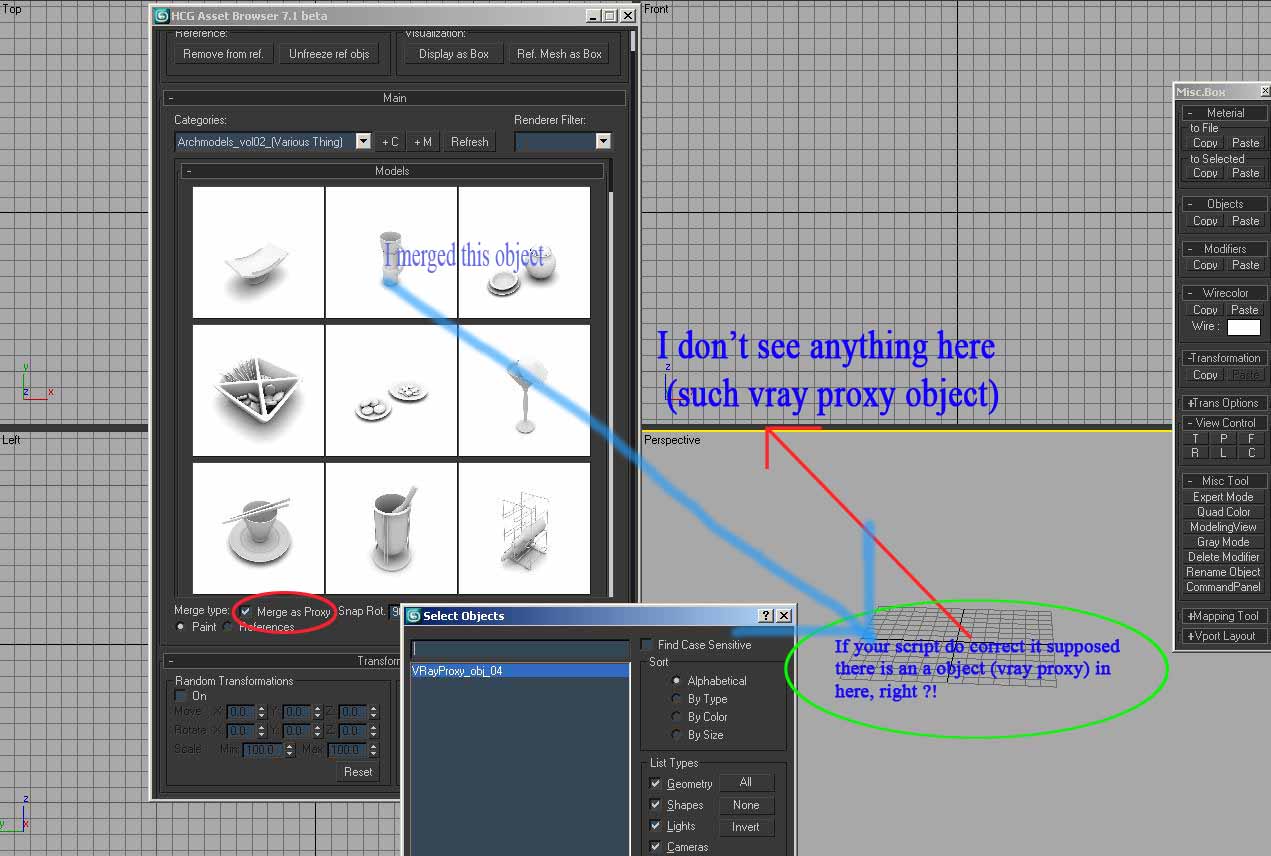
Display thumbnails of your models (an image with the same name of the max file needed )
Example models to show how to arrange your own libraries
Merge as vrayproxy: convert the model and save .vrmesh
Merge on references: the model will replace the selected objects, good to replace autocad blocks
Paint mode over surfaces good to vegetations and other models
Additional Info
Update 0.71 BETA:
Add model button: add a new model with the selected objects in the selected category
Add category button: add a new category in the selected category
Thumbnail
render: left click on the thumbnail to render (use the current scene
renderer) only works with default scanline and Vray. Carefull with the
renderer settings, this is a Experimental function.
Thumbnail render settings
Renderer filter settings
Refresh was improved
Display as box on/off button
Corrected the bug when cancel the library path change
How to use:
Need a surface to merge the model
Click on the thumbnail of the model to loading this to the scene
Select a surface and start to create instances of the model
Click: merge the model 1 time
Shift + Click: Rotate the model
Ctrl pressed: Paint the model on the surface
Change to your library path on preferences, need to refresh after change
Only tested on 3ds max 2009 64bits
Inspired by the Basic Asset Manager by Gavin Greenwalt
User review of HCG Asset Browser(Thanks Bona):
http://www.youtube.com/watch?v=EnUAD8FH_14
VideosComments (52)
3ds max 2014 version
SSantos · 2013-10-14
Ola Francisco,
Any chance to make it work on Max Design 2014 version?
This is just what we need to organize our massive library, can't wait to start use it!
Obrigado!
Marcio
Ffajar · 2010-06-29
no need like pro is OK too, I just need its function anyway and I hope the limitation not the quantity of object.
Francisco Hermida · 2010-06-25
i will release a free version with limited features soon, using the same interface as the pro version.
Wwhereareyou · 2009-09-21
free version for max 2010 ??
GGeorgeR · 2009-06-29
I am in the same boat as raistlin. I'd be willing to purchase right now so that you can justify spending more time on it and I can start my library!
raistlin · 2009-06-27
Hi
I'm interest by your hcg browser and i'd like to start my 3D library as soon as possible, cool you post a beta version to start the job as soon as possible (an update of your free script but which work right with v2010 please) and could you tell us a price for your job? (like vray multilight ? or more? i'm thinking that 30$ is a right price for exemple...
Thanks !
Ttrick · 2009-06-27
And PLEASE make a Freelancer version that you can use on both Workstation and Laptop, and that can be transfered easily between computers !!!!!!
Ccecofuli · 2009-06-25
It's possible to buy right now the "beta version"? Or, do you have a date for the final release 🙂
Francisco Hermida · 2009-06-25
cecofuli: The pro version will be compatible with the free version, you will can choice the thumb size, and the network path will work. The free version will be updated too but will be limited of features.
duke2: I will release the commercial version working as a demo like you said and will have the possibility to activate the script to a full version.
Ccecofuli · 2009-06-23
The script not work with network path. For example, if I set in the preference a path like that:
\\Xeon\Work\Proxy
The script not work. And I've an error if i right click for render the thumb.
GGeorgeR · 2009-06-22
I suggest that before implementing the license system, you simply restrict the current version so you can't have more than say, 10 items in the library. This will allow you to continue to develop the plugin and get (free) testing from the public!
Ccecofuli · 2009-06-17
Ah, and in the next built, will be possible to choose che thumb size? Now it's too much big IMO.
Ccecofuli · 2009-06-17
Hi chico,
no problem. It's my fault :)
I'm happy for you commercial relase. Max need a good model browser. The commercial version will be compatible with the free version? I hope will be no to much expensive.
Francisco Hermida · 2009-06-17
cecofuli: This merge rollout will be included in the next update, i'm finishing a comercial version of the script and i will release both soon.
What's the problem with the "ctrl pressed"?
And the "Ctrl pressed" mode
Ccecofuli · 2009-06-16
And the "Ctrl pressed" mode for the paint mode not work very well for the paint.
Ccecofuli · 2009-06-16
Very good script, but I can't see the "Merge" rollout in the 0.71beta. Why?
agg3d · 2009-06-06
Olá Chico,
Sou novo em MaxScript achei esse seu script muito bom. Gostaria que você me ajudasse numa questao que já me tirou noites de sono, como voce conseguiu criar a inserção de grupos?
Pois estou tentando criar um script para alinhar objetos em outro objeto, mas eu só consigo alinhar apenas um objeto, nâo o grupo todo. Toda vez que eu tento alinhar um grupo numa face, eu tenho problemas, ele alinha cada objeto individualmente ou só alinha o Gizmo do grupo sem mexer os objetos pertencentes ao grupo. Se puder me ajudar ,Obrigado.
Se não for pedir de mais e você não estiver fazendo isso com fins comerciais, será que você poderia disponibilizar uma versão (não precisa ser a completa) com o codigo aberto para que iniciantes como eu pudessem aprender um pouco mais sobre como são feitos os Scripts.
Novamente Obrigado e Parabéns pelo trabalho.
Francisco Hermida · 2009-06-11
agg3d: infelizmente eu não posso compartilhar o codigo do script, comecei a estudar maxscript, e me interessei muito pela atividade, para me manter nessa linha comecei a desenvolver uma versão comercial desse script, e não posso liberar o codigo dele para evitar possiveis concorrentes, essa parte do grupo é uma das partes principais, de qualquer forma, participo de um grupo de estudo no 3D1, a gente pode desenvolver outros estudos por la.
Aaf13 · 2009-06-04
First of all, this looks really promising. I've been looking for a way to organize all of our assets for awhile now.
For some reason, I can't get the thumbnails to show up. I was able to render thumbnails by right-clicking on the model and the jpeg files are created in the same directory. But they just won't show up in the asset browser. I also tried loading up the Library example and those thumbnails wouldn't show up either.
I'm using on MAX 2010 with vray1.5 SP3a.
2010 bug or am I doing something wrong?
Thanks!
Francisco Hermida · 2009-06-05
af13: This is a bug with the max 2010, i will fix this in the next update, i'm working with the script development, and soon i will post some news!
Ffajar · 2009-06-02
wow.... I hope the free version is still update!!
thank for making free version cause i don't have many money in my wallet.
by the way good luck making your comercial script and selling it well!
I think I'll wait your new next script (free version)!!
Thank for hearing from some one like me and your kindness!
Francisco Hermida · 2009-05-30
fajar: i will keep a free version, but i enjoy to did this script, and i want to spend my time doing this, but i need to pay my bills hehehehehehehhehehehe, the freeversion will be bugfree and very usable, i think you will like the next update :).
trick: Wow my first possibly customer, i will do my best to release a great product!
Ttrick · 2009-05-30
If you can make a bugfree professional supported product I would gladly pay for it. I expect my clients to pay me too ;)
Ffajar · 2009-05-30
arghhh come on why always comercial!!!! hehehehehehehehe....hah....hah!!
Francisco Hermida · 2009-05-29
Hi Marco,
I'm started to write a comercial version of the script with a .net interface, i will keep this actual script as a free version and i will keep the bug fixes, but all the others new features will be included in the comercial version. One of the features of the comercial version will be the drag and drop :).
You are right, i'm going to find a way to merge models without a surface.
In this version of the painter function, you can paint single models or paint a lot of models with random transformations (vegetation, rocks, people ...) while hold the ctrl key, all in the same function, with the users feedback, i will adjust the function to work in a smarter way (actually trying a lot of other ways hehe).
Thanks!
Marco Brunetta · 2009-05-29
I've been playing a bit more with this. A few thoughts on how the importing meshes work:
-Seems a bit weird that you MUST have a mesh to add the object to. I can see the benefits of being able to snap to an existing surface, yet on some occasions you might just want to add it to the scene. Maybe you could shift-click to add to the scene directly or something?
-It took me a bit to figure out I had to click on the object I wanted to snap too. Could this maybe be more automatic? Also sometimes I accidentally click on the object I'm inserting and it does some weird stuff...
-Is it possible to have some form of drag&dropping maybe? Right now it feels like it takes too many clicks to add an object.
Marco Brunetta · 2009-05-29
Nice video mate. It's looking really sweet.
Wwhereareyou · 2009-05-23
Otimooooo!! fico na espera da nova versao!
abraco,
Francisco Hermida · 2009-05-22
whereareyou:
Obrigado pelo comentario, olha qualquer sugestão é bem vinda, vamos la!
1- Já comecei a estudar essa possibilidade, tenho alguns codigos incompletos ainda, mas eu pretendo exibir por padrão o thumbnail quando nao tiver nenhuma outra imagem renderizada.
2- Esse necessidade eu vou tentar resolver utilizando uma nova interface .net, poderei melhorar a organização e os recursos visuais do HCG Asset Browser. Na proxima atualização irei utilizar a exibição do nome atraves do "tooltip" quando vc deixa o mouse sobre o botão por algum tempo.
3- Já estou preparando um novo sistema que vai possibilitar que voce use um cenario customizado .max, no sistema atual esta acontecendo um bug pois independe da posicao do modelo era pra ele ser exibido acima do plane. Irei corrigir isso.
4- Erá para estar funcionando, ele centraliza automaticamente todos os objetos do arquivo, talvez vc tenha luzes e cameras na cena, que estao influenciando no centro dos objetos, é bom ate imaginar essa possibilidade pois irei incluir um filtro para excluir da centralização cameras e luzes.
5- Mais uma vez estou limitado pela interface padrão do max, com a nova interface que estou preparando vai ficar mais facil exibir as categorias e subcategorias, mas o ideal eh usar o endereço da pasta aonde estao os projetos, no seu caso vc esta usando como endereço para biblioteca o c:\ ? tente por so usar a pasta modelos3d, assim nas categorias vai exibir "cadeiras/cadeirasnovas" no exemplo q vc citou. Quanto a não exibir pastas que não tem objetos tentarei pensar em algo, talvez exibir ao lado o numero de models existente na pasta ex: "cadeiras(4)"
6- Estou estudando ainda como implementar essa função, inclusive penso em fazer algo mais complexo nesse sentido, dando a possibilidade de vc adicionar informações aos modelos, dizendo por exemplo que são de madeira, e que sao utilizados na cozinha e etc, imagine vc fazendo uma busca "cadeira cozinha metal" e exibir so oq vc quer? logico q ira depender de vc deixar sua biblioteca bem organizada a esse ponto.
Fique a vontade para fazer sugestões, pois so assim posso aperfeiçoar o script e entender como os usuarios estão interpretando a sua interface, e assim posso buscar novas soluções para q o script atenda a todas as necessidades :).
.
.
.
bragibjornson:
I did some changes in the render thumbnail and fix some bugs, will post a updated version soon. Thanks!
Bbragibjornson · 2009-05-22
Chico:
Yep - Im using v.71 (beta).
Vray 1.50.SP2 is my default (current) renderer.
I noticed your post that the file saves to the local directory. My assets are on an external usb drive, but i dont think that it should make a difference, but I'll mention it in case it would.
Thanks, B
Wwhereareyou · 2009-05-22
Oi Chico, o script ta otimoo! vlww!! dos melhores que ja vi para o 3dsmax!! muito massa!! mais mesmo assim, eu sente a falta de algumas coisas que vou numerar aqui pra vc, depois vc vê o que acha e me diz, se for besteira pode deixar pra lá.
1- Possibilidade de max thumbnails? mais pra isso a gente já tem o browser do max né? (acho q essa aqui eh besteira ...)kkk
2- Nomes dos arquivos embaixo das miniaturas, quando a gente bota a imagem o nome vai embora...
3- O gerador de miniaturas tem um vrayplane, sera posivel q gente possa tirar ele ou intao escolher a altura dele em z já q tem modelos q ficam x debaixo. Tb pode não ser uma boa já que a gente deveria ter os modelos no ponto certo né?
4- O modelo quando não esta no centro da cena não da pra gerar a miniatura, isso tb pode ser besteira já q o bom eh a gente ter o modelo no 0,0 né'?
5- Nas categorias, se eu indicar a ruta dos meus arquivos, não posso ver o nome todo da ruta (ex: c;meus documentos/arquivos/3dsmax/modelos3d/cadeiras/cadeirasnovas), esta um pouco atrapalhado isso, tb tem pastas sem arquivos q ficam nas categorias. Era bom poder eliminar essas categorias q não tem nada, do mesmo jeito que tem um botao pra adicionar, outro pra eliminar mais sem eliminar a pasta do hd.
6- Um buscador dentro das categorias, pra achar aquele arquivo, o filtro eh bom, mais to sentindo a falta de um buscador x nome e talz.
Tudo isso é de priguica de nao arrumar pastas novas com rutas pequenas de todas minhas bibliotecas... rsrsrsrsrs...
Abraco,
Ffajar · 2009-05-21
yes correct (I already know that,I don't talk about render thumb, I already try render thumbnail,so I know that !) , but that not what I mean with the problem, as I told you earlier the problem is when You have model in DVD ----> merge as proxy (you already know that we can't rewritte/writte in DVD so we must put 3Dproxy to selected partition or folder in HD in order we can save and reuse it overtime)---->scene
The conclusion is " can I merge 3d model in DVD via this script with merge as proxy selected?, maybe also have dialog to tell where to save the proxy so we can reuse that proxy?" as I told you earlier it must be very though to make script that convert proxy --> save it to HD and then direct merge (converted model toproxy) to scene just like in VRay proxy coverter but the the different is this model is still not opened and selected in scene (3dsmax windows)!
this work maybe can do with litle trick, thoug. when you merge model (it's already selected right?) you make a little dialog (maybe launched with button) to ask do you want convert it to proxy (if answer is yes, you launching vray proxy dialog it's already automate to ask where to save it,right?) but then it just double work (just like olday work) if you want to a little automate maybe you can have dialog where to save texture too!
Maybe in next far future generation of this script you can have dialog /or just check button that not only ask where to save the proxy but also collect the proxy's texture itself! heheheheheheheh....... maybe i dream too much!!
Im sorry man to comment you so much!
thank!
Francisco Hermida · 2009-05-21
Fajar: I included in the last update(0.71) the renderthumbnail function, when you click the left mouse button in the thumbnail, the script will automatic render a image and update the image in the asset, this image will be placed in the same folder of the max file. You told me that you are using a cd/dvd to merge the models, in that case the render thumbnail function can't save the images.
I will revise the code to see if i'm using functions that not works in 3ds max 9.
Ffajar · 2009-05-20
Vray 1.5 RC5 and yes I using the latest version which is 0.71.Hey that left click function isn't developed (are you mean in render thumbnail, am I correct?)! which script do you mean thumb.renderer or batch it max!
Francisco Hermida · 2009-05-20
Fajar:
I saw my script startup folder and other scripts using this example of startup, so i did the same, i will see if can improve this! i will try to keep the script working on more versions as i can, don't worry hehe
Bragibjornson:
Are you using the last release 0.71? what was your currently renderer while you are testing the script?
Bbragibjornson · 2009-05-20
Chico:
Im testing this script, but i cant get the thumbnail renderer to work...
it says "Thumbnail render: left click on the thumbnail to render (use the current scene renderer) only works with default scanline and Vray." in your description, but if i left click on the thumbnail, nothing happens.
running max 2009 - 32bit w/ vray sp2.
Thanks!
Ffajar · 2009-05-17
The place of floater is working great !
Thank man!!
I want to make a little question about your startup script
"what's the point of placing startup script and execute mcr file ? if it's only execute .mcr file, you can just install your script and restart max ,this trick will do as long as you place mcr file to 3dsMax folder install dir/ui/macroscripts and you can acces it in costumize than place it to your own toolbar, if you want make your script run everytime you start max just execute the .mse file,right (i mean like this : fileIn ((getDir #scripts) + "\\Scripts\\HCGAB\\HCGAB.mse")? this trick will open maxscript at 3dsmax start, I think you already know that!"
ehhmmm..... A little request may be, can you make it (the next generation of this script) still run on 3dsMax 9 version , right now I still using it, I know it will need work a little though, I still using Max 9 rather than up version because it work better than latter version (2008,2009) and I only have VRay for this 3dsmax version!
thank's
Francisco Hermida · 2009-05-17
Hi Fajar!
1. The merge as proxy saves in the same directory of the original .max model i understand the problem with CD /DVD content, i'm going to do a vrayproxy path field in the preference dialog to you specify a place to save the vrayproxy in a custom path. The merge as proxy function is working like you said in HCG Asset Browser, i need to check if i'm used some functions that only works on max 2008 and up.
2. I'm working in a new .net interface, will be much better than this actual interface.
3. The new update included the save dialog position function, don't this working with you?
4. I need to work more on the undo function, maybe i release in the next update
i think i understand what you said, i'm happy because you give more work to improve the script. Hope you understand my english too hehe!
Thanks.
Ffajar · 2009-05-17
Hi cicho good to see U again and thank not to bore with me!! I already tried it today, here is some advice from me for your script :
1. The merge as proxy isn't working yet (see attachment)!! Maybe it need dialog to tell where to save vray proxy, with this function it will work user friendly (I hope)! maybe like browse for folder or progrees bar. Hey try this script (batch it Max), this script work batch processing object with script you selected and tell where to save proccesed object (just try it), in this case it maybe will help you to make merge object as proxy working better and have user interface too, you just have to make script select all object in scene (model resource that will merge in), attach it it together but leave it have material ID (soulburn script (attachSelectedObjects))maybe and convert it to vraymesh/mentalray proxy scripts. I know it's look very though! the problem here is maybe when you try to merge processed object to scene because it's in different location not in the same folder (in this case Ill try to merge model that I put on DVD, processed it, put in HD and merge it to scene I worked on)! wuffffff......
2. The interface is still to big (I know this script is try to re-script just like tress collection v2.00 in rendermask video demo) don't get mad if you don't....hehehehe http://www.scriptspot.com/3ds-max/rendermask
3. Can U make it appear not in center of screen like rappa tool do!? (createDialog blabla "HCGB" pos:[X,Y] or get position from ini file and load it, if not correct as ini, tell it to place in left or right side of screen)
4. I see this script maybe still doesn't have undo function (undo "label" on), correct me if I'm wrong!
I hope U understand what I'm talking about couse my bad english can make u really confused!
Fajar, please keep posting your comments, they are very important to me. Test the script to see if it will work properly, i'm spending all my time in this script and suggestions are always welcome
Ffajar · 2009-05-16
Good job bro thank for listening and your script!! I'll try it tommorow and send you my feed back as soon as I can , I hope you dont bore with me........hahahahah! right now I only use 3dsMax 9-32bit and Vray RC5.
Ffajar · 2009-05-10
I'll waiting for it!! thanks for information!
Ffajar · 2009-05-07
any new progrees of it now ? Im just curious. Can't wait the final result !!
Francisco Hermida · 2009-05-09
Fajar: i did new features to the script, i'm testing to find bugs, and i want to release a update on the next week.
new features:
- thumb generator
- auto set pivot on merged models (with settings)
it's just the beginning
thanks for your interest :)
Ffajar · 2009-04-28
OK I'll wait your script!
Hey Chico Hermida I try merge as proxy but why my viewport not display anything!!? can you explain!
Francisco Hermida · 2009-04-28
fajar: because my script doesn't have a loading bar, if you try to merge a heavy model this will take a while to do all internal steps to convert this to a vrayproxy. If your problem isn't this please explain with more details what is happening.
Ffajar · 2009-04-28
I think for batch render the thumb you can use automatic render
I forgot where I got it!!
fajar: to change the library path you need to use the preferences, and change the path to your own library.
Thank you for the script to renderthumbnail, i'm going to see how this script works, but i'm finishing my own version of this function.
Thanks
Ffajar · 2009-04-28
hey man can i add some libarary from diferent partion!
like browse wheere your library function!
Ffajar · 2009-04-28
finally some made it!! good script and very usefull tooo!!!
thank man
Im always looking forward your script
Marco Brunetta · 2009-04-28
I did a quick test. Here are my thoughts:
I LIKE
-The idea is good. I actually planned on working on something like this once I had some time.
-Overall it has a pretty clean interface which is a big plus for me. Everything seems to be clearly indicated.
I DONT LIKE
-I'm not too crazy about the dynamic rollout to show the objects. Wouldn't a listView/treeView be more adequate?
-Do you really need one button to turn on display as box and one button to turn it off? Wouldn't a checkbox or checkbutton do the same thing in one control? Or even one button labeled "Turn display as box on/off" ?
BUGS
-Hitting the browse button and canceling the dialog without choosing a path returns an error. You should add something like "IF thePath != undefined DO" to the code.
-Not sure it's a bug but hitting the refresh button only seems to empty the models sub-rollout
-I'm assuming there's still no way of adding objects as I could not find a way to do it...
Anyways... I'd like to see this one compleated! Keep it up
Francisco Hermida · 2009-04-28
- Dynamic rollout: i don't know yet a way to do this with the listview/treeview (displaying images), but i really think this change will speed up a lot the script.
- Dysplay as box button: i will try this to see if works well, and i will activate the checkbox on the merge settings to you paint the models with automatic display as box.
BUGS:
- browse button: going to fix this! have some other minors bugs.
- Refresh button: yes this is a bug, but i m changing the script to don't need to refresh after some changes, and to be in the same category when refresh
- the button to add objects is disactivated, im finishing this function, very important function :)
Marco Brunetta thank you very much for the comment, i never could think to be in this position (receiving a comment about a script), but after you released the matmanager script i started to study maxscript to try to do something like you did, and today i can enjoy this new skill, i'm very beginner and the work will be hard to finish all the things
Going to post a todo list and update this with the comments.
 By Francisco Hermida
 raistlin · 2009-06-27
 agg3d · 2009-06-06
 Marco Brunetta · 2009-05-29