ScriptSpot

Script

GrabViewport 2.1

By ravenslayer · Credited author: Leslie Van den Broeck · 2011-06-01

Version
2.1
Version requirement
3ds max 9 and up
Date updated
2011-06-13
Votes
56
Description

FOR THE LATEST VERSION PLEASE GO HERE http://www.scriptspot.com/3ds-max/scripts/grabviewport-0

2.1 Changes:
- Now properly includes alpha masks from Xoliul, 3point
shaders and standard material into the Alpha and all other passes
- Hides the World Axis icon from the viewport (max 2008 and higher only)
- Added directory selection and filename in the UI
- Saves settings to ini file and loads them the next time the script opens

Save High Resolution Viewport Captures

Passes:
Alpha: Saves alphas from the viewport to the alpha channel of the baseimage
Color: Assigns random colors to all objects and saves the separate pass
SSAO: Saves a separate Screen Space Ambient Occlusion Pass
Wire : Saves a separate Wire Pass
Z-Depth: Control the Zdepth range and save it as a separate pass (first increase the end untill all is visible and then tweak the begin parameter)

ColorMask, AOMask, WireMask: save a separate image or avi file to the same directory as the basefile (filename_passname.ext) AlphaMask : includes an alphamask in the viewportcapture alpha channel or saves out a separate avi file for the animation.

Tested in 3ds max 9, 2010 , 2011, 2012 (DIRECT3D)

PASSES PREVIEW


Install:

Drag Grabviewport2.mcr into your viewport or go to maxscript ->Run Script. Now go to Customize->Customize User Interface. Toolbars->Category->Grabviewport2 and drag the Grabviewport button into your UI or bind a key to it. Special thanks to : Borislav Petrov (MaxScript reference), Kostadin Kotev (miauu )for the Alpha Masking technique


Tags: viewport, Color, alpha, passes, capture, high resolution, masking

Comments (27)

Making image Sequence

glennn · 2013-04-03

Great script !
One Question
How can I get it to export an image sequence of 35 frames?
Script will only make one image and export.
Whats the trick?
Cheers

"filename" is indefined bug

harumscarum · 2013-03-16

this issue is localized - it happens when XnviewMP is opened on sript's run

Images sequence?

HCkev · 2011-11-13

Hi, I wonder if there is a way to save the animation into separate images rather than .avi file? I'm trying to save a turntable for a demo reel, and I am using the Xoliul viewport shader(so I can't make any rendering - only viewport captures). I'd like to save it into separate .png images so I can get some decent image quality rather than a compressed .avi file

Great script BTW!

great script - but some suggestions and bug reports

harumscarum · 2011-09-19

- custom image size doesn't work now (max2012x64)
- need option to disable frame buffer which appears after image capture
- if world axis is already disabled script should not try to disable it and then don't need bring it back
- now script dont work if ViewCube is deleted from max
- please add separate macroscript to assign on shortcut which will run script as image capture with last settings
- automatic file naming - maxfilename_date_time.png
- save animation as images sequence

thank you very much for efforts

Hi mate

glennn · 2013-04-03

Do you know if there has been a fix or trick to get the animation to save as an image seq ?
Cheers

Michele71 · 2011-08-25

Thanks for this great script :)

THANKS

othoap · 2011-08-25

easy to use, well designed and laid out. Thanks

Q?

mustafa mamdouh · 2011-08-18

Is that work with nitrous viewport in max 2012? I can't make high resolution grab the result always the same screen resolution!!

thanks
Mustafa

Error in Script

r3ynard · 2011-06-22

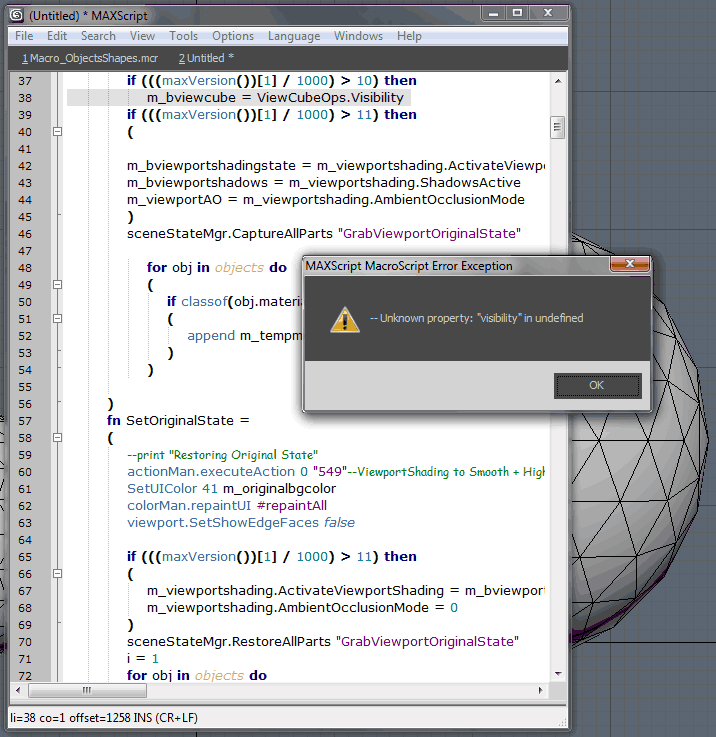
This script give me an error, "visibility" in undefined.
I'm using max2009 64bit. Anyone can help me?

Thanks.

Attachments

edit that line

Anubis · 2011-06-22

Hi r3ynard,
just delete .Visibility from that line, ie it s'd look like this:

if(((maxVersion())[1] / 1000) > 10 and ViewCubeOps != undefined) then

cheers

Still Error

r3ynard · 2011-06-23

Hi Anubis,

Sorry for double posts earlier, coz my Internet is bit slow here.
Anyhow, the script still give me error when I deleted the .Visibility from the line.

Attachments

ravenslayer · 2011-06-23

hey r3ynard did you press ctrl+e to evaluate the script after you adjusted it?

i'm going to make sure i fix this in the next update but it must be because you used the clean 3ds max script or something simular that disabled a few standard max functions

tnx for helping him out :)

ravenslayer · 2011-06-23

tnx for helping him out anubis :)

Error in Script

r3ynard · 2011-06-22

This script give me an error, "visibility" in undefined.
I'm using max2009 64bit. Anyone can help me?

Thanks.

Attachments

Viewport and texture mess

Violet · 2011-06-15

Still does this in my version - may be something with my system?

Attachments

will look into it

ravenslayer · 2011-06-18

tnx for informing me , could you give me your system specs, max version and what bitversion it is

i think this might be caused by the viewport capturing too fast while the viewport isn't updated entirely yet

r3ynard · 2011-06-22

These are the specs of my system:
Intel Xeon X5355, 4GB Ram
Quadro FX 4600
Windows XP 64bit, 3dsMax 2009 64 Bit.

fajar · 2011-06-13

some thought .... maybe you can add callback when max close or save file, it autmatically save grabbed viewport in current directory and same name as original max file.

thanks

my problem fixed

harumscarum · 2011-06-03

yeah i'm one of those who delete AutoCamMax in order to get rid of viewcube.

and here i have some more suggestions:

1. forced expert mode (for better image proportions)
2. disable image frame buffer on capture
3. automatic filenames "customprefix_date_time.png"(would be useful for dialogless mode)

Thank you for efforts! best screenshot tool for max

tnx :)

ravenslayer · 2011-06-03

ahah yeah that's probably something i can't check for in my code :)

i'll look into those suggestions, so consider them added to the list!
tnx

and i added an extra check to the script incase the viewcubeops isn't available

great script!

harumscarum · 2011-06-03

must be great tool - i was always needed bigger resolution screenshots
but for me it doesn't work under 2011 and 2012 (image attached)

and one suggestion - would be great to be able to assign individual shortcut to run script without dialog (with last settings applied)

Thank you!

Attachments

problem

ravenslayer · 2011-06-03

tnx for the suggestion

about your problem, that is very odd because the viewcube has been inside 3ds max since 2009
What version of max are you running? is it 32 or 64 bit? design or the standard?

rs3d · 2011-06-03

Ambient Occlusion error message in 2008 even though the
option is blacked out in the script's UI... And thanks
for this useful script :)

Ambient Occlusion error

ravenslayer · 2011-06-03

Hey there rs3d

I updated the script and it should be working fine now
I forgot to add some colons at a multiline if statement

and tnx glad it's useful to you :)

More options :)

rs3d · 2011-06-03

Excellent, thank you!

Would be nice to have some more options, for example
Viewport Background Color, Disable OSD, Force Viewport
Anti-Aliasing, etc...

ravenslayer · 2011-06-03

tnx for the suggestions.

The disabled OSD already happens for max 2010 and up but the function doesn't work for earlier versions. Perhaps i can find another way for earlier versions.

beter AA is something you'd have to achieve by taking bigger screenshots and scaling them down i'm afraid. I've searched for ways to set AA for max but only found some external applications from nvidia and ati that would allow this.

Viewport background isn't a problem so i'll add it in the next version

for future updates i'm also planning on having the option to make the script automatically load the screenshots and all passes into photoshop with the right blending modes etc...

other suggestions are always welcome