Ghost Keyer 2 will allow you to key objects without having to select them. You can create custom groups of objects that will be keyed together.
Script
By MATSCRPTART · Credited author: Matthew Dicks · 2008-12-02
Tags: Animation, selection, key, set
Ghost Keyer 2 will allow you to key objects without having to select them. You can create custom groups of objects that will be keyed together.
Updated 12-4-08 Undo Support Added
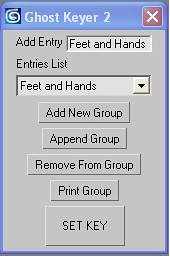
This Script will allow you to set keys for objects even when they are not selected. The idea is to avoid having to stop workflow while animating to choose same objects everytime you need to set a key. Just decide which objects will most likely have keyframes set at the same time and add them to the list.You can create custom groups of objects that will be keyed together.
To create a new group Enter a name for the selected items in the Add entry area then hit Add New Group.
Add or subtract items from the currently selected group in the drop down list using the Append Group and Remove from Group buttons.
To set a key select a group from the drop down list. Then Press Mark Key whenever you need to set a key.
Use the Print Group Button to list the currently selected items stored in the current group in the drop down list. The objects will be printed in the lower Maxscript Listener Window.
See Video Tutorial for demonstration of use.
VIDEO TUTORIAL http://www.youtube.com/watch?v=XRcOupoqiUA
Installation Notes: Ghost Keyer 2
Put Ghost Keyer 2 in your scripts / startup folder Run Ghost Keyer 2 From Script Menu in max
User Interface Category Ghost Keyer
I am still making Ghost Keyer 1 available because it has an action wich can be binded to a hotkey. Binding to hotKeys is currently not available for ghost keyer 2.
Installation Notes: GHOST KEYER_1 Run GHOST KEYER_1
User Interface Category Ghost Keyer
Installation Notes: GHOST KEYER_1_W ACTIONS Put GHOST KEYER_1_W ACTIONS
Put GHOST KEYER_1_W ACTIONS in your scripts startup folder , restart max
User Interface Category Ghost Keyer
MATSCRPTART · 2008-12-03
12-3-08
Just Fixed it. Works great now. Be sure to put Ghost Keyer 2 in Your Scripts Startup folder.