ScriptSpot

Script

Get Materials (one click!)

By rode3d · Credited author: Hernan Rodenstein · 2014-04-07

Version
1.03
Version requirement
3ds Max 2012 and higher
Date updated
2025-01-15
Votes
6
Download
Download
Description

A very simple but EXTREMLY USEFUL script you will use all the time!

With just one click it opens the Slate Material Editor and displays all the materials for the selected objects well organized in a clean view.

Forget about the annoying material picker tool. Add this simple button to your toolbar and every time you want to see the material/s for your current selected object/s just click the button and... Voila!

It will save you a lot of time!
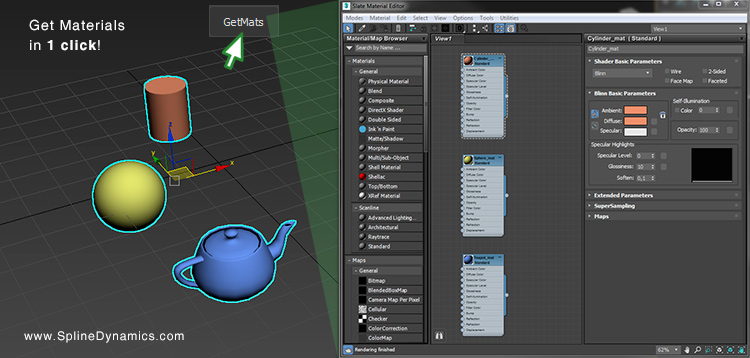
INSTALLATION: Just drag the script to any viewport, go to Customize -> Customize User Interface -> Toolbars tab -> choose Spline Dynamics - free scripts category. Drag "GetMaterials" to your top toolbar. Ready to use!

Note: This is a free and open script. You may use it or modify it as you like. I provide no support or warranty for it. Use it at your own risk.
I hope you enjoy it!

Additional Info

It comes in 3 versions:

GetMaterials.ms: opens the Slate Material Editor, cleaning the default view.

GetMaterials_newView.ms: opens the Slate Material Editor in a new view.

GetMaterials_CompactMatEditor.ms: opens the Compact (Classic) Material Editor, overwriting the first slots.

The latest versions of these scripts will be always available at this page under the name 'Get Materials (one click!)'.

Tags: Material, Material Editor, materials, Slate Material Editor, show materials

Comments (21)

Updated!

rode3d · 2024-04-23

Now it works properly for all 3dsMax versions!
Cheers!

Error in 3dsmax 2021

d1myan · 2022-12-27

Error on 3ds max 2021. It worked fine on 3ds max 2019
if the View 1 tab already exists, it cannot delete it, and 3ds max exits with an error
Is there any way to fix this? A very convenient scenario was

It doesn't work

npelouin · 2020-11-03

Script doesn't work on 3ds Max 2020, nothing is happening. I tested the two versions on two different computers. And I can't add it to my toolbar. Strange.

The script was succesfully tested on Max 2020 and 2021

rode3d · 2020-11-04

What do you mean you can't add it to your toolbar?
That's very strange. It looks like a 3dsMax temporary error, not a script error.
Did you have this behaviour with other scripts too in the past?

npelouin · 2020-11-30

It's ok! The script works now! I've just reinstall 3ds Max 2020 and everything is ok. Sorry for my comment!

npelouin · 2020-11-30

It's ok! The script works now! I've just reinstall 3ds Max 2020 and everything is ok. Sorry for my comment!

Edit Create just one temporary view

drunkenmaster · 2020-04-20

If someone wants to keep all existing views, and don't want to create a bunch of new views here is edited version below. It creates one new temporary view called "TEMP" each time you use a script, but keeps all costume created views.

macroScript GetMaterials
category:"Spline Dynamics - free scripts"
tooltip:"Get materials"
buttontext:"GetMats"

(
-- *** Opens the Material Editor and shows just the materials for the selected objects ***
if (selection.count > 0) then
(
sme.Open()
--DELETE AND CREATE A NEW VIEW
--sme.DeleteView 1 false
sme.DeleteView (sme.GetViewByName "TEMP") false
NewView = sme.GetView(sme.CreateView "TEMP")
--POPULATE THE VIEW
for obj in selection do
(
NewView.CreateNode obj.material[0,0]
)
--ARRANGE THE VIEW
actionMan.executeAction 369891408 "40060"
)
else
(
messagebox "You must have at least one object selected!"
)
)

make slate thumbnails big as a default, or on hotkey

amitshneor · 2019-08-10

that script change my life ! its great !
now i have a question if someone knows :
is there a way , a preference or a maxscript , to make the nodes in the slate matrial editor be big and not small and as a default for new creations...?

i know of the double click and the preview window, i mean all the nodes in the view...

Thanks in advanced !

3ds max 2020

campy · 2019-05-07

Cheers. Working and pretty useful.

Great addition!

rode3d · 2018-07-02

Thanks Aleksey :)

New update

rode3d · 2018-05-14

Just added a new version of the script that shows the materials always in a new view into the Material Editor.
Both work in 3dsmax versions 2012 and higher.

Update 2016

dungoc2190 · 2018-05-11

Plesae Update version 3dsmax 2016!!! Thanks you very muck

dmitrybelonosov · 2016-12-22

Good idea! Thank you!

Bormax · 2016-06-20

Thank you!
Script looks useful, but it cleans all my opened views of Mat editor every time I use it. Would be great if materials of selected objects will be displayed in a new view and all existing views will be kept as they are.

This is cool~

suvi · 2016-06-16

Thank you Hernan~
I used to search for like this function.
It would be help so much for me.
And could I use it with after create icon that name of "rode3d" ?
As I see there are only text button.

select by face

charzamm · 2015-12-15

Hello, this is a great script, thanks so much. do you know of any that will allow me to do the same but only select by face so i can get which multisub its using to show up right away in the display. thanks!

ice-boy · 2014-04-14

sometimes when using the script it deletes all the ''views'' in the slate material. only view 1 is left.

rode3d · 2014-04-14

The aim of this script is to display the materials for the selected objects in a clean view, to give you quick access to them. If you already have the Slate Material Editor opened, the script will clean the current view and display just the materials you asked for.
If you want to modify the script to work as you need, please feel free to do it.
Cheers!

cool script! thank you

harumscarum · 2014-04-11

very useful! thank you very much
any way to modify it in order to display material with hidden unused slots?

thanks!

rode3d · 2014-04-11

Glad you like it. I'm afraid the commands from material nodes context menu are not scriptable. Sorry!