
ScriptSpot home

Gamma On&Off (shorcut)

Downloads

Release history (1)
  • Version 1.2Listed version

    Listing updated

    No download linked to this version

Other files (2)
3ds Max compatibility
Unknown
Community compatibilityNo compatibility reports yet

No reports yet for the available releases.

Community reviewsNo reviews yet.

Listing details

Version
1.2
Author’s update date
Legacy votes
16
Listing created
How compatibility works

Compatibility comes from the author’s supported range or requirements in the original listing. A tested version records what the author tried.

“2020 unconfirmed” in the catalog means support for 3ds Max 2020 is still unknown.

Community reports record successful tests on specific releases.

Posted by

tiagodmed

Credited author: Tiago Medeiros

More by this author

Description

New version with the enhanced user interface (1.2)
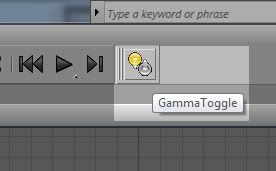

This is a simple script to facilitate the work of users, it creates a shortcut to be placed in the inteface of the 3ds Max for turning on or off the gamma 2.2.

The gamma adjustment is pre-configured but can be easily changed according to the needs of each user.

To install: Copy UI folder to your 3ds max folder. Run script 3dVício_GammaToggle.ms (...Autodesk\3ds Max 2010\ui\macroscripts) In menu Customize\Customize User Interface\Toolbars drag the button for your interface.

Comments (5)
fajar

UI Mode

Hey pal I made it for you UI version for gamma on/off, just copy the text bellow on your maxscript editor .....and you know the rest.
Made using max 2009 thats not support affect color and material editor correction yet.so you can add the rest


(
	Global gammaChanger

	try (destroyDialog GammaChanger) catch()
	
	rollout GammaChanger "Gamma Changer" width:135 height:124
	(
		spinner spn_Gm_Val "Gamma : " pos:[35,42] width:91 height:16 range:[0.01,2.2,1.8] type:#float scale:0.01
		GroupBox grp2 "Bitmap Files" pos:[4,65] width:129 height:57
		spinner in_Gamma "Input Gamma    " pos:[22,81] width:108 height:16 range:[0.01,5,1] scale:0.01
		spinner Out_Gamma "Output Gamma " pos:[22,100] width:108 height:16 range:[0.01,5,2.2] scale:0.01
		checkbutton EnbGamma "Enable Gamma/LUT" pos:[7,18] width:120 height:21
		GroupBox grp5 "Setting" pos:[3,1] width:129 height:63
		
		
		on GammaChanger open do
		(
			if IDisplayGamma.colorCorrectionMode == #gamma then 
				(
					EnbGamma.checked = true
					spn_Gm_Val.enabled = true
					in_Gamma.enabled = true			
					Out_Gamma.enabled = true
				)
				else
				(
					EnbGamma.checked = false
					spn_Gm_Val.enabled = false
					in_Gamma.enabled = false			
					Out_Gamma.enabled = false
				)
		
				spn_Gm_Val.value=IDisplayGamma.gamma	
				in_Gamma.value=fileInGamma
				Out_Gamma.value=fileOutGamma
		)
		on EnbGamma changed state do
		(
			if state == on then 
			(
				IDisplayGamma.colorCorrectionMode = #gamma
				IDisplayGamma.gamma = spn_Gm_Val.value
				fileInGamma = in_Gamma.value
				fileOutGamma = Out_Gamma.value
				spn_Gm_Val.enabled = true
				in_Gamma.enabled = true
				Out_Gamma.enabled = true
			)
				else 
			(
				IDisplayGamma.colorCorrectionMode = #none
				spn_Gm_Val.enabled = false
				in_Gamma.enabled = false			
				Out_Gamma.enabled = false
			)
		)
		
		on in_Gamma changed val do 
			(
			fileInGamma = in_Gamma.value
			)
			
		on Out_Gamma changed val do 
			(
			fileOutGamma = Out_Gamma.value
			)
		
		on spn_Gm_Val changed val do
			(
				IDisplayGamma.gamma = spn_Gm_Val.value
			)
	)
	CreateDialog GammaChanger 135 124 style:#(#style_toolwindow,#style_sysmenu)
)
titane357

reload map in gamma 2.2

it you be great to bundle the script with an another to reload selected objects diffuse map in gamma 2.2 :-)

tiagodmed

Great idea! In a hurry I did not even think about it, thanks John!

JokerMartini

Here you go!

macroScript msGammaToggle category:"JokerMartini" tooltip:"Gamma-Toggle" silentErrors:hideErrors
(
if (IDisplayGamma.colorCorrectionMode != #gamma) then
(
IDisplayGamma.colorCorrectionMode = #gamma -- enable Gamma (don't modify)
IDisplayGamma.gamma = 2.2 -- adjusts the gamma to 2.2
IDisplayGamma.affectColorPickers = false -- disables Affect Color Selectors (to enable this option, use "true")
IDisplayGamma.affectMEdit = false -- disables Affect Material Editor (to enable this option, use "true")
fileInGamma = 1.0 -- adjusts the Input gamma, in "Bitmap Files", to 1.0
fileOutGamma = 2.2 -- adjusts the Output gamma, in "Bitmap Files", to 2.2
)
else
(
IDisplayGamma.colorCorrectionMode = #none -- disables gamma (don't modify)
)
)

harumscarum

thanks!

it very useful for me - but is it possible to make TOGGLE in order to use one shortcut to on/off gammа
thank you