ScriptSpot

Script

FilePathFinder Pro & Light versions

By Kstudio · Credited author: Oleksandr Kramer (Kstudio) · 2009-06-15

Version
4.17.01
Version requirement
3ds Max 2016 and above
Date updated
2025-05-01
Votes
415
Download
Download
Description

Using the FilePathFinder you can be sure that you have complete control over external links into your scenes.

Asset tracking features include support for XREF files and easy linking with external files.

Using the FilePathFinder (and Batch Render&Relink), you can search for missing assets and relink external files.

In addition, files that are linked to selected objects are displayed in Interactive Mode, and bitmap textures can be toggled and placed within the Material Editor.

Also with this tool, you can easily make an archive a 3ds Max scene.

Note that FilePathFinder supports the highest number of asset types of any plug-in.
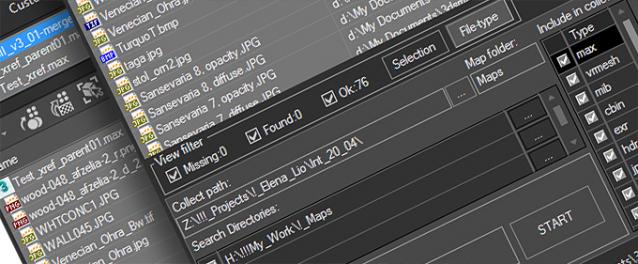
 

The Batch Render&Relink tool helps manage your asset files into the 3D model and material libraries in Batch Mode.

BR&R is capable of rendering thumbnails for 3D models, materials, and IES photometric files.

Batch Mode makes for an easy way to gather and compile many assets at once.


The new version of FilePathFinder is released with support to 3ds Max 2026

and many new features that improve managing scene assets

FilePathFinder Pro version 4.17.01

  • Adds support to 3Ds Max 2026
  • Play IFL, and animated GIFs directly in the list view
  • Play IFL and animated GIFs in the external Asset Viewer
  • Ability to change selected assets directly from the Asset Viewer using keyboard shortcuts
  • Adds an ability to include/exclude search directories by filename
  • More accurate material/texture placement in SME
  • Drops support to light theme
  • Fixes an issue with including/excluding search directories by filename
  • Fixes an issue with searching, relinking, collecting, and archiving the content of IFL files
  • Fixes an issue with relink assets in batch mode for Demo version [Batch Render&Relink]
  • Fixes an issue with renaming external scene links with status #Found
  • Fixes some issues with relink assets using exclude directories
  • Fixes a bug with relinking assets in huge scenes
  • Fixes a bug when using the tool together with Materials Manager and Models Manager
  • Some other optimizations, fixes and speed improvements

See the full list of history changes on this page - Update History.

Features:

Asset Tracking

  • Search for missing assets
  • Relink external files
  • Collect external files
  • Archiving a 3ds Max scene
  • Ability to exclude files from collecting by type of file
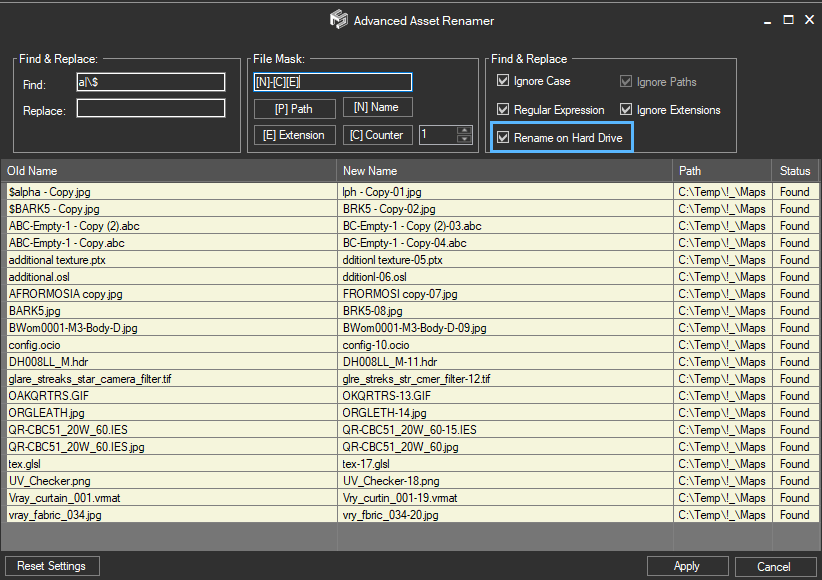
  • Advanced Asset Renamer
  • Removing links from a scene
  • Ability to collect Asset files via clipboard and drag&drop method
  • PRO version includes the “Batch Render&Relink” tool for organizing Asset files for 3d Models and Materials Libraries in the batch mode
  • Support to xRef files
  • Batch Relink multiple files using “Fast Mode”
  • Support to almost all known renderers and plug-ins.

Selecting objects, work with materials and textures

  • Convert & Resize Images [PRO version]
  • Select objects by their links to files
  • Displays in interactive mode a list of files linked to selected objects
  • Place Materials and BitmapTextures into the Material Editor
  • Show/Hide bitmap in the viewport
  • Opening the files into the external application.

Misc Features

  • Auto-check for updates
  • Displays thumbnails for Bitmaps, 3d models, Proxy, IES, Material Libraries and other file-types (include formats HDR, EXR, PSD and others)
  • Various methods of display files in list: by type of files, linked to selected objects, by status, by mask of name
  • The “Batch Render&Relink” tool for rendering the thumbnails for 3ds Max scenes, Material Libraries and IES files
  • Collect the preview thumbnails with source files
  • Unostentatious and “Transparent” the demo-version
  • User-Friendly interface
 

Videos

Tags: bitmap, map, utility, workflow, relink, find, select, texture, hdri, xref, Proxy, VrayProxy, collect, ies, ifl, pipeline, organise, MentalProxy, PointCashe, SpaceWarps, sort, GroundWiz, Displace, Track, external file, merge, drag&drop, Slate Material Editor, asset file

Comments (48)

todor · 2021-06-08

Very cool script!

roamn · 2013-12-03

And is process automatical please? renaming files manually on HDD (in windows) is not an option for me of course because there are tons of textures.

So please, is the process automatical?

Kstudio · 2013-12-04

Now possible to easily rename only one file with link.

In the future i extend the API for add the ability to write extension for customization of process.

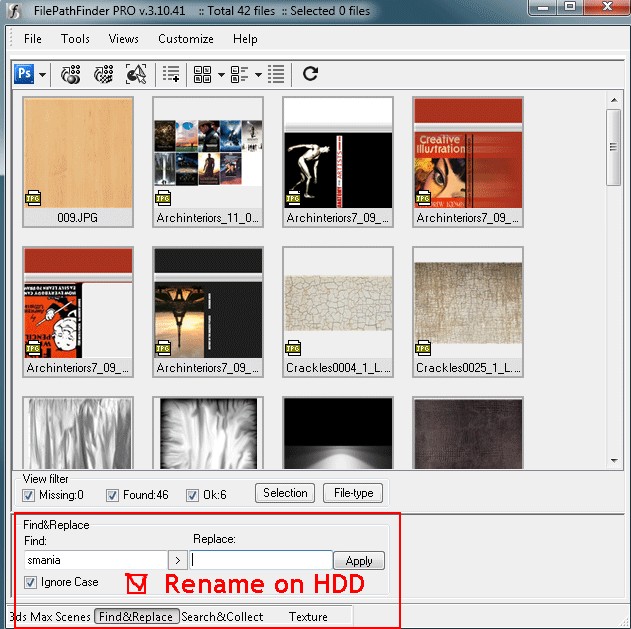
Also i have a plan for add the ability to rename links on HDD in the section "Find&Replace"

roamn · 2013-12-01

Does this script support renaming the texture name both in 3ds max and in windows/HDD, e.g. simple.jpg to redgreenyellow.jpg both in 3ds max but also in windows? I need to rename the textures files. is it possibůle

opcion de renombrar texturas donde esta?

jnls · 2019-03-23

en que version se puede renombrar las texturas en 3DS MAX y en el HDD? tengo la version 2.92 y no existe o solo es una a una? estaria mejor que se pudiera renombrar las texturas en max y el hdd masivamente o en grupo, porque les falta esa opcion...

Mass rename links and files

Kstudio · 2019-03-25

Current version supports to rename only one file and external link using the menu-item "Rename Link&File" as on video below at time 25:10.

https://youtu.be/tMLwzes3mDs?t=1510

But  3rd version of Project Manager ( and later the FilePathFinder) will have ability to mass rename links and files.

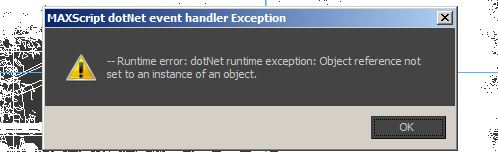
Runtime error

paranoidx · 2013-07-21

Im using demo mode with PRO version before purchase, don't know why but this is the error I got.


My .NET is 4.0

Kindly assit,

Thank you,

Kstudio · 2013-07-21

Please generate the bug report (menu "Help" ==>> "Create support Request")

If you can not run the FilePathFinder, then start the script SupportRequest.mse by dragging it into viewport.

You can find it in this directory

C:\Users\[USERNAME]\AppData\Local\Autodesk\3dsMax\[20XX]\ENU\scripts\TrackScripts\FilePathFinder\

Thanks for bug-report.

fajar · 2011-12-30

Got this error when finished updating and run the script


 My Dotnet is complete n updated


Kstudio · 2011-12-31

Maybe you're using an older version of the Project Manager and run it before running the new version of FilePathFinder.

Restart the 3ds max and try again.
It must work.

Not reccomend for using the PM and FPF on one session of 3ds max.
The Project Manager have all features of FilePathFinder and has not reason for using both programs on one computer.

fajar · 2011-06-23

This is pos about file path finder pro or light ? quiet confused with your writing

UNINSTALL way?

peprgb · 2011-05-20

Hi, after searching long the web....is there any possible way of unisntalling this script? would appreciate some info on this

Thanks,

Kstudio · 2011-05-20

The last version has uninstaller.
Download it, drop the mzp file into viewport and turn on the chekbox "Uninstall" .

simmsimaging · 2011-05-02

The super slow linking of network pathed images continues to be an issue. It can literally take 10 minutes to re-link an image that is on the same drive, but a different directory. Any clues? It's a great script in terms of functionality, but can be unusable for me like this.

(It's not always that slow btw - but not sure what triggers it since all jobs and my texture archives are all on the same drive in the same network location.)

/b

Kstudio · 2011-05-06

Possible reasons:
1. antivirus application.
2. The network path is specified on by ip-address (eg \\192yu168.0.1)

Maybe you should change your antivirus.
Or change the network paths to such \\servername ...

simmsimaging · 2011-05-06

Thanks.

No antivirus installed on this machine, and I use UNC path names (\\server\x\y\file.xxx etc)

Again, it only seems to be happening with FPP. Asset manager and Relink Bitmaps do not seem to hit this slowdown. Any other thoughts?

/b

Very slow re-linking of images

simmsimaging · 2011-03-04

I found using the search/collect function, without collecting, was running extremely slowly, like 10-15 minutes to go through two folders and re-link maybe 20 bitmaps, so I tried using the manual option (f4 on a single bitmap). This took 1min 50 seconds to re-link, even though I pointed FPF PRO right to the image. The same process in Asset Manager is instant.

Is there some setting that might be causing it to run super slowly?

/b

Kstudio · 2011-03-05

Open scene before relinking and run FilePathFinder.
Open preferences dialog (menu customize) and generate bug-report.
Also write about not standard programs installed on your system.

simmsimaging · 2011-03-06

I have emailed the bug report. Noted in the email as well, but I am not sure what "non-standard programs" would include. There are many things installed on the system, but I have another script (relink bitmaps) which I also use and it doesn't seem to run this slowly, at least it hasn't in the past.

replace texture ?

simmsimaging · 2011-03-01

So far the script seems great!

I seem to remember in one of the videos that it was possible to select a texture in FPF Pro and replace it with another one (which I supposed would replace all instances in the file?). I can't seem to do it - although there is a greyed-out option called "replace selection" in the right-click menu for all the textures in my current scene.

Is there a trick to enabling it, or am I just wrong about what it is for?

Thanks /b

Several methods to replace the links

Kstudio · 2011-03-01

There are several methods to replace the links to texture
Browse
Find & Replace
Set Path
Rename

About using "Replace Selection" watch video http://www.youtube.com/watch?v=x2LwASVQEfs
at time (5 min 25 sec)

simmsimaging · 2011-03-01

I watched the video but it is not clear to me what is going on there. What is actually being replaced? I have no idea what I'm looking at there :)

The find/replace function seems to do the trick. Is it possible to add a function so that you can just click on another bitmap to fill in the replace slot? Or maybe drag one from the thumbnails to the slot? It would save the manual retyping of the name every time you want to try quick iterative tests with different maps.

Kstudio · 2010-07-23

Hi Chico!
Thanks for nice comment
And nice proposition - welcome to Odessa, Ukraine!

Francisco Hermida · 2010-07-06

Great script! lots of features, we should work together :)

Kstudio · 2010-05-09

:)
Thanks KOKEKO!

KOKEKO · 2010-04-29

That's A MUST HAVE!
I just forgot about all stuff that i used before for painful process of maneging files in Max))))copy pasting round and round links...or relinking...
the material assigning feature is mind blowing)
I hope that this script will become a part of distributive of autodesk products line.It's more "complete" then standard max tools for such tasks)))

Kstudio · 2010-04-27

I found and fix a problem due to a bug in Max 2011 with decimal divider.
Thank the harum.scarum for helping.

Kstudio · 2010-02-12

Thanks Philipp.

Here you can view the latest screenshots of a future version of FilePathFinder Pro.

Latest screenshots Alfa-version

Due to the visual presentation of data will be easier to work with the scene.

philhxc · 2010-02-11

just bought it and its worth every penny!

Kstudio · 2009-10-01

FilepathFinder v2.5.08

  • Fixes issues with retarget files speed
  • Fixes issues with «Image view» mode

Kstudio · 2009-08-03

Lifted some restrictions on the demo version.
Only from 3 of August to 10 of August you can buy FilePathFinder Pro with 40% discount.
The price of this week 15$.
www.3d-kstudio.com

Kstudio · 2009-07-06

Backup needed only in case of a malfunction in the processing of 3dsMax parent scene and included xRefs.

trick · 2009-07-06

Alexander,

OK. I thought when you process 1 Max-file this Max-file is also backed up so you will have all assets in one location, ready for backup and/or transporting, if neccessary.

> And one very, very small

Kstudio · 2009-07-06

> And one very, very small thing: the first tab should be "search" instead of "searh" ;)


Thank you - will be fixed. :)


--------------------------------------------------------------------------------

Backup max file - Quote from Help:

Creating the Back-up – before the operations of 3dsMax file processing, files are copied to the Backup folder along with the textures, or, if the textures can not be collected, to the project file folder.

In Incremental mode, the Backup folder’s name is added with the time when process of file’s operating has been started, for example “Backup_Th.15.5.2009.09h.50min.”

Please kindly note, the Backup folder is created only when several 3dsMax scenes are worked on in automatic mode.

Creation of backup folder is no purpose when working on single scene

(there are standard tools for such matters).

www.3d-kstudio.com

trick · 2009-07-06

Alexander,

Great! Looking forward to that :) If you keep developing at this speed I don't need to work anymore ;)
Did you find out why Max backup does not work ?
And one very, very small thing: the first tab should be "search" instead of "searh" ;)

Kstudio · 2009-07-06

The next update will have the opportunity to display in the list, linked to selected objects of files.

Thanks Erik Clemens for the idea.

Also, version 3 will be completely resizeable

and add the ability to view thumbails for bitmaps.

www.3d-kstudio.com

Kstudio · 2009-07-04

Thanks Eric.

Further the utility becomes even more powerful and will perform all job instead of the user.🙂

www.3d-kstudio.com

trick · 2009-07-04

Alexander,

I have been using FPF on some fairly large projects now and I must say it's a very professional and solid utility. Especially showing the associated objects makes tracking errors and issues a breeze. It really tracks all used VRay assets without a hickup. Being able to collect all assets from my data disks and bring them over to my office/renderfarm and back makes those trivial tasks real fun. And of course listening to (and solving) my licensing "nagging" makes you my hero ;)

trick · 2009-06-30

Track,

Sorry if I expressed myself not so clearly. I never had problems with the network card in my Dell machines. I just said that network cards are integrated. I did however have some persistent problems with NVidia graphics cards and dual monitors, which were related to the motherboard, so in the end they were replaced 4 times in a row, before the problem was solved. So you can imagine the trouble with all my licenses !!

Anyway: I know I will love your tool, I just hope I don't have to fight your licensing. Consider me your client ;)

Kstudio · 2009-06-30

Really computers Dell such unreliable?

For 10 years of use non-brand computers at me only 2 times broke motheboards.

Upgrade workstation as a rule happens not more often than an once in a year.

If your computer breakage, you can address to me for a new key earlier

then half a year , certainly if computers do not break too often.

www.3d-kstudio.com

trick · 2009-06-27

That is a nice move !

But why not make some sort of transfer tool. Autodesk offers 2 authorisations when you are on subscription and also offers the PLU utility to transfer licenses yourself. So obviously there should at least be the possibility to do this for plugins. You can also build in a check whether one license with the same serial is used twice on the network, and therefore can not run. You can even generate a personalized key that can only be run on the network once: if this key is illegally used you simpy lose your license !!

I only need 1 license with 2 authorizations for work and home. But when I have computer trouble I really hope problems can be solved and are not limited by past authorizations !! Especially since network adapters in my DELL machines are integrated on the motherboard !! I did not have PC problems for quite some while but WHEN I have them they mostly come in waves.

Kstudio · 2009-06-27

New system of licensing.

Now at purchase of one version you can receive 2 licences at once and if necessary 3 more,

but not earlier than  in 6 month or  rarely.

Maximum quantity of licences for the user - 5.

www.3d-kstudio.com

trick · 2009-06-27

This script is not Freelancer friendly:

- you are only allowed to install it on one workstation, so if you have a laptop you need to buy an extra license

- if in that time you want to move the license to a new PC or buy a new PC you will have to wait 6 months before you can use this script on it...unless you buy a seperate network card, attach the license to it and move that to the new PC

...very user friendly...

Reminds me about VRayScatter licensing...and compare that to Itoosoft's Forest Pro...

The price for this script is perfectly OK...licensing surely NOT !

Saetar · 2009-06-26

FilePathFinder is the best script in the class for operations with external files and is better than Relink Bitmaps, r7_relink_assets and others.

Аdvantage:
1. Very convenient collector of files
2. Сorrectly finds all missing files and it is possible to remove them easily
3. Friendly interface
4. Find and replace files and many other things

I seldom buy something, but this script I recommend to buy all.

Kstudio · 2009-06-26

?

Yet did not meet analogues FilePathFinder with the same possibilities.

Show please still scripts which work with ALL external files,

Allow to search missing files, collect and sort files by filetype?

Choosing objects by their connection with file?

Have possibility conveniently to look through bitmaps?

To open bitmaps in Editors?

Elaboration of xRef files in automatic mode?

Renaming the links by mask?

www.3d-kstudio.com

kutsanan · 2009-06-26

36 dollars agaist free Relink script?

cagataykoroglu.blogspot.com