ScriptSpot

Script

Easy pivot

By grover_gol · 2012-06-09

Date updated
2012-06-14
Votes
8
Download
Download
Description


Description

“Easy pivot” allows you to set new position of pivot point with just one click .


How it works

If you selected one object. Run script. Choose one of 27 possible new pivot places.

If you selected several objects. Run script. At first pick main object. Then choose one of 27 possible new pivot places.

If you selected a group.  Run script. Choose one of 27 possible new pivot places for group bounding box. After placing pivot group opens automatically and group bounding box is selected.

Setup

1. Download and unzip "easy_pivot_setup_archive.zip". 2. For right installation in Windows 7 you need admin rights to change the "Scripts"  folder , which is located in the root folder of 3ds Max. To get these rights do this: right-click on the folder "Scripts", select "Properties", then in the "security" set full access to the current user. 3. After receiving administrator rights on "Scripts"  folder  changing, just drag and drop "easy_pivot_setup.mzp" in the 3ds Max window. In the case of a successful installation, this screen appears:  
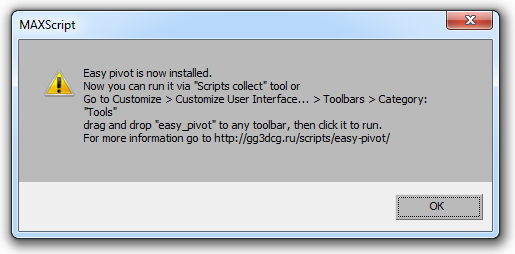
This means that the script was successfully installed.  Now you can run it via "Scripts collect" tool or go to: Customize > Customize User Interface... > Toolbars > Category: "Tools", find the list "easy_pivot" and drag you to a convenient toolbar.  

Tags: pivot, set pivot

Comments (14)

does not work in 3ds max 2017!!!

marche · 2016-08-26

Hello any chance an update for 3ds max 2017, I was using it in max 2016 and it was great a very usefull!!!

does work in 3ds max 2017

grover_gol · 2016-08-31

hi marche. For me it works fine in 3ds max 2017. Try to reinstall maybe.

Manual install

grover_gol · 2017-01-28

Hi March here is manual install archive. DOWNLOAD

Hi guys

grover_gol · 2012-06-18

About group pivot.

Unfortunately there is no way to update the position of a point in a closed group except cycling through the pivots by pressing W, E, R. So I decided to open it at the end of pivot placing. For me it's the most convenient way.

About encrypted scripts.

If I wanted to put ms file, I would have done it. Tell me, please. When you post an image to the Internet, then you are putting the source max file too, don't you? it seems to me that you don't. Everyone has the right to decide what to do. Thanks.

denisT · 2012-06-19

"Everyone has the right to decide what to do."

absolutely!
everyone has a right to encrypt 20 lines of his first code. and for sure everyone has a right to stay in kindergarten for the next year.

denisT · 2012-06-17

i ask this question almost everyone who posted an encrypted script... Is the code too bad and it's embarrassing to show it? or it's too clever to be shared?

su37 · 2012-06-16

Hi GroveR_GoL
select a group ,after run your script,group is opend
can you keep group is close ?

Refreshing the pivot

3dwannab · 2012-06-14

Hi, Love the script and I have no problems only a small one which I have noticed with other pivot scripts. But yours is the best one I used so far. So attached image. It hasn't updated the scale pivot point. Please note that this is a group. Its seem to work fine with ordinary objects so far. The only way I can seem to update the pivot point is to go to 'Hierarchy>Pivot>Affect Pivot Point' and cycle through the pivots by pressing W, E, R and maybe Minimising or maximising the view-port. Although this only happens every so often.

Attachments
  • move.jpgPivot refresh problem196 KB

Re: Refreshing the pivot

grover_gol · 2012-06-14

Hi, thanks for the tip. I know about this small inconvenience. Now I'm trying to solve it. Will soon lay out an updated version.

grover_gol · 2012-06-14

An updated version is now available.

fajar · 2012-06-11

Thanks

Hi guys

MerlinEl · 2012-06-11

Here is my old version , created at 30.10.2009.


 Lets learn to gather, no prob 😉 

Attachments

fajar · 2012-06-09

could you upload the ms file ? lets learn together