Script
Disable "Display Selected with Edged Faces"
DBy Digital Animation Services · 2014-11-18
- Version
- 1.0
- Date updated
- 2014-11-17
- Votes
- 2
- External download
- External download
Description
This script DISABLES the checkbox in the Viewport Configuration Dialog's "Visual Style & Appearance" tab labeled: "Display Selected with Edged Faces". If you use this maxscript, this checkbox will be disabled on: Max Open, Max Reset and Max File Open commands.
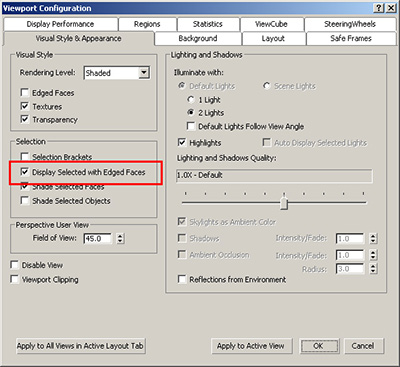
If you like the "Display Selected with Edged Faces" feature to be on most of the time, you should NOT use this script. To use this script, copy the enclosed maxscript file to the "scripts\Startup" folder of the root 3ds max installation. e.g.: C:\Program Files\Autodesk\3ds Max Design 2015\scripts\Startup.
Version Information: This script will work for3ds max 2013 - 2015.
Additional Info
The 3ds max documentation indicates that this feature is "OFF" by default yet I have found it to be ON by default in 2015.
Honestly, I can't remember if that is true in earlier versions.
I like Edged Face mode but I want control over whether it is on or off as I work, without having to disable it in each viewport.
Edged faces can quickly be turned on and off (for the entire scene) with the "F4" hotkey.
Download note:
For some reason, a direct link to the file from scriptspot is not working so you will have to go through my website's "Maxscript" tab at the DAS homepage. Sorry.....
 spacefrog · 2014-11-19