ScriptSpot

Script

Custom Graphic User Interface Modifier

By MKlejnowski · Credited author: Marcin Klejnowski · 2012-07-19

Version
3.1
Version requirement
3ds Max 2009 +
Votes
10
Description

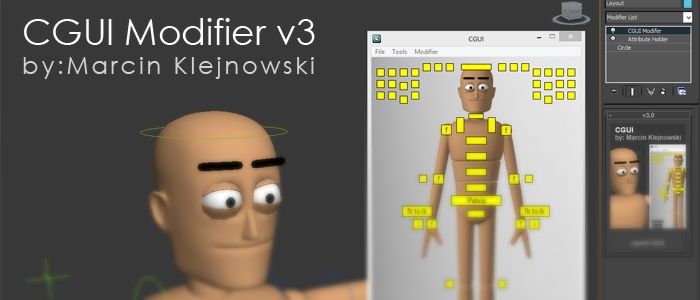
Custom Graphic User Interface

-----------------------------------------
Information
-----------------------------------------
This is a scripted modifier plugin which allows the creation of a GUI picker tool with out any knowledge of maxscript. This supports up to 100 buttons with the ability to customize their: size, position, color, text , style , and function. Now Supports MaxScript and group features. ALSO NOW SUPPORTS IMPORTING AND EXPORTING

-----------------------------------------
How To Install Correctly
-----------------------------------------
Save files usings 1.5 or lower will not work with 2.0 or higher
Simply place the script into one of the provided locations below. A bug prior to
version 1.5 required to have the script in two location for it work from start up.

Example Locations:
C:\Program Files\Autodesk\3ds Max 2011\Scripts\Startup
C:\Program Files\Autodesk\3ds Max 2011\plugins

-----------------------------------------
Version Log
-----------------------------------------
-- 3.1
-fixed a bug which would delete the undo history when the MaxScript event was used on a button.

-- 3.0
-UI redesign and overhaul (trimmed a lot of fat)
-FINALLY added an import and export feature (sorry it took so long)

-- 2.1 fixes
-Added buttons which used the right click feature to work with tablets.
-Fixed bug which messed up group values when trying to rename a group
-Fixed bug which crashed the tool when trying to delete refnodes from the list
-Fixed bug which used to replace the wrong nodes in the ref Node section

-- 2.0
-Added new maxscript feature, groups, additional button options
-Cleaned up the UI

-- 1.5 fixes
-Should have finally fixed issues people have been having when trying to launch the edit rollout causing an error........I HOPE

-- 1.4 fixes
-Finally figured out the true problem of "Unknown property" error. Install into "\Scripts\Startup" directory (can be used to fix previous builds) I was wrong Sorry
-Fixed bug when a button was being used in between two which where. (Example, Button 01 and Button 03 where ON but Button 02 was OFF an error would occur if you pressed Button 03
-Added a minimize button feature. (Great Idea dori3d)

-- 1.3 fixes
-Added information in the help options and added in the help rollout a button which will open the folder to the location the script needs to be moved to in order to work from start up.

-- 1.2 fixes
-Added drop down list to help switch between multiple CGUI modifiers with in a scene
-Added a help rollout with links to script page for future updates and link to how the plugin works on vimeo. Plus and email where to send bugs too.
-Fixed bug causing the controllers not to redraw their colors when you first launch the tool

-- 1.1 fixes
-"Unknown property: "CollectBtnInfo" in undefined <<" error when opening the edit options.

Videos
Attachments

Tags: rigging, gui, picker

Comments (28)

decrypt and we can continue developing it?

pixhellmann · 2020-06-05

I also have couple of improvements, I'd like to add:
- copy / paste button parameters (incl. mirror in X)
- adding rightclick maxscript commands to a button
- fixing the save load issue

it seems you don't want to continue this nice modifier.
can you please upload an unencrypted version?

cheers,

philipp

Saving layout ? any issue ?

kaneda · 2018-12-15

Hello Marcin.

First I wanted to say thanks for that great tool, probably one of the best in that category on 3dsmax.
Obviously there is a few details that could be better for a daily use when you have many characters to setup with that tool in order to speed up the process but still that's not the point of my email.

I have many characters with excately the same number of bones and hierarchy, all of them rigged with biped and Iam trying to save or export a layout of my first GUI whitch is finished to import it on the other characters just to keep the whole interface and buttons no matter if they are not functionnals. Of course if they are it would be great but Iam trying to avoid doing thoses buttons many times again and again witch is a huge work. (It takes me around 2 hours making all that buttons on the first character and I have about 25 characters to make :( so you can imagine )

I try to export and import but I got a maxcript error on import so I wonder if it's possible or not and maybe you have a solution for me.

Thanks in advance !

An Idea

Jaber_Zaker_Joybari · 2014-09-01

Idea
can you add a very useful feature? Turning Your Idea Into a Product is so dificult but if you can you can be much ahead of your rivals. The idea:
Something like MotionBuilder. We have several characters with same and special naming system.I mean Ch1 Main_Cnt,spin01cnt,spine02cnt and etc... Ch2 Main_Cnt_aa ,spin01cnt_aa,spine02cnt_aa and Ch3 Main_Cntbb ,spin01Cnt_bb,spine02Cnt_bb .Next

We do as shown in the tut.The idea is that just once (only one time) take time and assign Cnt to the buttons after that saving (for example) all the name of linked Cnt to button then load it then add prefix to it aa, bb,cc then for example select Chr2 [Main_Cntaa] creating Refresh button and after that because all Cnt is similar the second character are assigned to the buttons.I know that it is difficult to say in word so think of....but If it is Possible that would be a great feature.

again Thanks for sharing such script
Jaber Zaker

Jaber_Zaker_Joybari · 2014-08-23

First thank you to share this handy script.
Would you mind me asking, put ms file of the very beginning of this script for us to follow your steps, or at least tell us where to begins to create such script. Thanks again to share this script and pose store modifier.

Resizable Edit Menu

TimSormin · 2014-01-11

I don't know if I'm missing something simple, but when I tried to set up my first Picker I couldn't read the names of any of my ref nodes because the window was too narrow and all I could see was the first half of the names - which are all the same. Either a re-sizable window or a sideways scroll bar would be fantastic.

MKlejnowski · 2014-05-23

Sorry about the size of the list box. Again this is all in hindsight. I'm in the process of actually redoing the script and hopefully making it better. The new script will be more modular and have the ability to actually use more than just buttons (possibly sliders and more interesting controls). I can't promise that more than just buttons will be available when it is released but the script will be better tailored to adding new UI elements with out having to completely redoing the whole script.

Demo Rig

eagleeyez · 2013-11-28

Great script and features Marcin, is it possible to download a demo scene with rigged character to play with? it will make the learn curve less steep for most of us.

thanks.

PS: I'm yawning right now because of you :P

MKlejnowski · 2013-11-29

Im hoping to make a new tutorial video for the new version. I might post a version with loMax using the tool.

And on a side note is the yawning a good thing or a bad?

Thanks!

vindalsace · 2013-07-01

That would be great! Thanks. I look forward to seeing the next version.

MKlejnowski · 2013-06-09

vindalsace that is something in my to do list for this script. I will at some point provide a import and export feature to this tool.

How to export the GUI to another scene file?

vindalsace · 2013-06-07

Thanks for sharing this great tool!

Question for the developer and users: The CGUI picker seems to be saved in the max file where you initially created it, in the Object-Space modifier list.

How do you export a CGUI from one file into another file that has the same rig?

dori3d · 2013-02-27

Hi MKlejnowski, keep it up with the good work. Can't wait to see the new version. ;)

error

titane357 · 2013-01-30

3dsmaxdesign 2013x64 win seven
--Unknown property: UpdateBtnClrQuick" in undefined.
when clicking "edit" button in main window
Can't wait to see next version, looks like just what I need !!!!!!
Thanks

MKlejnowski · 2013-02-25

"titane357" This might sound odd but try putting the plugin into the startup and plugin directory. I really have no idea why it needs the overkill.

titane357 · 2013-02-25

hello MKlejnowski,
you are right, I'm the most stupid idiot of the planet....
It is sooo easy to install, how can I miss something.
Works fine !!! Thanks :-)

MKlejnowski · 2013-02-26

No your not stupid at all....Actually i am. Its a bug i finally have figured out. Gonna release a version 1.5 with the fix in place which would allow it to work by simply having it in the plugin directory. Also a 2.0 version with a bunch of additional features will be coming out soon. Just have to make some new tutorial videos and i will release it. THANK YOU EVERYBODY WHO HAS BEEN TELLING ME ABOUT THE ISSUES.

2013 error

dreamco · 2012-09-14

3dsmax 2013x64 PU 05 error:

--Unknown property: UpdateBtnClrQuick" in undefined.

Also the size editor with the logo itself should be accessed through the edit button to free more UI space.

Cheers

For all Bug Reports.

MKlejnowski · 2012-09-14

For anyone reporting a bug with the plugin please provide some more steps in the matter that you are getting the tool to get errors for you. Here are some things to try to get the plugin to work.

First and foremost install the plugin into the \Scripts\Startup directory and restart your 3ds max. If you do not want to restart max just drag and drop the file from which you put into the \Scripts\Startup directory into the viewport to execute the script. This step alone should fix and --Unknown property Error people are receiving.

dreamco
I just tested the script on Max 2013 X64 with the steps above and I am not receiving any errors at the moment. If you are still getting the error after trying the steps stated above then please provide me with steps on how you are getting your error so I may find a solution to it. I am also working on a version 2.0 which has cleaner UI and added features.

dreamco · 2012-09-16

I followed the steps and it works now. My bad :(

dori3d · 2012-09-11

Hi Marcin, and thank you for updating this very handy tool. I've just tested the 1.4 update and everythink seems to be OK. I dont know about the errors of the other guys here, although I've put it in max/plugins folder, it worked like a charm.

Keep it up with the good work, looking forward to it.. ;)

Amazing

benjaminF · 2012-09-09

Thanks a lot for this great script ! My vote !

Amazing script

malbers · 2012-08-30

I was looking for a script like this for a long time, I have some similars for maya but for 3Ds there none aviable. thank you very much from Cuba.

dori3d · 2012-08-26

Hi Marcin. I've been playing with GUI on my latest projecet and it was very handy. I'll like to thank you for making it public.
Image Hosted by ImageShack.us

After hours of work I've come with a couple of suggestions:

UI enhancements:
1. Sometimes we work with multi pannels and a minimize button for the GUI would be handy.
2. The height: and width: buttons in the top of the GUI are for editing the layout, and maybe you can put them in the edit panel near LoadImage... buttons. (to free more UI space).
Image Hosted by ImageShack.us

Morph channels:
Staying to the concept of filtering/exposing the objects/controlers you want, I was thinking about doing the same, but with morph channels. Collecting them first and exposing only what we need on the GUI. I dont know if it can be done with the GUI, but the idea comed from a tool I've builded for manipulating morph targets.
Image Hosted by ImageShack.us

Can't get it work in 3dsMax 2013...

UbiGuy · 2012-08-22

I have put it here : C:\Program Files\Autodesk\3ds Max 2013\stdplugs\stdscripts But I still getting an error. Any Idea?

MKlejnowski · 2012-08-22

Its a know issue I am trying to figure out. For now try the \Scripts\Startup directory. There is a work around until i get a permanent fix.

1.load 3ds max (fresh boot)
2.drag and drop script into viewport
3.should work from here on out(also at this point you want to load saved scenes)

Repeat at each 3ds max boot to get around this for now. Please post results if the \Scripts\Startup directory fixes the issue for you. Also would like for people to test this out in 2009 , 2010 , 2011 , 2012 , and 2012 32 and 64 bit version. I have it working from the \stdplugs\stdscripts directory on 2011 64 bit with no issues so i am trying to figure this out.

Thanks for your help guys.

Great tool for speeding workflow.

dori3d · 2012-08-15

Very useful tool. I'm testing it at work and it works smothly with max2012 x64. I'll post some screen shots of the scenes while testing it. During the work, some small ideas commed to my had and I'll like to share with you, if I can. You allready added a very useful feature I was about to ask (dropdownlist to switch between multiple CGUI).

Once again thanks for sharing such a useful tool and keep it up with the good work.

MKlejnowski · 2012-08-16

Any ideas to help improve the tool would be great. For now I'm possibly looking into adding a "MaxScript" feature allowing the buttons to perform MaxScript commands in addition to what they do now.

kimarotta · 2012-07-20

Nice plugin and creative... thanks