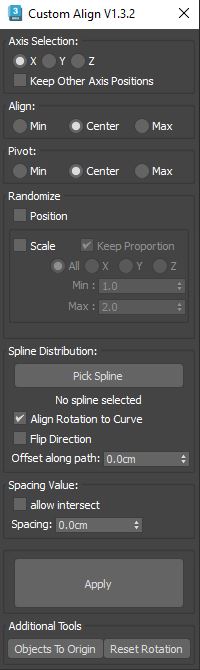
This script is intended to align objects with a given spacing. You can randomnize position and scale and choose between object center or object base, you can also align to min and max, this is especially useful for randomizing books on shelves or any similar task like populating supermarket shelves or if you have to evenly space any objects.
If your pivot are centered and you 've choosen base pivot, your objects will move from their initial positions, the opposite is also true so make sure you press "center pivot" or "base pivot" button first to be sure that all your objects share the same "type" of pivot.
the initial objects position will be kept unless you choose random position option.
Groups are treated like one object ( the pink dummys are automatically selected while object inside groups are removed from selection).
Installation : drag and drop in the viewport, then go to customize, customize user interface, tool bar, category "SimonScripts"
Tips:You can disable "Fixed Width Text Buttons" in customize, preferences, general, ui display, it will set the custom buttons to fit the size of their text
Update 1.1: the spacing spinner is now realtime, and i remove the beep sound when "no objects are selected" error message pops
Update 1.2: code cleanup and Bug correction , Object to origin button messed up with grouped object. I also added a "keep proportion" option on randomized scale. The objects pivot are now automatically set to the chosen pivot type (center or base)
Update 1.3: A bit of code cleanup and I added a new option to randomize scale only in the chosen axis or on all axis, also fixed the undo for the spacing spinner.
Update 1.3.1.:Minor update, just an UI element that need to be greyed out when randomize scale was off.
Update 1.3.2: Added spline support, you can now evently space different sized objects along a spline.
Update 1.3.3: the new function to scatter on spline was flipping objects and wasn't respecting initial ordering of selected objects. now it does, by default it uses x axis but you can use Axis selection if you need to order by a different axis. it stores object ordering in object user properties, if you need to change order you need to select object and use the button in the bottom of the script
Update 1.3.4: Slightly different UI. The script no longer changes objects' pivots, so you can now align by original pivot positions. This can be useful if you need to align objects on a path where each object has a different size and different pivot placement. You now have two "Min", "Center", "Max" settings — by combining these two settings you can get 9 possible placement alignments. I also added a function to "bake" positions onto the path using path constraints. You can use this function even without using the rest of the script: pick a path, place some objects on or close to the path (or use the rest of the script to place your objects), and it will create dummies at your objects' positions on the spline. Your objects will be parented to those dummies that are constrained to the path."
Update 1.3.5: New option to disable Spacing so that objects can be aligned without changing the distances between them, plus a new Anchor option to use the First or Last selected object as the reference point for alignment and/or spacing distribution.
Update 1.3.6:Previous version wasn't working well on very small objects, and a few other bug fix.