ScriptSpot

Script

Copitor

By zOffTy · 2011-03-07

Version
2025.1
Version requirement
Max 8 to 2025 !
Date updated
2024-10-04
Votes
124
External download
External download

Tags: copy, paste, save, backup, autoback, merge, temp, quicksave

Description

Copitor allow you to quick copy/paste selected objects to another Max scene or in another Max if you have 2 3dsMax open. I also like to use it like as a "quick backup" for try something, and to be sure to loose nothing :)

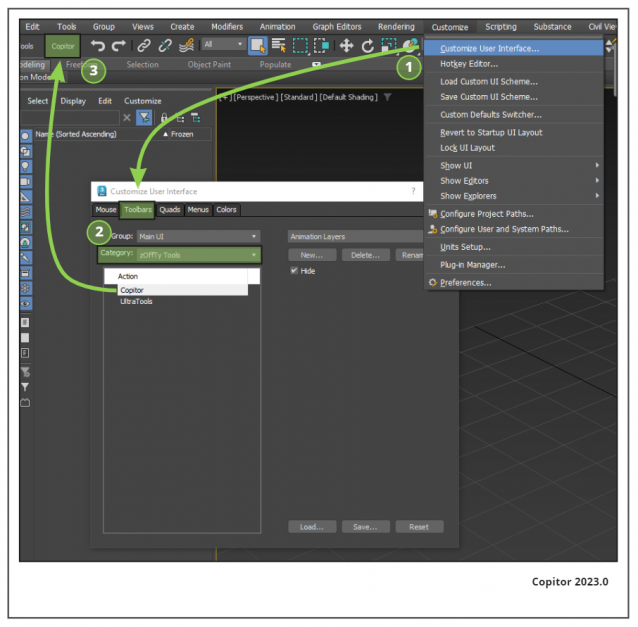
Installation: Drop The file in max viewport and go to Customize ==> Customize User Interface ==> Category: zOffTy Tools ==> Copitor

Copitor installation


Additional Info

What's new? 04/10/2024 v2025.1 -When you paste a selection from Copitor, you are now directly in Move mode. 02/10/2024 v2025 -Replaced Undo fonction by Thehold fonction, it should be more stable 23/04/2024 v2024.1 -Fixed undo issues with Max 2024 -Fixed selection issues when copy'ing selection 17/09/2023 v2023.3 -Fixed some issues about thumbnails refresh 01/04/2023 v2023.2 -Toggle save max version in copitor options -Thumbnails are now refreshed each time you are clicking on the Copitor dialog -Some tooltip fixed 27/01/2023 v2023.0 -Fixed some issues with 3dsMax 2023, now it's works better -Better refresh of the thumbnails 08/11/2020 v2020 -Copitor have 10 years ! -Tested and Working well on Max 2016 to Max 2020 -We can specify specific folder for all Slots. -Specific folder are working on Local or on LAN, with NAS for example -Fixed some minor issues 04/10/2017 v3 -Added Option button for toggle merge material from Copitor -Fixed some issues when running copitor for the first time 04/08/2017 v2.5 -Slot6 ONLY can have a special folder to use it on lan network with NAS 03/07/2017 v2.3 -tested on Max 2018, all seem to be ok 08/05/2017 v2.2 -fix the undo state hidding grid and wire no more! -thumbnail ratio change -add 1 more slot 28/11/2016 v2.1 -Position of Copitor is now saved. If you want reset the position of copitor, go in your autoback folder, and open "copytor.ini" then delete 2 lines of [DialogPosition] -Fix Thumbnails size -Fix the undo state always hidding grid and wire 05/05/2016 v2 -Better ui for 3dsmax 2014 and newer -add 5e slots -Fix some crash 07/03/2011 v1.61 -Added on Scriptspot http://www.scriptspot.com/3ds-max/scripts/copitor -Fix some crash 16/11/2010 v1.5 -Add a 4e slot 02/11/2010 v1.4 -Fix some crash 30/10/2010 v1.3 -Fix some crash 29/10/2010 v1.0 ! -Launch !
Comments (32)

Any reports of malfunctions in Max 2025

RobH2 · 2024-09-03

Do you have any reports of malfunctions in Max 2025. Occasionally, it will copy the mesh but when I open a new file to paste, it's not there and a completely different and old set of files are in each slot. Sometimes, when I paste, nothing happens.

Are you updating this awesome and loved script for Max 2025?

copitor 2024

mitviz · 2023-05-15

any chance of getting this for max 2024?

zOffTy · 2023-07-09

Hello Mitviz,

I didn't started to try on max 2024.
Do you have some error or issue?
Thanks!

copitor 2024

mitviz · 2023-05-15

any chance of getting this for max 2024?

Copitor

zOffTy · 2022-12-09

Hello all,
For info I will update soon Copitor to be 100% working with 3ds max 2023

Thanks,

zOffTy, Copitor owner

Copitor

zOffTy · 2022-12-09

Hello all,

DO NOT download the zip file in comment's, it's the wrong version.

I send a message to Admin to delete it. I hope he will do it soon.

Thanks,

zOffTy, Copitor owner

different copy paste folder

pietro3d · 2020-04-03

Very nice script. Bu since I use different scene project, I need to select a generic folder (like C:\users\Documents) for use copitor. So If I use different scene project, copy and paste are the same folder so It can be used with all scenes.
Thanks

Give

Bobby Parker · 2019-10-14

I gave $25 for your script, but never got an email, download link, or anything! I also emailed you from your website and got an error.

max 2019

nikilodio · 2019-07-08

Hi, please help, I need copitor 2019. Can you give me script?

max 2019

nikilodio · 2019-07-06

Hi, help please. I need copitor for max 2019.

Copy models between different Max versions

Vic Shx · 2018-04-02

I wonder if would be possible to use it to transfer models between Max 2018 and 2017
Currently is not possible.
This could give done giving the option to save in older version

aleksey.sheremetov · 2018-02-22

Hi zOffTy, thank you for such simple and usefull plugin - using it everyday.

Just have small quastion/request about it - is there a way to put copy/paste buttons on toolbar?

I usually have 2-3 instances of 3ds max open and exchange objects between them frequently - so it would be much faster to select objects and press "copy" on toolbar in one scene, and press "paste" in another scene. I attached screen shot how it could look like.

Also it would be great if I could assign copy/paste actions on keyboard.

Best regard, Aleksey

Attachments

download link

pyro777 · 2017-11-21

When I click the download link, (https://gumroad.com/l/Copitor)it takes me to another page, but I don't see a place to download the latest version. The only link on that page brings me right back here.

More slots?

rachka · 2015-03-16

Why not many more slots?

Made a few Changes.

locke · 2014-01-15

Hi ! Thank's for your Script, we use it a lot here and i made a few modifications, So i post them here if someone wants it.

Changes:
-Hide the grid for the preview, but put it back if was here before.
-Center the viewport to selection to make the capture.
-Change paste option to Auto-rename if Object Using the same name are already into the paste scene.
-Add a Fifth Slot
-Add a Clear All Slots Button
-Add a spinner to choose How Many slots you want
-Add a Refresh Button when working with several Max Scene in the same time, and copitor is already open in both.
-Make the floater Dockable + remind last dock positions + last number of slots choosen when re-opening it.

Thanks for making your code open !

Attachments

Thanks!

n0name · 2014-10-26

Это самый часто используемый мной скрипт. Спасибо.

titane357 · 2013-09-12

could be nice to have option like in merge tool : rename object or material name,... sometime it is a bit dangerous to paste in a file.

Must-have tool...

Naxos · 2013-09-12

Many thanks for this one !!

kyle108 · 2012-09-25

seems like after using copitor once, if i close and reopen the menu it appears blank with no buttons. is anybody else having this issue?

zOffTy · 2012-10-07

hi

@obaida @amisima, Thanks ;)

@kyle108: weird..What is your Max version?

obaida · 2012-09-24

Thank you very much "zOffTy" its important script . and thank you again for making it open source , so for that I modified it to add clean button (By holding SHIFT and pressing on image button) it will reset (paste button) and (delete the photo and max file) .

Great :)

amisima · 2011-05-07

Thank you for this! And another thank you for the source :) I've added "saveAsVersion:2011" at the end of "saveNodes" and now i can move stuff between 2011 and 2012 seamless :) Maybe it's a good idea to build those in :) Best regards

Thanks all :)

zOffTy · 2011-04-27

@omid3098, weird :/ Have you deleted all files in your #autoback folder?

@Barbiturat, mmmh I've not planned to add a clear button

@titane357, you can keep the grid if you want, just edit the script and comment these lines:
--viewport.setGridVisibility 1 off -- Cache la grille, cest moche!

Unknown system exeption

omid3098 · 2011-04-25

it seems there is something wrong here:
just copied a model from my scene and pasted into another clear scene.
it was working, but today I can not make it work any way.
I guess it may be related to scene units, because first time this happened was this difference. or maybe I'm wrong :-??
here is what listener says:

"I'm a virgin button !"
-- Error occurred in Pasteselected1.pressed(); filename: C:\Users\Consul1\AppData\Local\Autodesk\3dsMax\2011 - 64bit\enu\UI\usermacros\zOffTy Tools-Copitor.mcr; position: 3321; line: 64
-- Frame:
>> MAXScript Rollout Handler Exception: -- Unknown system exception <<

Barbiturat · 2011-04-05

Thanks! Very useful script!
Can you make "clear" button for Copy/Paste slots?

Great script! Just a minor suggestion...

vbn · 2011-04-04

Great script, zOffTy! Very handy for merging objects.

I have just one recommendation for improvement. I see that this script makes files in the project autoback folder. After I close the script and 3ds Max the files are still there. Wouldn't it be tidier and less resource consuming to make the script so that it deletes these temporary files after the objects are merged (or when 3ds max is closed)? I don't know if it's possible but just a suggestion :)

jsrocha · 2011-03-12

cool script man, thanks!

Jsrocha

titane357 · 2011-03-10

"Cache la grille, cest moche!"...
Nice script, but MY grid is nice ! When it deseaper it looks like a "bug".
Works well on 2011 x64. Thanks

Michele71 · 2011-03-07

Nice plug ;) Thanks you! One point to you :)

jinj · 2011-03-07

awesomeeeeeeeeeeeeeeeeeeeeeeeeeeeeeeeeeee
thankssssssssssssssssssssssssssss
many many many thanks for sharing