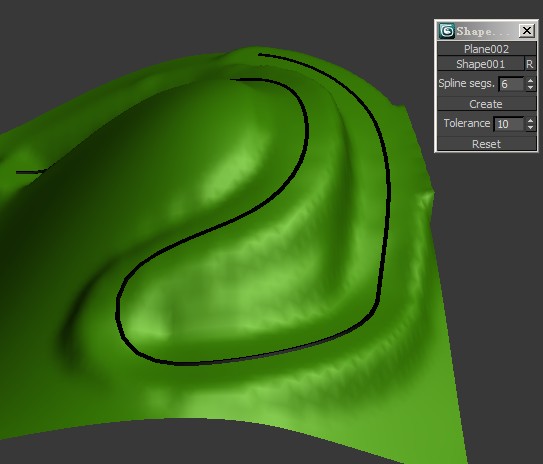
This script allow you conform(snap) selected verticies to a spline

Script
 By mad · 2009-07-16
Tags: spline, snap, conform, vertex
This script allow you conform(snap) selected verticies to a spline
gives error about not able to normalize spline
 crystal3d · 2017-11-29
too bad, maybe things will work out
arxangel · 2010-09-23
I am unable to get this script to work in 3DS Max 2010 64Bit.
The error:
Compile error: Nested macroscript definitions are not permitted
in line: MacroScript s
mad · 2010-09-29
im not sure what this error means but im testet it in max 10 and it worked fine so i dont know where is the problem :(
mad · 2010-09-10
so i foud a little bit time and modified the script for your purpose ...it may work but maybe slower ;)
 z0mbie · 2010-09-12
thanks you very very much
I use it in max 9 .
:) although slower but very it's very useful
mad · 2010-09-12
im glad you are satisfied ;)
mad · 2010-09-10
ouuu i must disapoint you but "append if unique" function isnt in max 9 and this is the problem :( this script doesnt work in max 9
for now i dont have time to solve this problem but you can change "appendIfUnique" to only "append" but it will not work properly
maybe tonight ill take care about it and send new script but im not sure
z0mbie · 2010-08-25
Can use it in 3dsmax 9 64bit? my OS is win7 64.
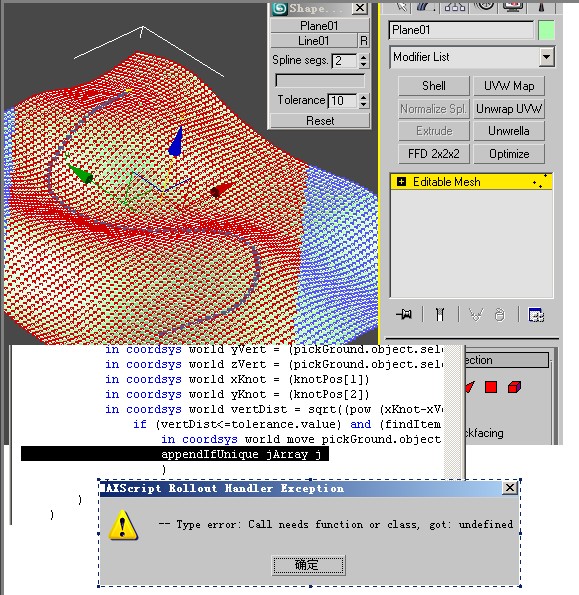
I test it display error :"-- type error:call needs function or class,got:undefined"
thank you
mad · 2010-09-09
hi,
i dont think that max version is the problem, it seems the script have a hiden bug somewhere :( i cant help you because i donw know which function call for the undefined value or which value is undefined. can you tell me error row number displayed in maxscript editor?
z0mbie · 2010-09-10
I use it in 3dsmax 9 64bit and max9 sp2 .
my OS is winXP 64BIT and win7 64 bit
kuang123456 · 2009-07-20
very very good!!
titane357 · 2009-07-17
hello
fun script !!! I have some requests :
- use polyobjects
- more speed (soo easy :-))
- use smooth selection.
I tried to use it for a road, with smooth selection I could have a smooth blending with the ground.
mad · 2009-08-01
hi and thanks for comments
- use polyobjects -> polymesh dont have functions what i required :( or i dont known about them :(
- more speed (soo easy :-)) -> sorry but i dont known how speed up this script but you can speed up it a little by selecting verticies which you use(around the spline) not all verticies in the object ;)
- use smooth selection -> i try implement this in later version :) but meantime i dont have idea how to do it :)
- I tried to use it for a road, with smooth selection I could have a smooth blending with the ground. -> smooth selection doesnt work in this case use relax to verticies near the road (but not on the road) and btw use smaller number in spline segments to perform smoother road shape ;) with your number is the road like a stairs, generaly is there one rule "more groud verticies -> more spline verticies" (smaller spline segments number)
p.s. i see u have too many polygons on your terrain it must take a loooooooooong time to calculate this:) the script work this way: it takes verticies from spline and test all selected groud verticies whith is beneath each one so if you have many verticies on the spline and the groud too calculating of this will take looooooooong time :)