 By kumodot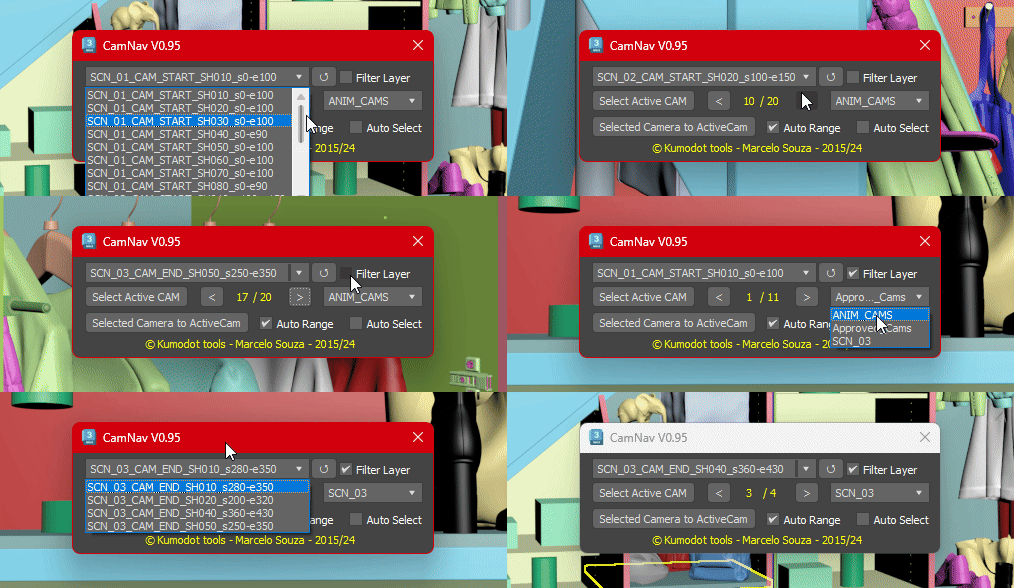
This Simple script just helps you navigate through all cameras you have on your Max scene with a few clicks.
0.95 Features are :
- Select Active Cam - It selects the active camera node (From the active viewport);
- Show the total number of cameras and the number you are now;
- Navigation arrows - left and right, to go over each camera (Sorted by name);
- Set your active viewport to the camera you selected on Explorer;
- Direct select and switch the camera from the dropdown list. One-click select and change Camera;
- Auto Range - This detects and set timeline range to the camera range using the first and last found keyframes. (Default ON);
- New on 0.95 - Auto Select option (Default OFF) - Select the camera node while navigating thru them or keep your original selection;
- New on 0.95 - Filter Layer and Layer Selection - This scans your scene and list all layers that contain cameras in, so you can navigate only over those cameras on that layer (if the filter is ON).
- New on 0.95 - Refresh Button - So any change you make on the scene can be updated on the script.
- 1.01 - Bug Fixes. Fixed error qhen there's no layers or cameras on scene.
- 1.02 - Bug Fixes - When using the arrows the first camera in the loop wasnt updating. fixed.
I Hope you enjoy it ! @Msouza3d (Aka Kumodot)
 fangzi · 2024-04-08