

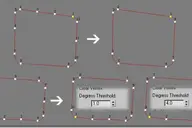
create stair by 2D shape,arc,Fan line,donut arc , Irregularity spline,Single Line,Multi Line to stair.

1.Arc to SpiralStair
original shape: arc

result: SpiralStair

2.Fan line to SpiralStair
original shape: Fan line

result: SpiralStair


3.Donut Arc to SpiralStair
original shape: donut arc

result: SpiralStair


4.Irregularity Shape
original shape: Irregularity spline

result: Irregularity Steps

5.Single Line to Steps
original shape:Single Line

result: Steps


6.Multi Line to Steps
original shape:Multi Line

result: Steps


UI:

Comments (9)
Comment policy
It's brilliant!
How To install it as a button
copy CADStair.mse to C:\Program Files\Autodesk\3ds Max 2020\scripts\Aimgle
Note that 2020 may differ regarding to the version you are using:
Open 3ds max
Script menu> Run Script
Aimgle-CADStair.mcr
Script menu> Run Script
Install_CADStair.ms
Customize menu > Customize user interface > toolbar tab
Category:
Aimgates
Drag cad stairs to any where you want
wbplugins
Wasti Brothers
Please check 3ds max WBplugins
i hope YOU i like it ..
isolate keys of every face morpher
I have developped a script in order to control facial expressions as Eric Dlegare see:http://www.youtube.com/watch?v=kkaHmBvEwxU
It is a panel whith slider, pictureBox, etc
My problem is that i animate my morphers i have the keys of my all morphers on timeLine and i don't know how i can isolate the keys of every morpher.
If someone has a solution i would be happy.
I also wondered if it is possible to associate a key on my sliders etc...(
To make my sliders which find on my panelFaceControl objects of view port)so I could have the keys of every morpher and no the keys of all morphers.
Thanks and sorry for my bad english.
Very useful tool, thanks!
Wow, this is a fantastic script!
very well ,thank u !!
wbplugins
wasti brothers
please check this WBplugins
i hope you will like this plugins
wow, let me try that...