Bookmanager 2 is a great tool for automatic process of books placement. It is written in MAXScript for use in Autodesk 3ds Max software. It has a wide range of features and easy to use interface. Try free demo version and if you like it get the full version.
Script
Bookmanager
 By modelplusmodel · 2012-08-06
- Version
- 2.0
- Version requirement
- 3ds Max 2010 or higher
- Date updated
- 2018-01-26
- Votes
- 8
- External download
- External download
Tags: scatter, Placement, Book, books, shelf, bookshelf, fill
Description
Additional Info
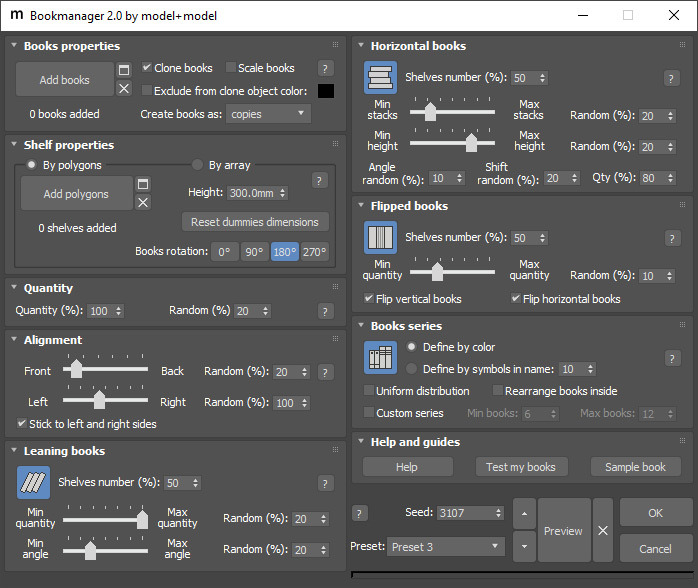
Main features:
• Horizontal, Leaning and Flipped books
• Placing books directly on shelf polygons
• Placing books in array
• Editing dummy shelf size in viewport
• Books series that can be quickly defined by objects name or color
• Books alignment within the shelf length or depth
• Books cloning option
• Books scaling option
• Books quantity settings
• Seed option with buttons for quick Seed change
• Randomness option for all main settings
• Predefined and user presets
• Option to test and fix book pivot allows using any 3rd-party books
Free demo available.
Watch the introduction video below, download demo and read Bookmanager 2 online documentation
This product has customer defined price now.
Suggested price:
$5 - non-commercial use
$15 - freelancers
$25 - companies under $100k/year
$40 - companies above $100k/year
Videos
Comments (9)
Modifying old shelf dummy?
 3DKodo · 2022-03-08
Hi, great script, there is a way to resume old shelf dummy to modify books disposition?
or I'd to make new shelf dummy?
Thanks
+1
ttus · 2018-02-13
easy way to put books and other things.
so useful
bu i care a bit is even Align only
by default put object option is nothing.
I wanna Tweak
In the product version, offset XYZ gap?


Thanks
modelplusmodel · 2018-03-05
Thank you, ttus. Do you place other objects besides books? Could you contact us to email support@modelplusmodel.com to discuss details.
Price policy changed
modelplusmodel · 2018-12-23
We really want Bookmanager to be available for many. That is why from version 2.0 we introduce a new price that is not fixed and defined by you via Pay What You Want scheme ($5 minimum). It no longer goes with Vol.06 Books package. Follow the product link for more information.
 cornerofart · 2017-11-07
40$ it's too much for the script dude, come on its just script it's not program!!
Thank you everybody for the feedback
modelplusmodel · 2013-02-12
Bookmanager goes free with Vol.06 Books collection, but if you buy it separately you will get a $40 discount to this volume. All updates with new features are also free. Please contact us at support@modelplusmodel.com for any questions or ideas for future releases.
 luxxeon · 2013-02-08
Agree with comments below. Great idea, but way too much for such a tool.
rgayan21 · 2013-02-08
40$ is too much for the script
I'm totally agree with fajar
fajar · 2012-08-07
40$ for manage a book >!?....give a little thought when you sell your item ....
have nice day.