Script
Batch Loader
 By Anubis · 2009-10-05
- Version
- 2.0
- Version requirement
- 3ds Max 9+
- Date updated
- 2012-10-26
- Votes
- 75
Tags: import, max, batch, 3ds, files, fbx, anubis, meshes, obj, merge
Description
Quick Merge/Import multiple files.
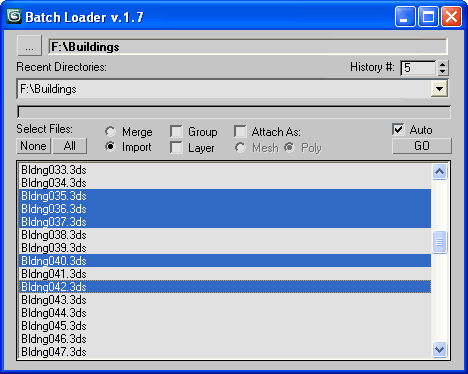
Features:
- Merge multiple .MAX files
- Import multiple .* files (ie all that can be imported)!
- Log all files where failed to load to Listener (if any)
- Multiple history for recent used paths available
- Limit count of recent paths to keep in history added
- Group option available
- Layer option available
- Attach option available
- "Auto" option (if is checked no prompt for Merge/Import) *
- Dialog window is resizeable
- Auto rename duplicated objects on import
[*] If "Auto" is unchecked then default Max Merge/Import dialog appear for each file.
It is slower alternative, but it is important and useful in some cases.

Additional Info
I noticed that there is interest in scripts like "Batch Merge".
I also read the comments and requests, so here's what I created.
Version history:
- 1.0 - initial version
- 1.1 - minor code polish up
- 1.2 - INI file previously saved to Scripts folder, now saved within script source file location
- 1.3 - added minimal dialogue size when the dialogue is resized
- 1.4 - suppress the name conflict dialogue when imports and "Auto" option is on (now auto rename)
- 1.5 - create layer per file using it file name as label
- 1.6 - minor fixes
- 1.7 - attach per file as mesh or poly
- 1.8 - suppress additional imports dialogue; browse for folder dialogue start in recent path
- 1.9 - auto renaming rewriten (as the auto suggested name is not always correct, now append count digits)
- 2.0 - now check (by name) for existing layer and create new only if not exist
(TodoList: Remove stored paths that no more exist)
 asymptote · 2013-08-21
 barigazy · 2013-08-21
 crystal3d · 2011-10-04
 caebrasil · 2011-01-24