
Want to make Arches in Max for games? Here's a new fast primitive for making arches for BSP games (this can export as world geometry in the Source Engine).
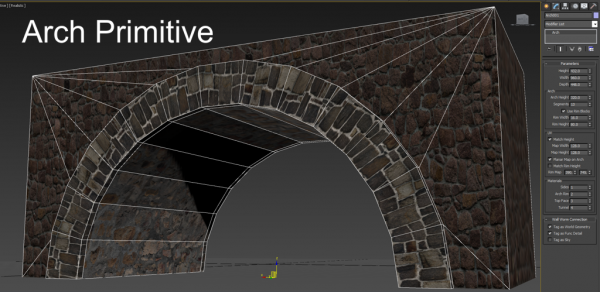
Arch Primitive
Downloads
Version 1.43Listed version
Listing updated
Visit author’s download pagewallworm.com
Release notes
Version 1.43 • Added new parameters for tunnel fill blocks that can act as doors or entities. • Fixed bug when the Hide Internal Faces is turned on at same time as Delete Internal Faces. • Fixed Face Selection functions not working when Delete Internal Faces is on.
Earlier releases (7)
Version 1.42
Release notes
Version 1.42 • Added new setting to align bridge top face UVs to the world.
Version 1.41
Release notes
Version 1.41 • Updated UVS on tunnel to flow seamlessly when the tunnel arch blocks are turned off. • Updated the Material ID of the outside of an arch to always be the Tunnel material if the Bridge is turned off.
Version 1.31
Release notes
Version 1.31: • Fixed a potential error with setting face selection. • Updated tunnel UVS so that the inside UVS flow seamlessly and flow up to the outside rim.
Version 1.4
Release notes
Version 1.4: • Added new parameter for Base Height. This allows creating the arch at heights above the base (tall arches). • Added new Vertex Selection functions: Select Arch Inner Vertices and Select Arch Outer Vertices. • Set different smoothing groups to different parts to the arch to smooth appropriate faces in game engine.
Version 1.3
Release notes
Version 1.3: • Added Stack Selection Rollout. • Added option to Hide Internal Faces on mesh. • Fixed some settings that could cause a block to be missing.
Version 1.2
Release notes
Version 1.2: • Fixed inverted Normals when using the Turn option. • Added new material ID setting for hidden faces. • Added new button to pick a material from another object.
Version 1.1
Release notes
Version 1.1: • Added new setting to make the bridge elements optional. • Added option to turn the direction of the tunnel (swapping X/Y). • Added button labeled "s" to Swap the Width/Depth values and toggle the Turn setting. • Added a Rotate Top UV checkbox to rotate the top faces UV by 90 degrees. • Added button to generate a multimaterial for the Arch. • Fixed bug where one of the faces above the arch rim had an incorrect material ID if the arch segments was an even value.
- 3ds Max compatibility
- Unknown
Community compatibilityNo compatibility reports yet
No reports yet for the available releases.
Community reviewsNo reviews yet.
Listing details
- Version
- 1.43
- Original version requirement
- Probably any... developed in 2015+
- Author’s update date
- Legacy votes
- 4
- Listing created
How compatibility works
Compatibility comes from the author’s supported range or requirements in the original listing. A tested version records what the author tried.
“2020 unconfirmed” in the catalog means support for 3ds Max 2020 is still unknown.
Community reports record successful tests on specific releases.

Description
Setup & notes
Version 1.43
- Added new parameters for tunnel fill blocks that can act as doors or entities.
- Fixed bug when the Hide Internal Faces is turned on at same time as Delete Internal Faces.
- Fixed Face Selection functions not working when Delete Internal Faces is on.
Version 1.42
- Added new setting to align bridge top face UVs to the world.
Version 1.41
- Updated UVS on tunnel to flow seamlessly when the tunnel arch blocks are turned off.
- Updated the Material ID of the outside of an arch to always be the Tunnel material if the Bridge is turned off.
Version 1.4:
- Added new parameter for Base Height. This allows creating the arch at heights above the base (tall arches).
- Added new Vertex Selection functions: Select Arch Inner Vertices and Select Arch Outer Vertices.
- Set different smoothing groups to different parts to the arch to smooth appropriate faces in game engine.
Version 1.31:
- Fixed a potential error with setting face selection.
- Updated tunnel UVS so that the inside UVS flow seamlessly and flow up to the outside rim.
Version 1.3:
- Added Stack Selection Rollout.
- Added option to Hide Internal Faces on mesh.
- Fixed some settings that could cause a block to be missing.
Version 1.2:
- Fixed inverted Normals when using the Turn option.
- Added new material ID setting for hidden faces.
- Added new button to pick a material from another object.
Version 1.1:
- Added new setting to make the bridge elements optional.
- Added option to turn the direction of the tunnel (swapping X/Y).
- Added button labeled "s" to Swap the Width/Depth values and toggle the Turn setting.
- Added a Rotate Top UV checkbox to rotate the top faces UV by 90 degrees.
- Added button to generate a multimaterial for the Arch.
- Fixed bug where one of the faces above the arch rim had an incorrect material ID if the arch segments was an even value.
Comments (4)
Comment policy
Great!!
...and thanks...also for email ;)
Nice plugin
Very Nice Plugin!!
Now it is only possible to make arc that are half circle.
It could be really useful if it would also be possible to make all kind of arcs, meaning center not placed at bottom of primitive but lower. Ideally the points of the arc on the ground should be fixed, and the top point of the arc should be able to move up or down!!
Thanks :)
I'll add that in the next update :)
Part one of this is done... allowing the arch to start from arbitrary heights on the object. Changing the arc curve shape will be an update coming next.